Introduction
News
Sailing Notes
Notes
Food
Places
Croatia
North
Central
South
⛵ Sailing Food Plan & Shopping List
Duration: 6 Days | Crew: 8 People
📅 Daily Meal Schedule
| Day | Breakfast | Lunch / Salad | Main Dinner |
|---|---|---|---|
| Day 1 (Sun) | Daily offer / what’s found | Pasta with Roasted Pepper Pesto | Red Lentil Soup |
| Day 2 (Mon) | Daily offer / what’s found | Greek Baked Chickpeas | Harira Soup |
| Day 3 (Tue) | Daily offer / what’s found | Black Lentil Salad | Vegetable Risotto |
| Day 4 (Wed) | Daily offer / what’s found | Poke Bowl | Chili sin Carne |
| Day 5 (Thu) | Daily offer / what’s found | Shakshuka / Lečo | Butter Beans |
| Day 6 (Fri) | Daily offer / what’s found | Veggie Couscous | Leftover Feast |
See Shopping List for the full ingredient list and water requirements.
⚓ Yacht Cooking Tips
- Freshness Order: Use mushrooms, spinach, and soft tomatoes first. Cabbage, carrots, and potatoes can wait until the end of the week.
- Bread Management: Start with fresh bakery bread. Switch to vacuum-packed “bake-off” bread that you can toast in the oven from Day 4 onwards.
- Storage: Heavy items (water, cans, potatoes) should be stored low in the boat (the bilge) to keep the boat stable.
- Cleaning: Save fresh water by rinsing dishes in seawater first, then doing a final quick rinse with fresh water.
🍲 Recipes
- Pasta with Roasted Pepper Pesto
- Red Lentil Soup
- Greek Baked Chickpeas
- Harira Soup
- Black Lentil Salad
- Vegetable Risotto
- Poke Bowl
- Chili sin Carne
- Shakshuka / Lečo
- Butter Beans
- Veggie Couscous
- Porrusalda
🛒 Master Shopping List
Calculated for 8 People | 6 Days
🥬 Fresh Produce
| Item | Quantity | Used in |
|---|---|---|
| Onions (yellow) | ~15 pcs (~3 kg) | Red Lentil Soup, Greek Baked Chickpeas, Harira, Risotto, Chili, Shakshuka, Couscous |
| Onion (red) | 6 | Black Lentil Salad |
| Garlic | 5 heads | All savoury dishes |
| Leeks | 7 large stalks | Red Lentil Soup, Greek Baked Chickpeas |
| Carrots | ~2 kg (~15 pcs) | Red Lentil Soup, Harira, Risotto, Poke Bowl |
| Bell peppers | 20 pcs (mix of colors) | Chili sin Carne, Shakshuka |
| Zucchini | 6 | Vegetable Risotto, Veggie Couscous |
| Fresh tomatoes | 14 | Veggie Couscous (4), Butter Beans (4) |
| Cucumber | 8 | Poke Bowl |
| Avocado | 8 (mix ripe/firm) | Poke Bowl |
| Celery | 2 large bunches (~12 stalks) | Red Lentil Soup, Harira |
| Fresh parsley | 3 bunches | Black Lentil Salad, Shakshuka, Pasta with Tuna, Veggie Couscous |
| Fresh cilantro | 2 bunches | Harira, Veggie Couscous |
| Lemons | 6 | Red Lentil Soup, Harira |
🧀 Fridge & Proteins
| Item | Quantity | Used in |
|---|---|---|
| Eggs | 30 | Shakshuka + breakfasts |
| Klobása / hard salami | 400 g | Greek Baked Chickpeas |
| Tofu (firm) | 3 packs (~1.2 kg) | Greek Baked Chickpeas (400 g) + vegan Shakshuka option (800 g) |
| Parmesan | 400 g | Pasta with Pepper Pesto (80 g), Red Lentil Soup (rinds + garnish), Risotto (100 g) |
| Mozzarella | 4 balls | Black Lentil Salad |
| Smoked salmon | 800 g | Poke Bowl |
| Wakame (frozen) | 500 g | Poke Bowl |
| Hard cheese (Eidam / Gouda) | 1 kg | Breakfasts & snacking |
| Fresh spinach | 400 g | Butter Beans |
| Vegan heavy cream (oat/soy) | 4 packs (200 ml each) | Butter Beans |
🥫 Pantry & Dry Goods
| Item | Quantity | Used in |
|---|---|---|
| Pasta (penne / spaghetti) | 2 kg | Pasta with Pepper Pesto (1.5 kg) + extra |
| Arborio rice | 1 kg | Vegetable Risotto |
| Sushi rice | 1 kg | Poke Bowl |
| Couscous | 1 kg | Veggie Couscous |
| Buckwheat | 3 kg | Breakfasts |
| Vermicelli / soup noodles | 100 g | Harira |
| Canned crushed tomatoes | 10 cans (400 g) | Red Lentil Soup (2), Harira (2), Chili (2), Shakshuka (4) |
| Roasted red peppers (jars) | 4 jars (460 g each) | Pasta with Pepper Pesto |
| Tomato paste | 2 tubes (200 g each) | Harira, Chili, Veggie Couscous |
| Canned chickpeas | 8 cans (310 g each) | Greek Baked Chickpeas (4), Harira (4) |
| Canned beans (kidney or black) | 4 cans (400 g each) | Chili sin Carne |
| Canned corn | 6 cans (340 g each) | Vegetable Risotto (2), Chili sin Carne (2) |
| Canned peas | 6 cans (400 g each) | Vegetable Risotto (2), Veggie Couscous (2) |
| Canned mushrooms | 6 cans (400 g each) | Vegetable Risotto (2), Veggie Couscous (2) |
| Canned white beans | 8 cans (400 g each) | Butter Beans |
| Lentils (black / beluga) | 500 g | Black Lentil Salad |
| Lentils (red) | 1 kg | Red Lentil Soup (~500 g), Harira (200 g) |
| Olives (pitted) | 1 large jar (900 g) | Black Lentil Salad |
| Capers | 1 jar (100 g) | Black Lentil Salad |
| Sun-dried tomatoes (in oil) | 2 jars (280 g each) | Butter Beans |
| Nori / seaweed | 2 packs (25 g each) | Poke Bowl |
| Kimchi | 2 large jars (500 g each) | Poke Bowl |
| Edamame (canned) | 2 cans (400 g each) | Poke Bowl |
| Bamboo slices (canned) | 2 cans (540 g each, AROY-D) | Poke Bowl |
🧂 Spices & Essentials
| Item | Quantity | Used in |
|---|---|---|
| Olive oil | 2 L | All savoury dishes |
| Soy sauce | 1 bottle | Poke Bowl |
| Teriyaki sauce | 1 bottle | Poke Bowl |
| Rice vinegar | 1 bottle | Poke Bowl |
| Red wine vinegar | 1 bottle | Black Lentil Salad |
| Sriracha | 1 bottle | Poke Bowl |
| Wasabi | 1 small pack | Poke Bowl |
| Sesame seeds | 1 small pack | Poke Bowl |
| Harissa paste | 1 jar | Harira |
| Cumin | 1 jar | Harira, Chili, Shakshuka, Veggie Couscous |
| Smoked paprika | 1 jar | Harira, Chili, Shakshuka, Veggie Couscous |
| Cinnamon | 1 jar | Harira |
| Turmeric | 1 jar | Harira |
| Chili flakes | 1 jar | Chili sin Carne |
| Bay leaves | 1 pack | Red Lentil Soup |
| Dried sage or rosemary | 1 jar | Greek Baked Chickpeas |
| Dark chocolate | 1 bar | Chili sin Carne (1 square) |
| Sugar | 1 pack | Poke Bowl rice seasoning |
| Salt | 1 kg | All dishes |
| Black pepper | 1 grinder | All dishes |
| Vegetable bouillon | 3 packs (cubes/powder) | ~8 L broth across Red Lentil Soup, Harira, Risotto, Couscous |
| Bread | 12 loaves fresh (Days 1–3) + 6 packs bake-off baguettes (Days 4–6) | Serving with Greek Baked Chickpeas, Harira, Shakshuka |
| Snacks | 10 packs biscuits / crackers, 5 bags nuts, chips | — |
| Trash bags | 1 large pack | — |
| Baking paper | 1 roll | Greek Baked Chickpeas |
| Aluminium foil | 1 roll | Greek Baked Chickpeas |
🍺 Drinks
- Beer: 6 cans/person/day min
- Port wine
- Rum: 2 bottles min
- Coke + juice
💧 Water Requirements (3 L per person/day)
To ensure a safe supply for 8 people for 8 days (approx. 200 Liters):
- Option 1 (1.5 L Bottles): ~135 bottles (approx. 23 packs of six)
- Option 2 (2 L Bottles): ~100 bottles (approx. 17 packs of six)
Tip: Bring a permanent marker to label bottle caps with names to avoid waste.
Pasta with Roasted Pepper Pesto
Serves: 8 | Prep: 10 min | Cook: 15 min
Ingredients
- 1.5 kg pasta (penne or fusilli)
- 4 large jars roasted red peppers (or 8 fresh peppers, roasted and peeled)
- 100 ml olive oil
- 4 garlic cloves
- 80 g parmesan, grated
- Salt & pepper
Instructions
- Blend roasted peppers, olive oil, garlic, and parmesan until smooth. Season.
- Cook pasta al dente. Reserve 1 cup pasta water before draining.
- Toss pasta with pesto, loosening with pasta water as needed. Serve with extra parmesan.
Red Lentil Soup
Serves: 5 | Prep: 10 min | Cook: 50 min
Ingredients
- 4 tbsp extra virgin olive oil
- 2 medium yellow onions, medium dice
- 2 medium leeks, white and pale green parts only, rinsed and medium dice
- 3 medium carrots (~½ lb), medium dice
- 5 celery stalks (~6 oz), medium dice
- 2 large garlic cloves, roughly chopped
- 1½ cups red split lentils, rinsed
- 1 can (15½ oz) crushed Italian tomatoes
- 1–2 parmigiano-reggiano rinds
- 2 dried bay leaves
- 2 quarts (8 cups) low-sodium chicken or vegetable broth
- Kosher salt & freshly ground black pepper
- Freshly grated parmigiano-reggiano, for serving (optional)
Instructions
- Heat olive oil in a large soup pot over medium heat. Add onions, leeks, and a generous pinch of salt. Sauté with lid askew, stirring occasionally, until soft and translucent — about 10–15 minutes.
- Add carrots, celery, and garlic; stir for 3–4 minutes. Add lentils, crushed tomatoes, parmesan rinds, bay leaves, and broth. Bring to a boil, then reduce to medium-low and simmer uncovered for 30–40 minutes, stirring every 10 minutes, until vegetables are tender and lentils have broken down. Soup should be thick and hearty.
- Optionally blend a small portion with an immersion blender for a better texture.
- Season with salt and pepper. Add a squeeze of lemon if it tastes flat. Remove bay leaves and parmesan rinds before serving. Garnish with grated parmesan.
Greek Baked Chickpeas
Serves: 8 | Prep: 15 min | Cook: 60 min
Ingredients
- 4 cans chickpeas, drained
- 4 large leeks, white and pale green parts, sliced into rounds
- 2 onions, sliced
- 400 g tofu, cubed
- 400 g klobása / hard salami, sliced
- 6 tbsp olive oil
- 4 garlic cloves, minced
- 1 tbsp dried sage or rosemary
- 300 ml water or vegetable broth
- Salt & pepper
- Bread for serving
Instructions
- Preheat oven to 180°C.
- Combine chickpeas, leeks, onion, tofu, klobása, garlic, olive oil, and sage in a large baking dish. Add water and season generously.
- Cover with foil and bake for 45 minutes. Remove foil and bake a further 15–20 minutes until golden.
- Serve with crusty bread.
Harira Soup
Serves: 8 | Prep: 15 min | Cook: 40 min
Moroccan tomato soup with chickpeas and lentils — warming, spiced, and thick.
Ingredients
- 4 cans chickpeas, drained
- 200 g red lentils
- 2 onions, diced
- 4 celery stalks, diced
- 2 carrots, diced
- 2 cans crushed tomatoes
- 2 tbsp tomato paste
- 2 tbsp harissa paste
- 1 tsp turmeric
- 1 tsp cumin
- ½ tsp cinnamon
- 1 tsp smoked paprika
- 100 g vermicelli
- 2 L vegetable broth
- Olive oil, salt & pepper
- Fresh parsley & cilantro
- Lemon wedges for serving
Instructions
- Sauté onion, celery, and carrots in olive oil for 5 minutes until softened.
- Add garlic and spices; cook 1 minute.
- Add crushed tomatoes, tomato paste, lentils, chickpeas, and broth. Bring to a boil then simmer uncovered for 25 minutes.
- Add vermicelli and cook 8 minutes more. Stir in harissa.
- Season and serve with lemon wedges, fresh parsley, and bread.
Black Lentil Salad
Serves: 8 | Prep: 10 min | Cook: 25 min
Ingredients
- 500 g black / beluga lentils
- 1 red onion, finely diced
- 3 tbsp capers
- 200 g olives, pitted and halved
- 4 mozzarella balls, torn
- 4 tbsp olive oil
- 2 tbsp red wine vinegar
- Salt & pepper
- Fresh parsley
Instructions
- Cook lentils in salted boiling water for 20–25 minutes until tender. Drain and cool slightly.
- While still warm, toss with olive oil, vinegar, salt, and pepper.
- Mix in red onion, capers, and olives.
- Top with torn mozzarella and fresh parsley. Serve at room temperature.
Vegetable Risotto
Serves: 8 | Prep: 15 min | Cook: 35 min
Ingredients
- 1 kg arborio rice
- 1 kg mushrooms, sliced
- 2 zucchini, diced
- 2 cans peas, drained
- 2 cans corn, drained
- 2 carrots, diced
- 2 onions, diced
- 4 garlic cloves, minced
- 2 L vegetable broth, kept hot
- 100 g parmesan, grated
- Olive oil, salt & pepper
Instructions
- Sauté onion and garlic in olive oil until soft.
- Add mushrooms and carrots; cook until softened, about 8 minutes.
- Add rice and stir to coat. Pour in a ladle of hot broth; stir until absorbed. Repeat, adding broth one ladle at a time, for 18–20 minutes.
- Stir in zucchini, peas, and corn in the last 5 minutes.
- Finish with a drizzle of olive oil and parmesan. Season and serve immediately.
Poke Bowl
Serves: 8 | Prep: 20 min | Cook: 20 min
Ingredients
- 1 kg sushi rice
- 8 avocados, sliced
- 2 jars kimchi
- 2 packs nori / seaweed, cut into strips
- 4 cucumbers, sliced
- 4 carrots, julienned
- 4 tbsp soy sauce
- 2 tbsp sesame seeds
- Sriracha, wasabi & extra soy sauce for serving
Instructions
- Cook sushi rice per package instructions. Season with a splash of rice vinegar, a pinch of sugar, and salt.
- Divide rice into bowls.
- Arrange avocado, kimchi, seaweed, cucumber, and carrot on top.
- Drizzle with soy sauce and sprinkle sesame seeds. Serve with sriracha and wasabi on the side.
Chili sin Carne
Serves: 8 | Prep: 15 min | Cook: 35 min
Ingredients
- 4 cans kidney or black beans, drained
- 2 cans corn, drained
- 2 cans crushed tomatoes
- 4 bell peppers, diced
- 2 onions, diced
- 4 garlic cloves, minced
- 2 tbsp tomato paste
- 1 tbsp cumin
- 1 tbsp smoked paprika
- 1 tsp chili flakes
- 1 square dark chocolate
- Olive oil, salt & pepper
Instructions
- Sauté onion, peppers, and garlic in olive oil until soft, about 8 minutes.
- Add cumin, paprika, and chili flakes; cook 1 minute.
- Add beans, corn, crushed tomatoes, and tomato paste. Stir and simmer 25–30 minutes.
- Stir in dark chocolate at the end until melted. Season.
- Serve with bread or rice.
Shakshuka / Lečo
Serves: 8 | Prep: 10 min | Cook: 30 min
Eggs (or tofu) poached in spiced tomato and pepper sauce.
Ingredients
- 8 bell peppers, diced
- 4 cans crushed tomatoes
- 2 onions, diced
- 4 garlic cloves, minced
- 16 eggs (or 800 g firm tofu, cubed, for vegan)
- 2 tsp smoked paprika
- 1 tsp cumin
- Olive oil, salt & pepper
- Fresh parsley
Instructions
- Sauté onion and garlic in olive oil until soft.
- Add peppers; cook 5 minutes.
- Add crushed tomatoes and spices; simmer 15 minutes until sauce thickens.
- Make wells in the sauce and crack in eggs (or nestle tofu cubes). Cover and cook until eggs are just set, about 8–10 minutes.
- Season and garnish with parsley. Serve with bread.
Butter Beans
Serves: 8 | Prep: 10 min | Cook: 25 min
Creamy white bean stew with spinach, tomatoes, and sun-dried tomatoes in a rich vegan cream sauce.
Ingredients
- 8 cans white beans, drained
- 4 packs vegan heavy cream (oat or soy, 200 ml each)
- 400 g fresh spinach (or 500 g frozen)
- 2 jars sun-dried tomatoes in oil, roughly chopped
- 4 fresh tomatoes, diced
- 4 tbsp tomato puree
- 2 onions, diced
- 4 garlic cloves, minced
- Olive oil, salt & pepper
Instructions
- Sauté onion in olive oil over medium heat until soft, about 5 minutes. Add garlic and cook 1 minute.
- Add diced tomatoes, sun-dried tomatoes, and tomato puree. Simmer 8 minutes until tomatoes break down.
- Add white beans and vegan cream. Stir and simmer 10 minutes until sauce thickens.
- Fold in spinach and cook until just wilted, 2–3 minutes. Season with salt and pepper.
- Serve with crusty bread.
Veggie Couscous
Serves: 8 | Prep: 10 min | Cook: 20 min
Ingredients
- 1 kg couscous
- 2 zucchini, diced
- 2 cans peas, drained
- 4 tomatoes, diced
- 2 tbsp tomato paste
- 2 onions, diced
- 4 garlic cloves, minced
- 1 tsp cumin
- 1 tsp smoked paprika
- 2 tbsp olive oil
- ~1 L vegetable broth (hot, for couscous)
- Fresh parsley or cilantro, salt & pepper
Instructions
- Sauté onion and garlic in olive oil until soft.
- Add zucchini, cumin, and paprika; cook 5 minutes.
- Add diced tomatoes and tomato paste; simmer 10 minutes. Stir in peas. Season.
- Place couscous in a large bowl. Pour hot broth over in a 1:1 ratio, cover and rest 5 minutes, then fluff with a fork.
- Serve couscous topped with the vegetable sauce. Garnish with fresh parsley.
Porrusalda
Serves: 8 | Prep: 15 min | Cook: 55 min
Traditional Basque leek and potato soup — simple, hearty, and warming.
Ingredients
- 10 large leeks, white and pale green parts only, sliced into rounds and rinsed well
- 3 kg potatoes, broken into rough chunks (press with thumb against knife edge — don’t cut cleanly; rough edges release more starch)
- 3 carrots, diced
- 6 tbsp olive oil
- 4 garlic cloves, minced
- 2 bay leaves
- 2 L vegetable broth or water
- Salt & pepper
- Fresh parsley, crusty bread for serving
Instructions
- Sauté leeks in olive oil with a pinch of salt for 8–10 minutes until softened.
- Add garlic and carrots; cook 3 minutes.
- Add potato chunks, bay leaves, and broth. Bring to a boil.
- Reduce heat and simmer covered for 40–50 minutes until potatoes are very tender.
- Remove bay leaves. Optionally blend a small portion for a creamier texture.
- Season generously. Serve with crusty bread and a drizzle of olive oil.
Pasta with Tuna
Serves: 8 | Prep: 10 min | Cook: 15 min
Ingredients
- 1.5 kg spaghetti or penne
- 10 cans tuna, drained
- 200 g olives, pitted and halved
- 3 tbsp capers
- 2 jars sun-dried tomatoes, roughly chopped
- 4 garlic cloves, minced
- 4 tbsp olive oil
- Fresh parsley
- Chili flakes, salt & pepper
Instructions
- Cook pasta al dente. Reserve pasta water before draining.
- Warm olive oil and garlic in a large pan over medium heat. Add olives, capers, and sun-dried tomatoes; cook 2 minutes.
- Add tuna and toss gently — don’t break it up too much.
- Toss with drained pasta, adding a splash of pasta water to bring it together.
- Finish with parsley and chili flakes. Season.
Navigation — Staircase Method
The staircase method converts between four course types. The rule is simple:
- Going up (Compass → Water): ADD
- Going down (Water → Compass): SUBTRACT
The Staircase
┌──────────────────────────────────────────────────┐
│  KV  — Water Course     (Kurz vůči vodě)         │
│        ↑ + drift         ↓ − snos                │
│  KR  — True Course      (Pravý kurz)             │
│        ↑ + variation     ↓ − variace             │
│  KM  — Magnetic Course  (Magnetický kurz)        │
│        ↑ + deviation     ↓ − deviace             │
│  KK  — Compass Course   (Kompasový kurz)         │
└──────────────────────────────────────────────────┘
| Symbol | Name | Czech |
|---|---|---|
| KK | Compass Course | Kompasový kurz |
| KM | Magnetic Course | Magnetický kurz |
| KR | True Course | Pravý kurz |
| KV | Water Course | Kurz vůči vodě |
| dev | Deviation | Deviace |
| var | Variation | Variace |
| snos | Drift | Snos |
Signs
- W (West) var/dev → negative value
- E (East) var/dev → positive value
Variation (var)
Variation is the angle between True North and Magnetic North. Always update it from the chart for the current year:
Current var = Base var ± (annual change × years elapsed)
Example: Base 5°35’ W in 2018, annual change 6’ W, year 2023:
var = 5°35' + (5 × 6') = 5°35' + 30' = 6°05' W ≈ −6°
KK → KV (Compass to Water — going UP, ADD)
KM = KK + dev
KR = KM + var
KV = KR + snos
Example: KK = 261°, dev = 0°, var = −6°, wind from starboard (snos = −4°)
KM = 261° + 0°   = 261°
KR = 261° + (−6°) = 255°
KV = 255° + (−4°) = 251°
KV → KK (Water to Compass — going DOWN, SUBTRACT)
KR = KV − snos
KM = KR − var
KK = KM − dev
Example: KR = 346°, dev = 0°, var = −6°
KM = 346° − (−6°) = 352°
KK = 352° − 0°    = 352°
Drift (snos)
Drift is the sideways push of the wind on the boat, shifting the water course from the true course.
| Wind direction | drift sign |
|---|---|
| Wind from starboard (right) | − (subtract) |
| Wind from port (left) | + (add) |
Bearings
The same staircase applies when converting compass bearings to true bearings for chart plotting:
True bearing = Compass bearing + dev + var
Plot two or more true bearings on the chart — their intersection is your estimated position.
Distance & Speed
Distance (NM) = Speed (kts) × Time (min) / 60
Time (min)    = Distance (NM) × 60 / Speed (kts)
Example: Speed = 3 kts, Time = 90 min
Distance = 3 × 90 / 60 = 4.5 NM
ETA
ETA = departure time + travel time
travel time (min) = Distance × 60 / Speed
Example: Depart 16:00, distance = 9.6 NM, speed = 3 kts
travel time = 9.6 × 60 / 3 = 192 min = 3h 12min
ETA = 16:00 + 3:12 = 19:12
Converting Compass Bearing to Chart Bearing (Position Fix)
When you sight a landmark with a hand bearing compass, the reading is a compass bearing. To plot it on a nautical chart (which uses true north) you must convert it using the same staircase.
Steps
- Sight the landmark with the hand bearing compass → get compass bearing
- Convert to true bearing (go UP, ADD):
True Bearing = Compass bearing + dev + var - Plot on chart: from the landmark, draw a line in the reciprocal direction (true bearing ± 180°) — you are somewhere along this line
- Repeat for a second (and ideally third) landmark
- Intersection of the lines = your position fix
Example
Compass bearing to lighthouse = 043°, dev = 0°, var = −6°
True Bearing = 043° + 0° + (−6°) = 037°
Reciprocal   = 037° + 180°        = 217°
Draw a line from the lighthouse at 217° on the chart. You are on that line.
Tips
- Use 3 bearings when possible — if they form a small triangle (cocked hat), your position is inside it
- Choose landmarks roughly 60–120° apart for the best intersection angle
- Bearings to objects ahead or astern are less reliable — prefer objects to the side
- Take all bearings quickly to minimise error from boat movement
Measuring Compass Deviation
Deviation is caused by the boat’s own magnetic field (engine, wiring, steel fittings). It varies with heading and must be measured for each compass on each boat.
Formula
dev = True Course − var − KK
Where True Course comes from GPS, a transit, or a known bearing.
Method 1: GPS Comparison (easiest)
Modern GPS units show COG (Course Over Ground) in true degrees.
Requirements: calm water, no current, no wind (so the boat tracks straight — leeway = 0).
Steps:
- Motor (not sail — sails cause leeway) on a steady heading
- Note the compass heading (KK)
- Read the GPS COG (= True Course)
- Calculate deviation:
dev = GPS COG − var − KK - Repeat on at least 8 headings (N, NE, E, SE, S, SW, W, NW)
- Record results in a deviation table
Example: KK = 090°, var = −6°, GPS COG = 087°
dev = 087° − (−6°) − 090° = 087° + 6° − 090° = +3°E
Method 2: Transit / Leading Lines (most accurate)
A transit is two charted objects that line up — their true bearing is known from the chart.
Steps:
- Find two charted objects that form a transit (e.g. lighthouse and church spire)
- Look up or calculate the true bearing of the transit from the chart
- Motor until both objects are exactly in line
- Note the compass heading at that moment
- Calculate:
dev = True Bearing − var − Compass reading
Advantage: No GPS needed, very precise.
Method 3: Reciprocal Bearings
Use a hand bearing compass (minimally affected by ship’s magnetism) as a reference.
Steps:
- Anchor or stop the boat
- Send a person ashore with the hand bearing compass
- Both take bearings to each other simultaneously
- The two bearings should differ by exactly 180°
- Any difference is deviation in the steering compass
Deviation Table
After measuring on multiple headings, record the results:
| Ship’s Head (KK) | Deviation |
|---|---|
| 000° (N) | — |
| 045° (NE) | — |
| 090° (E) | — |
| 135° (SE) | — |
| 180° (S) | — |
| 225° (SW) | — |
| 270° (W) | — |
| 315° (NW) | — |
Interpolate between measured headings for any course in between.
Tips
- Deviation changes if you add/move metal objects, electronics, or speakers near the compass
- Remeasure after any significant modification to the boat’s equipment
- A deviation of less than ±3° is generally acceptable for coastal sailing
- Steer clear of metal objects and active electronics when taking compass readings
Quick Reference
| Goal | Formula | Rule |
|---|---|---|
| KK → KM | KM = KK + dev | Go UP, ADD |
| KM → KR | KR = KM + var | Go UP, ADD |
| KR → KV | KV = KR + snos | Starboard: −, Port: + |
| KV → KR | KR = KV − snos | Go DOWN, SUBTRACT |
| KR → KM | KM = KR − var | Go DOWN, SUBTRACT |
| KM → KK | KK = KM − dev | Go DOWN, SUBTRACT |
| Compass → Chart bearing | TB = KB + dev + var | Go UP, ADD |
| Plot position line | Reciprocal = TB ± 180° | Draw from landmark |
| Distance | D = V × t(min) / 60 | — |
| Time | t = D × 60 / V | — |
Sailing Logbook
Totals:
- As skipper: ~848NM
- Totals: ~948NM
Season 2026
- Distance: TBA NM
Season 2025
- Distance: ~105 NM
Season 2023
- Distance: 265 NM
- Maximum speed: 5.9 kts
- Average speed: 3.9 kts
Season 2022
- Distance: 208 NM
- Maximum speed: 7.6 kts
- Average speed: 3.1 kts
Season 2021
- Distance: 183 NM
- Maximum speed: 9.9 kts
- Average speed: 4.3 kts
Season 2020
- Distance: 87 NM
- Maximum speed: 7.1 kts
- Average speed: 3.1 kts
Season 2019
- Distance 100NM [^1]
[^1] 100NM sailed in baltic sea as training
2026
Marina Sibenik 30.05.2026 - 06.06.2026
Trip summary:
- Distance: TBA NM
- Maximum speed: - kts
- Average speed: - kts
- Boat: Dufour 460 GL | Almar
- Year: 2017
- Drought: 2.20 m
- Length: 14.15 m
- Beam: 4.50 m
- Engine: 75 hp (55,16 kW)
- Fuel tank: 250 l
- Water tank: 530 l
- Classical mainsail
Map

Route stops and details:
Trip Gallery
Planning
Sailing Notes
Generic Check
- Passport / ID card
- Driving licence
- Boat booking confirmation
- Insurance
- Crew list
- Skipper licence
- Boat contract / charter agreement
- Cash
- Payment cards
- Nautical charts & manual navigation tools
Personal Checklist
Clothing
- Hat/Cap
- Sunglasses + strap
- UV protective long-sleeve shirt (sun on open water is intense)
- Short-sleeve shirts
- Shorts
- Long trousers (evenings, March-April)
- Swimwear
- Light fleece / hoodie (cool nights, early season)
- Windbreaker / windstopper
- Light rain jacket (squalls occur even in summer)
- Shoes for land + sandals / flip flops
- Light-soled shoes or deck boots for the boat
- Reef shoes / water shoes (rocky Med beaches)
- Sailing gloves
Gear
- Travel pillow
- Headlight (with red light)
- Snorkeling mask + fins
- Binoculars
- Powerbank
- Hammock
Hygiene & Health
- Towel (quick-dry)
- Sunscreen SPF 50+
- After-sun lotion
- Lip balm with SPF
- Insect repellent (mosquitoes are common in marinas at dusk)
- Rehydration salts / electrolytes (heat exhaustion risk)
- Antihistamines (fenistil — jellyfish stings, insect bites)
- Eye drops (sun and salt air)
- Soap / shower gel
- Medicines
- Nausea pills (ginger sweets / lollipops)
Entertainment & Extras
- Musical instruments / songbooks
- Books
Boat Supplies
Kitchen & Cooking
- Aeropress / moka pot / French press
- Thermos flask
Tools & Repair
- Rope / string (1m short + longer line)
- Matches x3 + lighter + candles
- Needle & thread + plasters
- Duck tape
- Carpet tape
- Screws
- Phillips screwdriver
- Soldering gun
Pre-departure Checklist
- Knots practice: cleat hitch, clove hitch, figure-eight, bollard tie, bowline
- Boat orientation:
- Lines in lockers — which does what
- Mainsail halyard
- Furling jib
- Main sheet & jib sheet
- Winches
- Anchor & controller
- Autopilot is used only on engine or when waves are calm and the boat is well balanced from a sail trim perspective
- Prepare helm for quick deployment
- Always keep everything secured — the sea is not always calm and everything follows gravity
- Install safety lines and safety net on railing (when Amelia is on board)
Rules
- The designated skipper is always right — he is currently responsible for safety and navigation
- Skipper is responsible for safety — follow instructions immediately, without discussion
- Do not stand on cabin steps
Handover inspection
- Rudder
- Boom joint
- Furling jib lift
- Aft leech tensioner
- Navigational lights (port, starboard, masthead, stern, anchor light)
- Navigational ball and triangle (day shapes)
- Anchor (condition, chain, windlass operation)
- Autopilot (function, drive unit)
- Speedometer / log
- GPS / chartplotter
- Fuses (location, spares)
- Tools (location, contents)
- Engine room (belts, hoses, bilge, seacocks)
- Oil level — engine (dipstick fully inserted to read) and saildrive (dipstick rested on thread, do not screw in)
- Toilets & black water tank (check integrity with a bit of saponate — look for foam or food coloring at through-hulls)
Adriatic Winds
| Wind | Direction | Season | Typical Force | Character | Hazards & Notes |
|---|---|---|---|---|---|
| Bura | NE – ENE | Oct – Apr; possible year-round | 6 – 10+ (gusts >60 kn) | Cold, dry, katabatic; descends from Dinaric Alps; extremely gusty | Most dangerous Adriatic wind; strongest in Kvarner, Velebit channel, and Trieste; can appear with little warning; short steep seas |
| Jugo | SE – S | Autumn, winter, spring | 5 – 8 | Warm, humid, persistent; builds slowly over 1–3 days; long-period swell | Poor visibility, rain; seas become very rough and confused; subsides slowly; watch for prolonged forecasts |
| Maestral | NW – WNW | Jun – Sep (afternoons) | 3 – 5 | Thermal sea breeze; develops late morning, peaks early afternoon, dies at sunset | Reliable summer sailing wind; pleasant conditions; no significant swell; can build to F5–6 on exposed coasts |
| Tramontana | N – NNE | Autumn, spring | 4 – 7 | Cold, dry, continental; steadier and less gusty than Bura | Brings clear skies; chilly; can be confused with Bura onset |
| Nevera | NW – N (squall) | Jun – Sep | Squall: 7 – 10+ | Sudden violent thundersquall; forms rapidly over mountains in summer heat | Most dangerous in summer; little warning; waterspouts possible; seek shelter immediately when cumulonimbus build inland |
| Lebić | SW – WSW | Autumn, winter | 4 – 7 | Warm, humid; brings swell from the open Mediterranean | Rain and poor visibility; less common than Jugo; can combine with Jugo to create confused cross-seas |
| Ostro | S – SSE | Variable | 3 – 6 | Warm, humid southerly; precursor or variant of Jugo | Brings mist and cloud; often transitions into full Jugo |
| Burin | NE – variable (offshore) | Summer nights | 1 – 3 | Light nighttime land breeze; calm, dry; fades at sunrise | Complement to daytime sea breeze; useful for motoring out of anchorage at night |
| Pulenat | W | Variable | 3 – 5 | Moderate westerly; relatively rare in central Adriatic | Can bring short choppy seas on exposed passages |
| Levanat | E – ENE | Variable | 3 – 5 | Easterly; uncommon in central and southern Adriatic | May bring spray and choppy conditions; more frequent in northern Adriatic |
| Grego | Greco | NE (between Tramontana and Levanat) | Autumn, winter | 4 – 7 | Cold and dry; similar to Tramontana; can be gusty near capes |
| Vardar | — | NE – E | Winter | 5 – 8 | Cold, dry katabatic wind funnelled through river valleys in Greece/N Macedonia; reaches southern Adriatic |
2025
Marina Preveza 14.06.2025 - 28.06.2025
Trip summary:
- Distance: ~105 NM
- Maximum speed: - kts
- Average speed: - kts
- Boat: Bavaria Cruiser 41 | Anemoessa
- Year: 2016
- Drought: 1.85 m
- Length: 13.10 m
- Beam: 3.99 m
- Engine: 55 hp
- Fuel tank: 210 l
- Water tank: 360 l
- Furling mainsail
Map

Route stops and details:
Trip Gallery
2023
Marina Veruda 29.04.2023 - 06.05.2023
Trip summary:
- Distance: 215 NM
- Maximum speed: 6.08 kts
- Average speed: 3.88 kts
- Boat: Elan 40.1 Impression | Estela
- Year: 2020
- Drought: 1.80 m
- Length: 11.83 m
- Beam: 3.91 m
- Engine: 40 hp (29.8 kW)
- Fuel tank: 146 l
- Water tank: 400 l
- Classic mainsail
Map
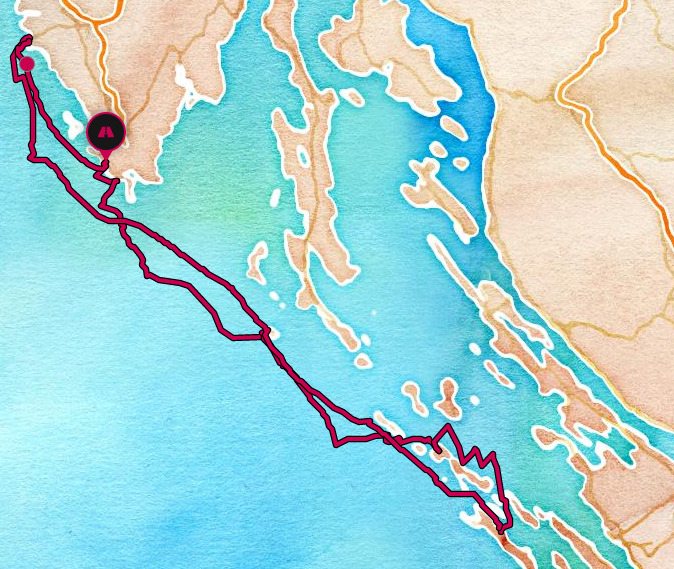
Route stops and details:
Trip Gallery
Marina Punat 16.09.2023 - 23.09.2023
Trip summary:
- Distance: ~50 NM
- Maximum speed: - kts
- Average speed: - kts
- Boat: Dufour 430 | Catacea
- Year: 2020
- Drought: 2.10 m
- Length: 13.23 m
- Beam: 4.30 m
- Engine: 75 hp (55.9 kW)
- Fuel tank: 250 l
- Water tank: 530 l
- Classic mainsail
Map

Route stops and details:
Trip Gallery
2022
Marina Pomer 07.05.2022 - 14.05.2022
Trip summary:
- Distance: 208 NM
- Maximum speed: 7.5 kts
- Average speed: 3.3 kts
- Boat: Beneteau Oceanis 35 | DalMar
- Year: 2016
- Drought: 1.85m
- Length: 9.99 m
- Beam: 3.7 m
- Engine: 29 hp (21.6 kW)
- Fuel tank: 130 l
- Water tank: 330 l
- Classic mainsail
Map
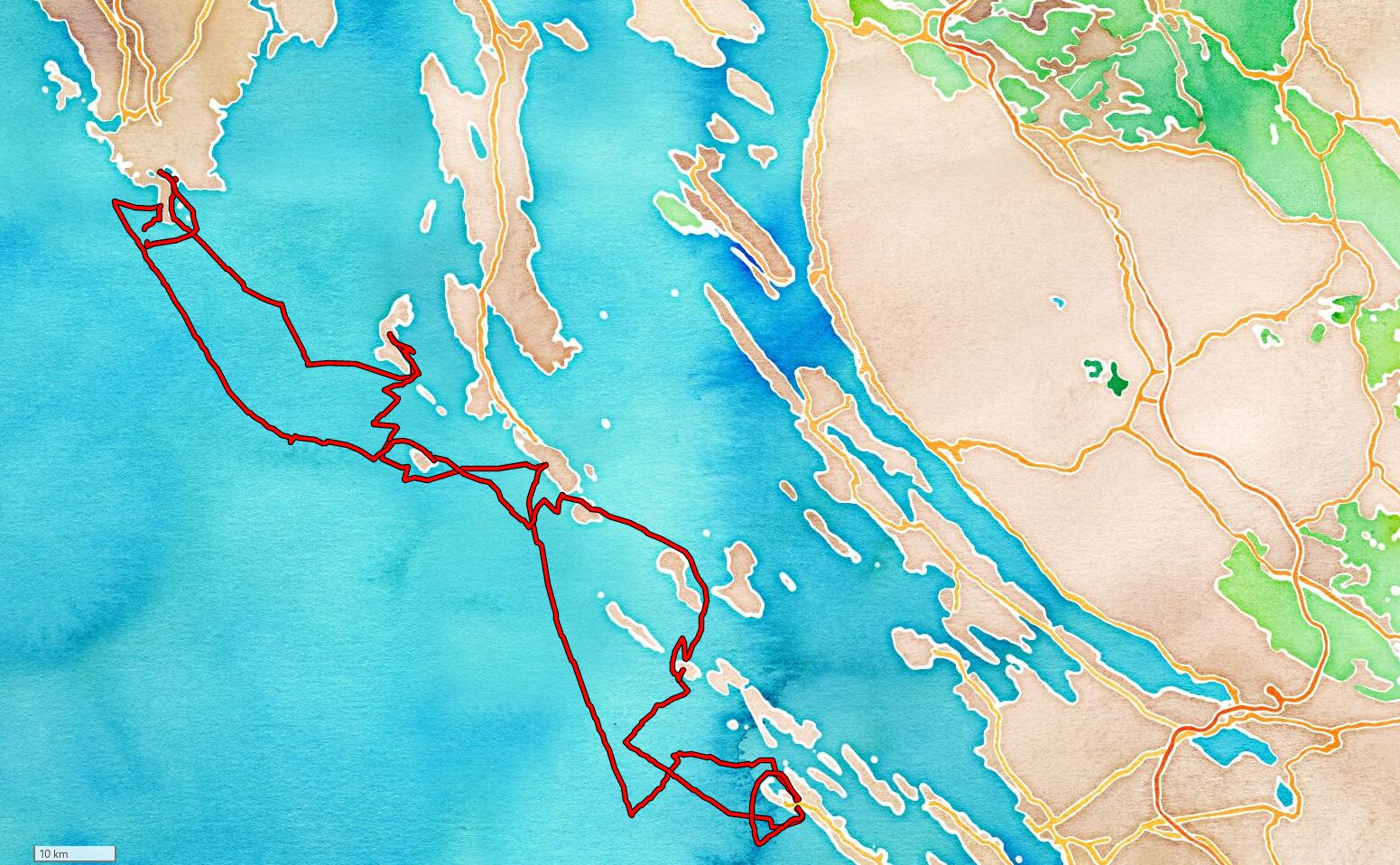
Route stops and details:
- Start: Marina Pomer ↓
- End: Marina Pomer
- GPX
Trip Gallery
2021
Marina Frapa Rogoznica 29.05.2021 - 05.06.2021
Trip summary:
- Distance: 183 NM
- Maximum speed: 9.9 kts
- Average speed: 4.3 kts
- Boat: Dufour 430 | Calando
- Year: 2020
- Drought: 2.10m
- Length: 13.24 m
- Beam: 4.3 m
- Engine: 60 hp (44.7 kW)
- Fuel tank: 200 l
- Water tank: 380 l
- Rolling mainsail
Map
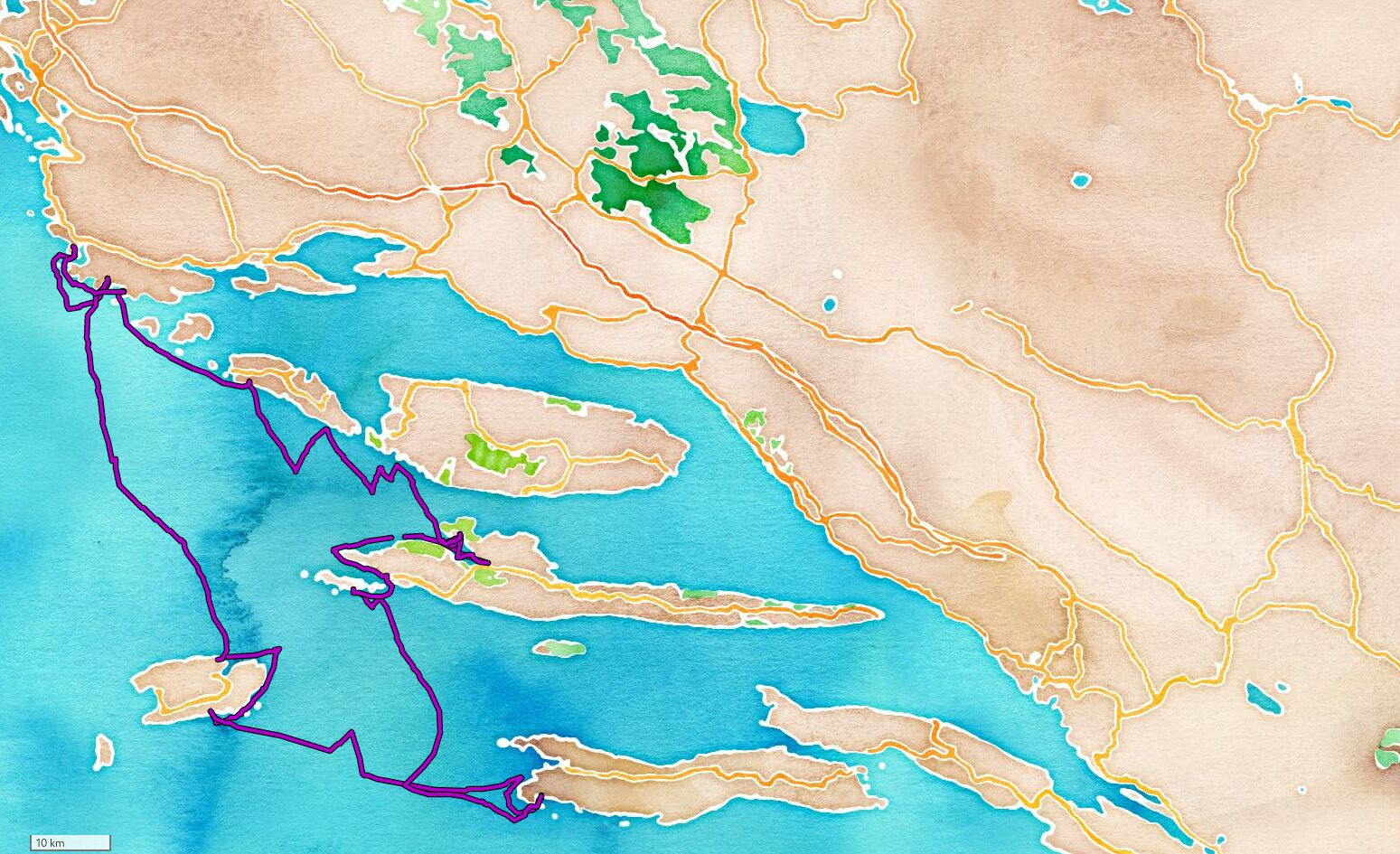
Route stops and details:
- Start: Marina Frapa ↓
- End: Marina Frapa
- GPX
Trip Gallery
2020
Vodice 05.09.2020 - 12.09.2020
Trip summary:
- Distance: 87 NM
- Maximum speed: 7.1 kts
- Average speed: 3.1 kts
- Boat: Jeanneau Sun Odyssey 30 | Espresso 1
- Year: 2009
- Drought: 1.95m
- Length: 8.99 m
- Beam: 3.18 m
- Engine: 21 hp (15.7 kW)
- Fuel tank: 50 l
- Water tank: 160 l
- Rolling mainsail
Route details
Trip Gallery
Sailing Galleries
Veruda - Dragove - Rovijn - Veruda 2023
Pomer - Veli Rat - Pomer 2022
Frapa - Vis - Frapa 2021
Vodice - Zut - Vodice 2020
Filesystem
XFS
XFS logging
Overview
XFS uses Write-Ahead Logging (WAL) to guarantee filesystem metadata consistency. Every metadata change is recorded in the log before being applied to the on-disk structures. If a crash occurs, the log is replayed to bring the filesystem back to a consistent state.
The logging subsystem has two major layers that work together:
- The circular on-disk log — a fixed-size ring buffer of 512-byte blocks stored in a dedicated log device (or the end of the data device).
- The Committed Item List (CIL) / Delayed Logging layer — an in-memory aggregation layer that batches and de-duplicates log writes before flushing to the on-disk log.
Key Data Structures
struct xlog — The Log Manager
Defined in xfs_log_priv.h, this is the central control structure for the entire
logging subsystem.
struct xlog {
    struct xfs_mount        *l_mp;           // owning filesystem mount
    struct xfs_ail          *l_ailp;         // Active Item List
    struct xfs_cil          *l_cilp;         // Committed Item List (delayed logging)
    struct xlog_grant_head   l_reserve_head; // logical reservation accounting
    struct xlog_grant_head   l_write_head;   // physical space accounting
    atomic64_t               l_tail_lsn;     // LSN of oldest unpersisted transaction
    struct xlog_in_core     *l_iclog;        // head of the iclog ring
    spinlock_t               l_icloglock;    // protects the iclog state machine
};
The two grant_head fields are the heart of log space management and are explained
in detail in Log Space Accounting.
struct xlog_in_core — The In-Core Log Buffer (iclog)
Each iclog is a chunk of memory that absorbs formatted log records before they are written to disk. They form a circular ring buffer of typically 4 to 8 buffers, each up to 256 KB.
struct xlog_in_core {
    enum xlog_iclog_state  ic_state;       // state machine position
    atomic_t               ic_refcnt;      // reference count
    wait_queue_head_t      ic_force_wait;  // waiters on forced flush
    struct xlog_in_core   *ic_next;        // next in ring
    u32                    ic_offset;      // current write cursor
    u32                    ic_size;        // total buffer size
    void                  *ic_datap;       // pointer to buffer data
    struct list_head       ic_callbacks;   // CIL checkpoint callbacks
};
Iclog state machine (xfs_log.c):
ACTIVE → WANT_SYNC → SYNCING → DONE_SYNC → CALLBACK → DIRTY → ACTIVE
| State | Meaning |
|---|---|
ACTIVE | Accepting new log records |
WANT_SYNC | Full or flushed, waiting for all writers to finish |
SYNCING | I/O submitted to disk |
DONE_SYNC | I/O complete, callbacks pending |
CALLBACK | Running CIL checkpoint callbacks (AIL insertion) |
DIRTY | Buffer spent; being recycled back to ACTIVE |
struct xfs_cil and struct xfs_cil_ctx — The Delayed Logging Layer
xfs_cil_ctx (xfs_log_priv.h) is the container for a single CIL checkpoint —
a batch of log items accumulated since the last checkpoint flush.
struct xfs_cil_ctx {
    xfs_csn_t          sequence;    // monotonically increasing checkpoint number
    xfs_lsn_t          start_lsn;  // LSN of first log record
    xfs_lsn_t          commit_lsn; // LSN of commit record
    struct list_head   lv_chain;   // chain of formatted shadow buffers
    atomic_t           space_used; // bytes accumulated so far
    struct xlog_ticket *ticket;    // log reservation ticket
};
xfs_cil (xfs_log_priv.h) owns the current context and drives the push:
struct xfs_cil {
    struct xlog           *xc_log;
    struct rw_semaphore    xc_ctx_lock;   // write-locked during push only
    struct xfs_cil_ctx    *xc_ctx;        // current live context
    spinlock_t             xc_push_lock;  // protects ordering list
    wait_queue_head_t      xc_commit_wait;
    void __percpu         *xc_pcp;        // per-CPU item lists
};
struct xfs_log_vec — The Shadow Buffer
When a transaction commits, each log item’s in-memory state is formatted into a
shadow buffer (a log_vec) and decoupled from the live object. This is the
central innovation of delayed logging.
struct xfs_log_vec {
    struct list_head      lv_list;     // CIL chain
    uint32_t              lv_order_id; // intra-checkpoint ordering
    int                   lv_niovecs;  // number of iovecs
    struct xfs_log_iovec *lv_iovecp;  // formatted region descriptors
    struct xfs_log_item  *lv_item;    // back-pointer to log item
    char                 *lv_buf;     // shadow buffer memory
    int                   lv_bytes;   // bytes used
};
After formatting, the log item is unlocked immediately. The shadow buffer holds all data required for the eventual log write.
Log Space Accounting: The Dual-Grant-Head Model
XFS tracks log space with two independent accounting heads, both defined as
xlog_grant_head (xfs_log_priv.h):
| Head | What it tracks | Can overcommit? |
|---|---|---|
l_reserve_head | Logical reservation (space promised to transactions) | Yes — future commits block, but existing ones proceed |
l_write_head | Physical bytes actually written to the log | No — hard limit, never advances past the tail |
Why two heads? Rolling transactions (e.g., directory operations that span many buffer modifications) need to reserve space upfront without exhausting the physical log. The reserve head allows logical overcommitment so a rolling transaction can keep rolling, while the write head enforces the actual circular buffer boundary.
CIL space limits (xfs_log_priv.h):
// Background push triggered at ~12.5% of total log size
#define XLOG_CIL_SPACE_LIMIT(log)  min_t(int, (log)->l_logsize >> 3, ...)

// Transaction commits throttled (sleeping wait) at 25% of log size
#define XLOG_CIL_BLOCKING_SPACE_LIMIT(log)  (XLOG_CIL_SPACE_LIMIT(log) * 2)
LSN Encoding
Log Sequence Numbers are 64-bit values:
LSN = (cycle << 32) | block_offset
- cycle: how many times the log has wrapped around.
- block_offset: 512-byte block offset within the log.
Macros CYCLE_LSN() and BLOCK_LSN() extract these fields throughout the code.
Transaction Lifecycle with Delayed Logging
This is the full path from a filesystem operation to a durable on-disk record.
Phase 1: Transaction Allocation and Reservation
xfs_trans_alloc()
  → xlog_ticket_alloc()
  → xlog_grant_head_check()   ← may sleep here if log is full
A ticket (reservation) is allocated holding the worst-case byte count for this transaction type. The reservation is calculated at mount time from geometric properties (tree depth, block size, etc.) and accounts for recursive modifications.
Phase 2: Item Modification
The caller modifies in-memory metadata (inode, buffer, dquot). Items are logged
via xfs_trans_log_inode(), xfs_trans_log_buf(), etc., which mark items dirty on
the transaction.
Phase 3: Transaction Commit → CIL Insertion
xfs_trans_commit() → xlog_cil_commit():
- Shadow buffer allocation (
xlog_cil_alloc_shadow_bufs()): outsidexc_ctx_lock, allocate memory sized for each item’s formatted representation. - Lock acquisition: acquire
xc_ctx_lockas a reader (allows concurrent commits). - Format into shadow buffers: call each item’s
iop_format()callback, writing item state into the shadow buffer. - Pin on first insertion: if the item has not been in the CIL before, call
iop_pin(). Re-logging (subsequent modifications before a checkpoint) does not add additional pins — the existing pin is reused and the old shadow buffer is discarded. - Add to per-CPU list: attach the
log_vecto the per-CPU CIL pending list. - Unlock item: the live object is immediately available for further modification.
- Release
xc_ctx_lock.
Relogging
Relogging is the critical property that prevents log tail pinning. Each re-commit of
an item supersedes the previous version. Only the latest aggregate snapshot is
written to the on-disk log (xfs-delayed-logging-design.rst):
Transaction  What is logged    LSN
    A             A             X
    B            A+B           X+n        ← A's slot at X is now stale
    C           A+B+C          X+n+m
Phase 4: CIL Background Push
The CIL push worker (xlog_cil_push_work(), xfs_log_cil.c) is triggered when:
- CIL space exceeds
XLOG_CIL_SPACE_LIMIT(background push), or - A caller explicitly issues
xfs_log_force()orfsync().
Push sequence:
1. Acquire xc_ctx_lock as WRITER  (excludes all new commits)
2. Swap context: xc_ctx points to a new empty context
3. Release xc_ctx_lock            ← concurrent commits resume on new context
4. Sort and aggregate log_vecs from the old context
5. Write start record and all item vectors to iclogs
6. Order commit record among concurrent checkpoints (xlog_cil_order_write)
7. Write commit record to iclog; submit iclog for I/O
8. On I/O completion: insert items into AIL, call iop_committed, unpin items
Step 6 — checkpoint ordering — ensures commit records appear in the log in strictly ascending checkpoint sequence order, regardless of when individual iclogs complete I/O.
Phase 5: Iclog I/O and AIL Insertion
When an iclog transitions from SYNCING to DONE_SYNC:
xlog_state_iodone_process_iclog()runs callbacks.xlog_cil_process_committed()inserts log items into the Active Item List (AIL) at their commit LSN.- Items are unpinned (
iop_unpin()), making them eligible for writeback.
Phase 6: AIL Writeback and Log Tail Advancement
Once items are inserted into the AIL the xfsaild kernel thread takes over. The
full mechanism is described in The Active Item List and Log Tail Pushing.
Log space is only reclaimed when the tail advances. This makes the log a true circular buffer.
Simple vs Rolling Transactions
XFS transactions fall into two categories based on how they interact with the log grant space reservation system.
Simple Transactions
A simple transaction reserves log space once, performs its work, and commits. The entire lifecycle fits within a single log reservation unit.
The reservation is computed as:
need_bytes = tr_logres × 1
At allocation (xfs_trans_alloc), xfs_log_reserve checks against l_reserve_head
and advances both grant heads by need_bytes:
xlog_grant_add_space(&log->l_reserve_head, need_bytes);
xlog_grant_add_space(&log->l_write_head, need_bytes);
At commit, xfs_log_ticket_ungrant returns unused space from both heads:
bytes = t_curr_res;                /* unused portion */
xlog_grant_sub_space(&log->l_reserve_head, bytes);
xlog_grant_sub_space(&log->l_write_head, bytes);
The transaction ticket has t_cnt = 0 (no refills) and the XFS_TRANS_PERM_LOG_RES
flag is not set.
Examples of simple transactions:
| Transaction | Operation |
|---|---|
tr_fsyncts | Timestamp update (utimensat, xfs_vn_update_time) |
tr_sb | Superblock counter update |
tr_swrite | Synchronous inode write |
Simple transactions never call xfs_trans_roll and never need xfs_log_regrant.
Rolling (Permanent) Transactions
A rolling transaction is allocated with XFS_TRANS_PERM_LOG_RES, signaling that it
may need multiple log reservation refills. The initial reservation is:
need_bytes = tr_logres × tr_logcount
where tr_logcount represents the maximum number of “units” the transaction can use
before needing to request more space from the grant heads.
The first unit goes to t_curr_res (the working reservation); the remaining
tr_logcount - 1 units are held in t_cnt as pre-paid refills.
When a rolling transaction exhausts its current unit, it calls xfs_trans_roll()
(xfs_trans.c), which performs a three-step handover:
-
Duplicate —
xfs_trans_dup()creates a new transaction structure, copying the ticket (with a reference count bump), transferring remaining block reservations and deferred operations to the new transaction. The old transaction’sXFS_TRANS_PERM_LOG_RESflag propagates to the new one. -
Commit the old transaction —
__xfs_trans_commit(tp, true)commits withregrant = true. This tells the commit path to callxfs_log_ticket_regrant()instead ofxfs_log_ticket_ungrant(). The difference is critical: regrant returns the unused portion of the current unit but retains the ticket for the next unit. -
Regrant log space —
xfs_log_regrant()acquires the next unit of log space for the new transaction.
/* xfs_trans_roll() — simplified */
*tpp = xfs_trans_dup(tp);           /* step 1 */
error = __xfs_trans_commit(tp, true); /* step 2: regrant=true */
error = xfs_log_regrant(mp, (*tpp)->t_ticket);  /* step 3 */
The Regrant Path
xfs_log_ticket_regrant() (xfs_log.c) handles the grant head accounting at roll
time:
void xfs_log_ticket_regrant(struct xlog *log, struct xlog_ticket *ticket)
{
    if (ticket->t_cnt > 0)
        ticket->t_cnt--;

    /* Return unused portion of current unit */
    xlog_grant_sub_space(&log->l_reserve_head, ticket->t_curr_res);
    xlog_grant_sub_space(&log->l_write_head, ticket->t_curr_res);
    ticket->t_curr_res = ticket->t_unit_res;  /* reset for next unit */

    /* If pre-paid refills remain, no need to acquire more space */
    if (!ticket->t_cnt) {
        /* Out of pre-paid units — must re-reserve on reserve head */
        xlog_grant_add_space(&log->l_reserve_head, ticket->t_unit_res);
    }
}
If pre-paid refills remain (t_cnt > 0), the refill is free — the space was already
reserved at allocation time. When pre-paid refills run out (t_cnt == 0),
xfs_log_regrant() must acquire new space from l_write_head via
xlog_grant_head_check():
/* xfs_log_regrant() */
tic->t_tid++;
tic->t_curr_res = tic->t_unit_res;
if (tic->t_cnt > 0)
    return 0;      /* pre-paid refill — no grant check needed */

/* Out of pre-paid units: check the WRITE head */
error = xlog_grant_head_check(log, &log->l_write_head, tic, &need_bytes);
Note the critical difference in which grant head is checked:
| Path | Function | Grant head checked |
|---|---|---|
| Initial reservation | xfs_log_reserve() | l_reserve_head (allows overcommit) |
| Regrant (out of units) | xfs_log_regrant() | l_write_head (hard physical limit) |
The reserve head allows logical overcommitment — it promises space that may not yet be physically available. The write head enforces the actual circular buffer boundary. A rolling transaction that exhausts its pre-paid units and needs more space contends directly on the write head, which cannot advance past the log tail.
Why Rolling Transactions Exist
Operations like unlink, create, rename, and truncate can generate an unbounded
number of log items through deferred operations. Deleting a file with 10,000 extents
generates 10,000 EFI/EFD intent pairs. A single non-rolling transaction would need to
reserve enough log space for all of them upfront — potentially exceeding the entire
log.
Rolling transactions break this into bounded units. Each roll commits the work done
so far (allowing the CIL to absorb it), releases the unused reservation, and obtains a
fresh unit for the next batch. The xfs_defer_finish() mechanism drives this: it
processes deferred ops in batches, rolling the transaction between batches.
xfs_trans_commit()
  → xfs_defer_finish_noroll()   ← processes deferred ops
      → xfs_defer_create_intents()  ← log intent items
      → xfs_trans_roll()            ← commit current, get fresh unit
      → xfs_defer_trans_roll()      ← re-join items to new transaction
      → xfs_defer_finish_one()      ← execute the deferred operation
      → xfs_defer_create_done()     ← log done item
      (loop until all deferred ops complete)
Rolling Transaction Types
All rolling transactions in XFS set XFS_TRANS_PERM_LOG_RES in tr_logflags:
| Transaction | tr_logcount | Operation |
|---|---|---|
tr_create | per-mount computed | File/node creation |
tr_remove | per-mount computed | Unlink |
tr_rename | per-mount computed | Rename |
tr_link | per-mount computed | Hard link |
tr_mkdir | per-mount computed | Directory creation |
tr_symlink | per-mount computed | Symlink creation |
tr_write | 2 (8 with reflink) | Buffered write allocation |
tr_itruncate | 2 (8 with reflink) | Truncate |
tr_ifree | 2 | Inode inactivation |
tr_addafork | 2 | Add attribute fork |
tr_create_tmpfile | 2 | O_TMPFILE creation |
tr_growdata | 2 | Grow data section |
tr_attrinval | 1 | Attribute invalidation |
The per-mount computed counts (from functions like xfs_icreate_log_count()) factor
in attribute operations that may accompany the primary operation, including potential
B-tree splits at the filesystem’s actual tree depth. For reflink-enabled filesystems,
tr_write and tr_itruncate increase from 2 to 8 units to accommodate CoW extent
remapping and refcount B-tree updates.
Grant Head Interaction Summary
Simple transactions interact with the grant system once — a brief reservation on
l_reserve_head lasting microseconds between xfs_trans_alloc() and
xfs_trans_commit(). Under concurrency, thousands of simple transactions contribute
minimal sustained grant head pressure because their reservations are allocated and
released so quickly.
Rolling transactions interact with the grant system multiple times. Each roll returns
unused space then re-acquires a full unit. When pre-paid units run out, the regrant
path checks l_write_head, which is the harder limit — it cannot advance past the log
tail. When the AIL cannot drain (slow storage), the write head fills and rolling
transactions stall on regrant, creating sustained waiters on l_write_head.
Both paths funnel through the same xlog_grant_head_check() function, which manages
the FIFO waiters queue. This has implications for fairness: a waiter on either head’s
queue affects all newcomers entering the same head’s check path. The interaction
between large rolling-transaction reservations and many small simple-transaction
reservations competing on the same grant head queue is a source of performance
pathology under log pressure.
The Active Item List and Log Tail Pushing
The AIL is the bridge between the log and the on-disk metadata. Its sole purpose is to track every log item that has been committed to the log but not yet written to its final on-disk location, and to push those items to disk so the log tail can advance and log space can be reclaimed.
Data Structures
struct xfs_ail (xfs_trans_priv.h)
struct xfs_ail {
    struct xlog          *ail_log;            // log being managed
    struct task_struct   *ail_task;           // xfsaild kthread
    struct list_head      ail_head;           // LSN-ordered item list
    struct list_head      ail_cursors;        // active traversal cursors
    spinlock_t            ail_lock;           // protects all AIL state
    xfs_lsn_t             ail_last_pushed_lsn;// LSN of last successfully pushed item
    xfs_lsn_t             ail_head_lsn;      // log head LSN at AIL init
    int                   ail_log_flush;      // counter: force CIL push when set
    unsigned long         ail_opstate;        // XFS_AIL_OPSTATE_PUSH_ALL flag
    struct list_head      ail_buf_list;       // buffers queued for delwri submission
    wait_queue_head_t     ail_empty;          // waiters for AIL to drain completely
    xfs_lsn_t             ail_target;        // LSN we are currently pushing toward
};
The list at ail_head is kept in strict ascending LSN order. The item at the front
(minimum LSN) defines the log tail: that is the oldest record in the log that has
not yet been written to disk.
struct xfs_ail_cursor (xfs_trans_priv.h)
struct xfs_ail_cursor {
    struct list_head      list;   // registered in ailp->ail_cursors
    struct xfs_log_item  *item;   // current position (low bit = invalidated)
};
Cursors allow xfsaild to walk the AIL safely even when items are deleted
concurrently. When an item is removed, every cursor pointing at it has its low
pointer bit set. The next call to xfs_trans_ail_cursor_next() detects this and
restarts the traversal from the new minimum.
The xfsaild Daemon Main Loop (xfs_trans_ail.c:653)
xfsaild is a single per-filesystem kthread. Its loop has three states:
┌──────────────────────────────────────────────────────┐
│ Set TASK_KILLABLE or TASK_INTERRUPTIBLE               │
│   (KILLABLE if tout ≤ 20ms for fast wakeup)          │
├──────────────────────────────────────────────────────┤
│ Check kthread_should_stop() → drain ail_buf_list      │
│   and exit on shutdown                                │
├──────────────────────────────────────────────────────┤
│ If AIL empty AND ail_buf_list empty → schedule()     │
│   (full idle: no timeout, wait for wakeup)            │
├──────────────────────────────────────────────────────┤
│ If tout > 0 → msleep(tout)                           │
├──────────────────────────────────────────────────────┤
│ tout = xfsaild_push(ailp)  ← core work               │
└──────────────────────────────────────────────────────┘
The thread is woken by:
xfs_ail_push()— called fromxlog_assign_tail_lsn()when the log approaches full.xfs_ail_push_all()— called by umount and log quiesce to drain the AIL completely.xfs_trans_ail_update_bulk()— any new insertion into the AIL.
Push Target Calculation (xfs_trans_ail.c:405)
Before scanning items, xfsaild_push() calls xfs_ail_calc_push_target() to
decide how far to push. The logic in order of priority:
-
Push-all flag set (
XFS_AIL_OPSTATE_PUSH_ALL) orail_emptyhas waiters: returnmax_lsn(the current log head). Push everything. -
Log already has ≥ 25% free space:
free_bytes = l_logsize − (head_lsn − min_lsn)
if free_bytes ≥ l_logsize / 4 → keep current ail_target
No pushing needed; keep the existing target.
-
Log has < 25% free space: advance the target by 25% of the log size from the current tail:
target_block = BLOCK_LSN(min_lsn) + (l_logBBsize >> 2);
// wrap cycle if needed
target_lsn   = xlog_assign_lsn(target_cycle, target_block);
The target is clamped to
max_lsnand never lowered below the existingail_target.
Design intent: one push round reclaims exactly 25% of the log, ensuring a predictable amount of free space without over-flushing.
The xfsaild_push() Loop (xfs_trans_ail.c:535)
This is the core of the push. It runs under ail_lock for the traversal, briefly
dropping it during I/O operations.
Step 1: CIL Pre-flush Optimization
if (ailp->ail_log_flush && ailp->ail_last_pushed_lsn == 0 &&
    (!list_empty_careful(&ailp->ail_buf_list) || xfs_ail_min_lsn(ailp))) {
    ailp->ail_log_flush = 0;
    xlog_cil_flush(ailp->ail_log);
}
When the AIL has items but the push cursor is stuck at the beginning
(ail_last_pushed_lsn == 0), it means items are pinned by in-flight CIL
transactions. Rather than spinning on pinned items, xfsaild forces a synchronous
CIL flush. This breaks the potential circular wait:
CIL holds pins → AIL cannot advance → log fills → CIL cannot commit → deadlock
Step 2: Cursor Initialization and Target Update
WRITE_ONCE(ailp->ail_target, xfs_ail_calc_push_target(ailp));
lip = xfs_trans_ail_cursor_first(ailp, &cur, ailp->ail_last_pushed_lsn);
The cursor starts from ail_last_pushed_lsn so that a push that hit the item limit
in one round can continue from where it left off in the next.
Step 3: Item Traversal
while (XFS_LSN_CMP(lip->li_lsn, ailp->ail_target) <= 0) {
    if (test_bit(XFS_LI_FLUSHING, &lip->li_flags))
        goto next_item;             // skip: already in-flight

    xfsaild_process_logitem(ailp, lip, &stuck, &flushing);
    count++;

    if (stuck > 100)
        break;                      // backoff: too many blocked items
    if (lip->li_lsn != lsn && count > 1000)
        break;                      // per-LSN limit: avoid infinite loop
}
Two hard limits prevent the push loop from monopolizing the CPU:
stuck > 100: if more than 100 consecutive items are pinned or locked, abort and sleep. Continuing would just burn CPU with no progress.count > 1000at a new LSN: prevents unbounded iteration when many items share the same commit LSN.
Step 4: Async Buffer Submission
if (xfs_buf_delwri_submit_nowait(&ailp->ail_buf_list))
    ailp->ail_log_flush++;
All buffers queued during the traversal are submitted in a single batched write.
submit_nowait returns non-zero if the submission was not possible (e.g. I/O error
or congestion), which sets ail_log_flush to trigger a CIL flush on the next round.
Step 5: Timeout Selection
The return value controls how long xfsaild sleeps before the next round:
| Condition | tout | Meaning |
|---|---|---|
| Reached target, or AIL empty | 50 ms | Wait for in-flight I/O to complete; reset cursor to 0 |
| >90% of items were stuck/flushing | 20 ms | Back off; next round may issue a log force; reset cursor to 0 |
| More items remain below target | 0 ms | Return immediately; continue from ail_last_pushed_lsn |
The cursor reset (ail_last_pushed_lsn = 0) on the first two cases ensures the
next wakeup re-evaluates the entire AIL from the minimum, picking up items that may
have been unpinned during the sleep.
Per-Item Push: xfsaild_process_logitem() (xfs_trans_ail.c:468)
For each item in the traversal, xfsaild_push_item() dispatches to the item’s
iop_push callback and interprets the return code:
| Return code | Meaning | Action |
|---|---|---|
XFS_ITEM_SUCCESS | Queued for I/O | Update ail_last_pushed_lsn |
XFS_ITEM_FLUSHING | Already being written | Increment flushing; update ail_last_pushed_lsn |
XFS_ITEM_PINNED | Held by an in-memory transaction | Increment stuck; set ail_log_flush |
XFS_ITEM_LOCKED | Could not acquire buffer lock | Increment stuck |
XFS_ITEM_FAILED | Previous I/O failed | Resubmit via xfsaild_resubmit_item() |
Items with XFS_LI_FAILED set are handled by xfsaild_resubmit_item() which
re-queues the backing buffer directly to ail_buf_list without calling iop_push
again, allowing the I/O to be retried on the next submission round.
Inode Item Push: xfs_inode_item_push() (xfs_inode_item.c:739)
Inode items use cluster flushing to amortize I/O overhead. A cluster is a group of inodes that share a single filesystem buffer (typically a 4 KB or 16 KB block).
1. Check preconditions (return PINNED or FLUSHING if not ready):
   - inode stale (being freed)?    → PINNED
   - ipincount > 0?                → PINNED
   - cluster buffer pinned?        → PINNED
   - XFS_IFLUSHING flag set?       → FLUSHING
   - xfs_buf_trylock() fails?      → LOCKED

2. Release ail_lock              ← avoids holding spinlock during I/O
3. xfs_iflush_cluster(bp)       ← formats ALL inodes in the cluster into bp
4. xfs_buf_delwri_queue(bp, &ailp->ail_buf_list)
5. Reacquire ail_lock
xfs_iflush_cluster() walks all inodes mapped to the same buffer and formats each
one’s in-memory xfs_dinode into the buffer in one pass. This means that when
xfsaild pushes one inode item, it potentially writes dozens of inodes with a
single I/O, which is critical for performance on inode-dense workloads.
The AIL lock is dropped during xfs_iflush_cluster(). Cursors handle any
concurrent deletions that occur during this window.
Buffer Item Push: xfs_buf_item_push() (xfs_buf_item.c:565)
Buffer items (btree blocks, superblock, AGF/AGI headers, etc.) have a simpler push path:
1. xfs_buf_ispinned(bp)?     → PINNED   (transaction holds a log reference)
2. xfs_buf_trylock(bp) fails?→ LOCKED   (re-check pin after trylock failure)
3. Log a warning if XBF_WRITE_FAIL is set (previous write error)
4. xfs_buf_delwri_queue(bp, &ailp->ail_buf_list)
5. xfs_buf_unlock(bp)
Unlike inodes, each buffer item maps 1:1 to a buffer, so no clustering is needed.
The trylock avoids blocking — if the buffer is locked by another writer, xfsaild
moves on and returns to it on the next round.
Tail Advancement: __xfs_ail_assign_tail_lsn() (xfs_trans_ail.c:753)
When xfs_ail_delete() removes an item from the AIL, it calls
xfs_ail_update_finish(), which calls __xfs_ail_assign_tail_lsn():
tail_lsn = __xfs_ail_min_lsn(ailp);   // LSN of first item in AIL
if (!tail_lsn)
    tail_lsn = ailp->ail_head_lsn;    // AIL empty: tail = current head

WRITE_ONCE(log->l_tail_space,
    xlog_lsn_sub(log, ailp->ail_head_lsn, tail_lsn));
atomic64_set(&log->l_tail_lsn, tail_lsn);
After updating the tail, xfs_ail_update_finish() calls xfs_log_space_wake(),
which wakes all threads sleeping on l_reserve_head or l_write_head. This
directly unblocks stalled transaction allocations.
The tail can only move forward. It is the minimum LSN of all items still in the AIL. The log space available to new transactions is:
available = l_logsize − (l_tail_space)
          = l_logsize − (head_lsn − tail_lsn)
Every item flushed to disk shrinks l_tail_space, freeing space for the next wave
of transactions.
AIL Locking Summary
| Lock | Scope | Notes |
|---|---|---|
ail_lock (spinlock) | All AIL list/state access | Dropped during I/O in inode push |
xfs_buf.b_lock | Individual buffer state | Acquired via trylock only; never spins |
i_pincount / b_pin_count | Pin reference counts | Atomic; checked before attempting push |
The key design rule: ail_lock is never held while waiting for I/O. It is
dropped before xfs_iflush_cluster() and reacquired immediately after, with cursors
protecting traversal safety across the gap.
On-Disk Log Format
Log Record Header (xfs_log_format.h)
struct xlog_rec_header {
    __be32  h_magicno;      // 0xFEEDbabe
    __be32  h_cycle;        // wrap count
    __be32  h_version;      // log version (1 or 2)
    __be32  h_len;          // data length in bytes
    __be64  h_lsn;          // this record's LSN
    __be64  h_tail_lsn;     // oldest uncommitted LSN at write time
    __le32  h_crc;          // CRC-32c of entire record
    __be32  h_num_logops;   // count of operations in this record
    __be32  h_cycle_data[]; // cycle number embedded in each 512-byte block
    uuid_t  h_fs_uuid;      // filesystem UUID
};
Operation Header
struct xlog_op_header {
    __be32  oh_tid;      // transaction ID (for grouping ops)
    __be32  oh_len;      // payload length
    __u8    oh_clientid; // XFS_TRANSACTION = 0x69
    __u8    oh_flags;    // START_TRANS | COMMIT_TRANS | CONTINUE_TRANS
};
Log Item Types
| Type | Value | Description |
|---|---|---|
XFS_LI_INODE | 0x123b | Inode core and data fork |
XFS_LI_BUF | 0x123c | Raw buffer (btree blocks, superblock, etc.) |
XFS_LI_DQUOT | 0x123d | Quota record |
XFS_LI_EFI/EFD | 0x1236/7 | Extent free intent/done |
XFS_LI_RUI/RUD | 0x123a/9 | Rmap update intent/done |
XFS_LI_CUI/CUD | 0x123f/g | Refcount update intent/done |
XFS_LI_BUI/BUD | intent pairs | BMBT update intent/done |
XFS_LI_ATTRI/ATTRD | intent pairs | Xattr update intent/done |
Intent/Done pairs implement a two-phase commit protocol for complex operations that span multiple sub-transactions (e.g., freeing extents requires updating the free space B-tree and the reverse-mapping B-tree). If the filesystem crashes between writing the Intent and the Done record, recovery re-executes the operation from the Intent.
B-tree Splits
A B-tree split is the most log-intensive operation in the XFS metadata path. A single record insertion can trigger a cascade of splits from leaf to root, each allocating a new block and logging multiple buffers. Because reservation sizes are calculated from the worst-case split depth, understanding splits is essential for understanding why XFS log reservations are as large as they are.
When a Split Occurs
XFS B-trees are full B+ trees: every block is kept as full as possible during
insertion. When an insertion targets a block that is already at maximum capacity,
the kernel first tries two cheaper alternatives before resorting to a split
(xfs_btree_make_block_unfull(), xfs_btree.c):
- Left shift (
xfs_btree_lshift()): move the leftmost record to the left sibling if it has space. - Right shift (
xfs_btree_rshift()): move the rightmost record to the right sibling if it has space. - Split (
xfs_btree_split()): only if both siblings are also full.
A split always produces exactly one new block at the current level and returns one new key/pointer pair to the caller, which must then insert that pair into the parent level — potentially triggering another split.
On-Disk Block Format
Every XFS B-tree block on disk begins with struct xfs_btree_block
(libxfs/xfs_btree_format.h):
struct xfs_btree_block {
    __be32  bb_magic;    // per-btree magic (e.g. XFS_BNOBT_MAGIC)
    __be16  bb_level;    // 0 = leaf, 1+ = internal node
    __be16  bb_numrecs;  // number of records/keys currently stored
    union {
        struct xfs_btree_block_shdr s;  // AG-rooted trees (32-bit sibling ptrs)
        struct xfs_btree_block_lhdr l;  // inode-rooted trees (64-bit sibling ptrs)
    } bb_u;
};
Both header variants contain:
| Field | Purpose |
|---|---|
bb_leftsib | Block number of left sibling (or NULLAGBLOCK/NULLFSBLOCK) |
bb_rightsib | Block number of right sibling |
bb_blkno | Physical block address of this block |
bb_lsn | LSN of the last transaction that modified this block |
bb_uuid | Filesystem UUID (guards against cross-filesystem recovery) |
bb_owner | AG number (AG-rooted) or inode number (inode-rooted) |
bb_crc | CRC-32c of the block (recalculated on recovery, not logged) |
Following the header, a block contains either:
- Leaf: a flat array of fixed-size records.
- Internal node: an array of keys followed by an array of
n+1child pointers.
All integer fields are big-endian on disk.
The Split Mechanism: __xfs_btree_split()
The core implementation lives in __xfs_btree_split() (xfs_btree.c). For BMBT
(block map B-tree) splits where no AGF lock is held, a worker-thread wrapper
xfs_btree_split() offloads the call to avoid unbounded kernel stack growth during
recursive allocation; all other tree types call __xfs_btree_split() directly.
Step 1: Allocate the New Right Block
xfs_btree_alloc_block(cur, &lptr, &rptr, stat)
xfs_btree_get_buf_block(cur, &rptr, &right, &rbp)
xfs_btree_init_block_cur(cur, rbp, level, 0)
Block allocation is type-specific:
| B-tree | Source of new block | Side effect logged |
|---|---|---|
| BNOBT / CNTBT | xfs_alloc_get_freelist() — AG free list | AGF header (XFS_AGF_FLFIRST, XFS_AGF_FLCOUNT) |
| INOBT / FINOBT | xfs_alloc_vextent_near_bno() — AG free space | AGF + AGI block counter |
| RMAPBT | xfs_alloc_get_freelist() — AGFL | AGF agf_rmap_blocks, space reservation |
| BMBT | xfs_alloc_vextent_near_bno() — data AG | Inode fork block count |
Every one of these block sources modifies an AG header (AGF or AGI), which is itself
logged as a XFS_LI_BUF item. A split thus always generates at least two logged
buffers before any tree data is touched.
Step 2: Divide Records Between Left and Right
lrecs = xfs_btree_get_numrecs(left)
rrecs = lrecs / 2
if (lrecs is odd && cursor position <= rrecs + 1)
    rrecs++          // tilt balance toward right when cursor is nearby
src_index = lrecs - rrecs + 1
xfs_btree_set_numrecs(left,  lrecs - rrecs)
xfs_btree_set_numrecs(right, rrecs)
The split point is chosen so that both blocks end up roughly half full. The odd- record tilt biases records toward the block the cursor is about to insert into, minimising the chance of an immediate follow-up split.
For leaf blocks: xfs_btree_copy_recs() copies the upper half of records into
the right block.
For internal nodes: xfs_btree_copy_keys() and xfs_btree_copy_ptrs() copy
the upper half of keys and their associated child pointers.
The key at src_index (the lowest key of the right block) is extracted and returned
to the caller as the split key — the value that must be inserted into the parent
level as the separator between left and right.
Step 3: Log Every Modified Buffer
This is the critical point at which the split becomes durable. The following log operations happen in order:
| What | Fields logged | xfs_btree_log_block() flags |
|---|---|---|
| Right block — all header fields | magic, level, numrecs, both sibling ptrs, blkno, LSN, UUID, owner | XFS_BB_ALL_BITS (excludes bb_crc) |
| Right block — data (leaf) | records 1..rrecs | via xfs_btree_log_recs() |
| Right block — data (node) | keys 1..rrecs, ptrs 1..rrecs | via xfs_btree_log_keys() + xfs_btree_log_ptrs() |
| Left block — changed header | bb_numrecs, bb_rightsib | XFS_BB_NUMRECS | XFS_BB_RIGHTSIB |
| Right-right sibling (if exists) | bb_leftsib | XFS_BB_LEFTSIB |
xfs_btree_log_block() converts the field bitmask to a byte range and calls
xfs_trans_log_buf(), which marks that range dirty in the transaction’s log vector.
xfs_trans_buf_set_type() is called first to stamp the buffer as
XFS_BLFT_BTREE_BUF, which recovery uses to distinguish B-tree blocks from other
buffer types.
The CRC (bb_crc) is deliberately not logged. It is recalculated from the block
contents during recovery using xfs_btree_reada_bufs(), ensuring the stored CRC
always matches what is actually on disk after replay.
Step 4: Update Sibling Chain
Before logging, the sibling doubly-linked list is repaired:
Before split:
  [left] ↔ [right-right]

After split:
  [left] ↔ [right (new)] ↔ [right-right]
Three pointer writes are needed:
left->bb_rightsib = right(logged as part of left block header)right->bb_leftsib = left(logged as part of right block header,XFS_BB_ALL_BITS)right->bb_rightsib = right-right(logged as part of right block header)right-right->bb_leftsib = right(logged separately:XFS_BB_LEFTSIBonly)
The right-right block read uses xfs_btree_read_buf_block(), which may issue a
synchronous read if the block is not already in the buffer cache. On cold-cache
workloads this is a significant latency source.
Upward Propagation: Recursive Splits
After __xfs_btree_split() returns, the caller (xfs_btree_insrec()) must insert
the split key and right-block pointer into the parent level. If the parent is
also full, it too must split. xfs_btree_insert() drives this loop:
do {
    error = xfs_btree_insrec(cur, level, &nptr, &rec, &key, &ncur, &i);
    // nptr is non-null if a split occurred at this level
    level++;
} while (!xfs_btree_ptr_is_null(cur, &nptr));
Each iteration may allocate one block and log three to five buffers. The loop terminates only when a level has room for the new key/pointer without splitting.
Worst-case depth: on a filesystem with a large allocation group and all optional B-trees enabled, a fully-populated RMAPBT can reach five levels. A single extent allocation that triggers a split at every level logs five new blocks plus five parent block updates plus five AG header updates — thirty or more buffer log items for one allocation.
The per-transaction log reservation must cover this worst case upfront, which is why reservation sizes are computed from tree height and block size at mount time rather than at runtime.
Root Split: Growing the Tree
When the split reaches the root, there is no parent to absorb the new key. The tree must grow one level taller.
AG-Rooted Trees (BNOBT, CNTBT, INOBT, FINOBT, RMAPBT)
xfs_btree_new_root() (xfs_btree.c):
1. Allocate a new block  → becomes the new root
2. xfs_btree_set_root(cur, &nptr, +1)
     → update AG header (AGF or AGI) root pointer and level field
     → log AGF/AGI with XFS_AGF_ROOTS | XFS_AGF_LEVELS
3. Initialize new root block (level = old_height, numrecs = 2)
4. Log new root block:  XFS_BB_ALL_BITS
5. Copy lowest key of each child into new root keys
6. Log keys:  xfs_btree_log_keys(cur, nbp, 1, 2)
7. Write left-child and right-child pointers into new root
8. Log ptrs: xfs_btree_log_ptrs(cur, nbp, 1, 2)
9. Advance cursor: bc_nlevels++
The AG header (AGF or AGI) records the new root block number and the new tree height. On the next mount, XFS reads those fields to reconstruct the cursor starting position without scanning the tree.
Inode-Rooted Trees (BMBT)
xfs_btree_new_iroot() (xfs_btree.c) handles the bmap B-tree, where the root
lives directly inside the inode fork rather than in a separate block:
1. Allocate a new block  → receives a copy of current inode-root contents
2. memcpy(new_block, inode_root_data)
   Fix bb_blkno in new block to match its physical address
3. Compress the inode fork to hold only the new root (one key + one pointer)
4. Log new child block:  XFS_BB_ALL_BITS + records/keys/ptrs
5. Log inode:  XFS_ILOG_CORE | xfs_ilog_fbroot(whichfork)
   (the inode fork data region is now a single-entry root node)
6. bc_nlevels++
The inode fork has a fixed size defined by its di_forkoff. Once the in-inode root
cannot hold another key/pointer pair even after a split, the inode root gains another
level outward, eventually consuming the entire fork and forcing a fork conversion.
Cursor Tracking Across a Split
The xfs_btree_cur maintains one xfs_btree_level entry per tree level, each
holding a (buffer, position) pair:
struct xfs_btree_level {
    struct xfs_buf *bp;   // buffer holding the block at this level
    uint16_t        ptr;  // 1-based index of current key/record
};
After __xfs_btree_split() divides the block, the cursor position may have moved
to the right block:
if (cur->bc_levels[level].ptr > lrecs + 1) {
    xfs_btree_setbuf(cur, level, rbp);           // switch to right block
    cur->bc_levels[level].ptr -= lrecs;          // adjust position
}
If there are more levels above, a second cursor is duplicated
(xfs_btree_dup_cursor()). One cursor tracks the left child; the duplicated cursor’s
parent-level pointer is incremented by one to track the right child. The insertion
loop in xfs_btree_insert() manages which cursor to use at each level and deletes
the spare when the split chain resolves.
What Gets Logged Per Split Level
Summing the buffer log items produced by one complete split at a single level:
| Buffer | Log items | Condition |
|---|---|---|
| AG header (AGF or AGI) | XFS_LI_BUF | Always — block allocation modifies AG header |
| New right block header | XFS_LI_BUF (XFS_BB_ALL_BITS) | Always |
| New right block data (recs/keys/ptrs) | XFS_LI_BUF | Always |
| Left block header | XFS_LI_BUF (XFS_BB_NUMRECS | XFS_BB_RIGHTSIB) | Always |
| Right-right sibling header | XFS_LI_BUF (XFS_BB_LEFTSIB) | Only if right-right exists |
That is four or five XFS_LI_BUF items per split level, plus the AG header
items from block allocation, which may themselves modify additional blocks (e.g.,
the AGFL block list used by BNOBT/RMAPBT to store free blocks). In a five-level tree
where every level splits, a single insertion can log twenty or more distinct buffers
before the transaction commits.
Crash Recovery of a Split
Because every buffer modified during a split is logged before the transaction commits, crash recovery is straightforward:
- Crash before commit: no log records for this transaction are durable. The pre-split blocks are unmodified. The newly allocated block may appear in the block allocation structures but will be reclaimed by the space recovery pass.
- Crash after commit: all log records are durable. Recovery replays each buffer item in order, restoring every block to its post-split state. The B-tree is structurally consistent at the end of replay.
There are no intent records for splits. A split is not a deferred operation: it is atomic within the transaction that triggered it. Either all split records are committed together, or none of them are.
Crash Recovery
xfs_log_recover.c implements recovery in two passes.
Pass 1: Log Scanning
xlog_recover() walks the log from tail_lsn forward:
- Reads each log record header.
- Validates magic number and CRC.
- Groups operation headers by transaction ID.
- Builds an in-memory map of all transactions present in the log.
Pass 2: Replay
xlog_recover_commit_trans() replays each complete transaction:
- For each log item, call
xlog_recover_commit_buffer/inode/dquot(). - Overwrite on-disk metadata with the logged versions.
- For intent items (EFI, RUI, etc.), reconstruct the pending operation and schedule it for Phase 2 completion via deferred operations.
xlog_recover_finish() processes all deferred operations, completing any
partially-done multi-step operations (extent frees, rmap updates, etc.).
Invariant enforced by design: a CIL checkpoint must be smaller than half the total log size. This guarantees that at least one full checkpoint is always present in the log, making partial-write crashes safe.
Locking Hierarchy
Violating this order causes deadlock.
1. xfs_mount.m_sb_lock        (filesystem-wide, rarely held)
2. xfs_buf.b_lock             (individual buffer locks)
3. xfs_inode.i_lock           (inode lock)
4. xlog.l_icloglock           (spinlock, iclog state machine)
5. xfs_cil.xc_ctx_lock        (rwsem, CIL context switch)
6. xfs_cil.xc_push_lock       (spinlock, checkpoint ordering list)
7. xfs_ail.ail_lock           (spinlock, AIL list)
xc_ctx_lock is a sleeping rwsem, not a spinlock, specifically to avoid holding a
spinlock during log I/O submission, which can sleep.
Performance Characteristics and Bottlenecks
Batching Efficiency (CIL)
The CIL’s primary value is write amplification reduction. Without delayed
logging, each fsync or log force flushes all dirty items individually. With CIL,
items modified 100 times between two checkpoints are written to disk once, at
their final state. In workloads with heavy relogging (directory updates, quota
updates), this can reduce log I/O by an order of magnitude.
Bottleneck: If the CIL is too small (< 8 MB on a busy filesystem), background pushes fire too frequently, destroying the batching benefit and driving up log I/O.
Per-CPU CIL Aggregation
Transaction commits add items to per-CPU pending lists (xc_pcp) to eliminate
contention on a single lock. Space accounting uses per-CPU counters until the soft
limit is approached, at which point it transitions to atomic operations and wakes the
push worker.
Bottleneck: On workloads with very many small transactions (e.g., millions of small file creates), the per-CPU-to-atomic transition point creates a serialization spike. Threads pile up in
xlog_cil_commit()contending onxc_ctx_lockwrite acquisition during the context switch.
Grant Head Waiters
When the log is full (write head nearly meets the tail), new transactions block in
xlog_grant_head_wait() on a FIFO wait queue.
Bottleneck — log tail pinning: The tail can only advance when the AIL empties items. The AIL can only empty items when their buffers are written to disk. If the storage device is slow, the log fills up and all new transactions stall. This is the primary throughput bottleneck on write-heavy workloads on slow devices.
Bottleneck — reservation overestimation: Reservations are computed for the worst case (maximum B-tree depth). On a mostly-empty filesystem, actual usage is much less, but the reservation holds the full amount until released. This reduces parallelism on small logs.
Iclog Contention (l_icloglock)
Every thread completing a CIL commit must briefly hold l_icloglock to copy its log
vectors into the current iclog and advance the write cursor. On many-core systems
(32+ CPUs), this spinlock becomes a serialization point under high log bandwidth.
Bottleneck: Large CIL checkpoints writing megabytes of log data while holding
l_icloglockfor each 32 KB iclog block starve concurrent threads trying to start new transactions.
AIL Push Rate and Tail Stall
xfsaild is a single-threaded daemon. On systems with many concurrent metadata
writers, it must push items fast enough to keep the tail advancing ahead of the
write head.
Bottleneck — device throughput: If the block device cannot sustain the required writeback rate,
xfsaildbuilds up a backlog, the AIL grows, the tail stalls, the write head catches the tail, and transaction allocation blocks — a global freeze. The only remedy is faster storage, a larger log, or reducing metadata write amplification.
Bottleneck — pinned items: Items held by long-running or stalled transactions cannot be pushed regardless of device speed. When
xfsaildencounters more than 100 pinned items in a row it backs off (20–50 ms sleep). If the items remain pinned across many rounds,ail_log_flushaccumulates and each new push round opens with a forced CIL flush to try to unpin them. A transaction that holds its locks too long effectively pins the log tail and starves all other writers.
Bottleneck — buffer lock contention:
xfsaildusestrylockon all buffers and returnsXFS_ITEM_LOCKEDimmediately if the lock is unavailable. Under heavy concurrent writeback, many buffers may be locked by page writeback or other kernel paths. Items returningLOCKEDcount against thestuckthreshold (100 items), triggering the backoff before the target LSN is reached.
Bottleneck — single-threaded design:
xfsaildprocesses the AIL serially. Each iteration submits buffers viaxfs_buf_delwri_submit_nowait(), which is asynchronous, but the traversal itself is sequential. On workloads that produce millions of small dirty metadata items, the daemon can spend more time traversing the list than the device spends doing I/O. There is no parallelism within a single push round.
Bottleneck — cluster flush overhead: Inode pushes call
xfs_iflush_cluster()which formats all inodes in a buffer cluster. While this amortizes I/O, it also meansxfsailddrops and reacquiresail_lockfor every inode buffer, and any cursor invalidation during that window forces a restart of the traversal from the AIL minimum. On a filesystem with millions of recently-modified inodes spread across many clusters, this restart overhead can significantly slow the effective push rate.
Observable symptoms of a stalled tail:
xfs_log_forcelatency increases (callers sleeping onl_write_head).xfs_buf_delwri_submit_nowaitreturns non-zero repeatedly (setsail_log_flusheach time), causing redundant CIL flushes./proc/fs/xfs/statcountersxs_push_ail_pinnedandxs_push_ail_lockedgrow faster thanxs_push_ail_success.xfsaildwakes withtout=20continuously (>90% contention threshold crossed).
Tuning levers:
- Larger log: more space between head and tail gives
xfsaildmore time before the write head catches the tail. - Dedicated log device (separate fast NVMe): isolates log writes from data writeback, reducing contention on the device queue.
vm.dirty_ratio/vm.dirty_background_ratio: reducing the dirty page ratio limits how many buffers can be in-flight at once, reducing lock contention seen byxfsaild.
Checkpoint Ordering Serialization
xlog_cil_order_write() (xfs_log_cil.c) ensures commit records are written in
sequence order. When two concurrent checkpoints race, the higher-sequence one must
wait for the lower-sequence one to establish its commit_lsn before writing its own
commit record.
Bottleneck: Under extreme concurrency with many small checkpoints firing in rapid succession, checkpoint ordering serialization limits the rate at which new commit LSNs can be established, capping throughput in the log-write path.
Recovery Time
Recovery time is proportional to the amount of data between tail_lsn and
head_lsn at the time of crash. A larger log retains more history, meaning more
data to replay. On systems with very large logs (hundreds of GB) and high write rates
before the crash, recovery can take minutes.
Bottlenecks and Write Amplification
Write amplification in XFS logging occurs at several independent layers. Each layer multiplies the number of actual device writes relative to the application-level operation that triggered them. Understanding which layer is responsible for observed I/O load is essential for diagnosis.
Write Amplification Taxonomy
Layer 1: Fundamental WAL Amplification
Every metadata modification is written twice: once sequentially to the log, and
once in-place to the metadata location on disk. This is the irreducible cost of
crash consistency via WAL. A single mkdir that modifies an inode, a directory
block, and two AGF entries produces at minimum four log writes and four eventual
on-disk writes — eight device writes for four logical changes.
Application write
  └─ metadata change
       ├─ → log write (sequential, via iclog)
       └─ → on-disk write (random, via AIL writeback)
The log write is sequential and cheap per-byte. The on-disk write is random and expensive per-operation. For metadata-heavy workloads on rotational storage the random on-disk writes dominate; on NVMe the log bandwidth is more often the limit.
Layer 2: Relogging Amplification (Pre-CIL)
Before delayed logging, every transaction that modified an already-logged item wrote the item to the log again in full, even if the change was a single byte. A hot inode touched by 1 000 transactions before being flushed to disk would appear 1 000 times in the log. Log space consumption was proportional to transaction count, not to the number of distinct objects.
CIL eliminates this at the log level: the item is formatted once per checkpoint regardless of how many transactions modified it within that checkpoint window. The reduction in log write amplification depends entirely on the relogging rate. On workloads with heavy relogging (directory entry updates, quota tracking, allocation group headers), CIL can reduce log write volume by one to two orders of magnitude.
Layer 3: Shadow Buffer Copy Amplification
CIL introduces one additional in-memory copy per commit. Each item is formatted from
its live in-memory representation into a shadow buffer (xfs_log_vec.lv_buf)
before being added to the CIL. This decouples the item from the log write so the
item can be unlocked immediately, but it means every committed item is represented in
memory at least twice: once as the live object (inode, buffer) and once as the
formatted shadow. The shadow is later copied into the iclog when the CIL pushes.
Memory path for a single logged inode:
xfs_inode (in memory)
  → iop_format() → lv_buf (shadow buffer, CIL holds it)
       → xlog_write() → iclog data buffer (ring)
            → disk
Three copies before the data reaches the log device. This amplification is intentional: it removes the need to hold any lock on the live object during log I/O, enabling the parallelism that makes delayed logging viable.
Layer 4: Metadata Cascade Amplification (B-tree Fan-out)
A single application-visible operation triggers a cascade of internal metadata changes, each of which must be logged independently. The worst case occurs during extent allocation on a filesystem with all optional B-trees enabled:
| Operation step | Items logged |
|---|---|
| Inode size/extent count update | XFS_LI_INODE |
| BMBT (extent map B-tree) block | XFS_LI_BUF × (tree height) |
| AGF header update | XFS_LI_BUF |
| Free space B-tree by block (BNOBT) | XFS_LI_BUF × (split depth) |
| Free space B-tree by size (CNTBT) | XFS_LI_BUF × (split depth) |
| Rmap B-tree (RMAPBT, if enabled) | XFS_LI_BUF × (split depth) |
| Refcount B-tree (REFCBT, if enabled) | XFS_LI_BUF × (split depth) |
| AGI header (if inode allocation) | XFS_LI_BUF |
| Inode B-tree (INOBT/FINOBT) | XFS_LI_BUF × (split depth) |
A single fallocate call on a filesystem with rmapbt and refcountbt enabled can
log 20–40 buffer items. Each B-tree split creates a new block that must also be
logged. The reservation system accounts for this worst case, which is why per-
transaction reservations are large relative to the actual bytes changed.
Layer 5: Intent/Done Record Overhead
Multi-step operations (extent free, rmap update, refcount update, attribute write) write a pair of log records — an Intent before the operation and a Done after. This ensures recovery can detect and complete partial operations. The overhead is two additional log records per complex sub-operation:
EFI (Extent Free Intent)  ← written before freeing extent
  → btree updates (AGF, BNOBT, CNTBT, RMAPBT, REFCBT)
EFD (Extent Free Done)    ← written after btree updates complete
On workloads that perform many small file deletions (e.g. log rotation, build artifact cleanup), Intent/Done pairs can account for a significant fraction of log traffic. A delete of a 100-extent file generates 100 EFI/EFD pairs plus all associated B-tree buffer logs.
Layer 6: Iclog Block Padding
Log records are written in units of 512-byte blocks and padded to the next block boundary. Small transactions that log only a few hundred bytes waste the remainder of the block. On workloads with many small transactions the padding overhead can reach 30–50% of raw log bandwidth, effectively shrinking the usable log size.
The CIL largely mitigates this by batching many small transactions into a single large checkpoint record. Padding waste is then amortized across the checkpoint rather than per-transaction.
Bottleneck Catalog
Each bottleneck is described with its root cause, how it manifests in observable metrics, and what can be done to mitigate it.
B1: Log Full — Grant Head Stall
Root cause: The write head has caught up to the tail. No physical log space
remains for new transactions. All calls to xlog_grant_head_check() block on the
l_write_head FIFO wait queue.
Cause chain:
Device too slow → AIL drain lags → tail does not advance
  → write head catches tail → xlog_grant_head_wait() blocks all writers
Symptoms:
- All application threads stall in
xfs_log_reserve()simultaneously — a global filesystem freeze from the application’s perspective. dmesgmay showXFS: xlog_grant_log_space: sleepif debug logging enabled.iostatshows log device at 100% utilisation with very low metadata device I/O (metadata writes are blocked waiting for log space)./proc/fs/xfs/stat:xs_trans_ailstalled;xs_push_ail_successnear zero.
Mitigations:
- Increase log size (
mkfs.xfs -l size=...or external log device). - Move the log to a dedicated faster device (NVMe vs. HDD).
- Reduce B-tree fan-out amplification by enabling
bigtime,nrext64, or choosing a larger block size to pack more records per B-tree node. - Reduce the number of enabled optional B-trees if rmap/reflink are not required.
B2: CIL Context Switch Contention
Root cause: The CIL push worker acquires xc_ctx_lock as a writer to swap
the live context. During this window, all concurrent xlog_cil_commit() calls block
waiting for the read lock. On many-core systems with high transaction rates the
context switch becomes a serialisation barrier.
Symptoms:
- CPU profiles show many threads spinning or sleeping in
xlog_cil_commit(). - Short bursts of very high lock wait time correlate with checkpoint boundaries.
- Transaction commit latency has a periodic spike pattern matching the CIL push interval (every few hundred milliseconds under load).
Mitigations:
- The CIL is already tuned to minimise the write-lock hold time (context is swapped
then lock released immediately). The main lever is reducing push frequency by
ensuring the log is large enough that the CIL soft limit (
XLOG_CIL_SPACE_LIMIT, ~12.5% of log) is not hit too often. - Workloads that issue many synchronous
fsynccalls force CIL pushes on every call. Batchingfsync(e.g. usingsync_file_rangeor application-level buffering) reduces push frequency.
B3: Iclog Spinlock Serialisation (l_icloglock)
Root cause: Every thread writing to an iclog must hold l_icloglock for the
duration of the copy. The lock is a raw spinlock. On systems with 32+ CPUs all
running concurrent CIL push workers, the spinlock degrades to a bottleneck.
Symptoms:
perforftraceshows high time in_raw_spin_lockcalled fromxlog_write_iclog()orxlog_state_get_iclog_space().- Log write bandwidth plateaus below the device’s sequential write capacity.
- Adding more CPUs does not improve log throughput.
Mitigations:
- Use larger iclogs (
mkfs.xfs -l version=2,size=...,su=262144sets 256 KB iclogs). Larger iclogs mean fewer lock acquisitions per unit of log data. - Reduce the number of concurrent CIL pushes by ensuring workload transactions are large enough to batch well before hitting the CIL limit.
B4: Reservation Overestimation on Small Logs
Root cause: Each transaction type holds a worst-case reservation for the entire duration of the transaction, even if the actual log usage is a fraction of that. On a small log (< 256 MB), the sum of all in-flight reservations can exhaust the reserve head even when the physical log has space, causing false stalls.
Symptoms:
xlog_grant_head_check()blocks onl_reserve_headeven thoughl_write_headhas available space.- Log device utilisation is low but transaction latency is high.
- Reducing concurrent writer count relieves the stall.
Mitigations:
- Increase log size. Reservations are a fixed fraction of log size; a larger log accommodates more concurrent in-flight transactions.
- Avoid small logs on high-concurrency filesystems. The minimum practical log size for a busy filesystem is typically 512 MB; 1–2 GB is common on production systems.
B5: AIL Tail Stall — Pinned Items
Root cause: Items in the AIL that are still pinned by in-flight CIL transactions
cannot be flushed. If the CIL checkpoint does not complete quickly enough (e.g.,
because log I/O is slow), the tail cannot advance. xfsaild counts pinned items
against the stuck threshold and backs off after 100 consecutive pinned items.
Symptoms:
/proc/fs/xfs/stat:xs_push_ail_pinneddominates overxs_push_ail_success.xfsaildsleep time is consistently 20–50 ms (backoff mode).ail_log_flushcounter increments rapidly, causing redundant CIL flushes.- Log I/O latency is high (slow log device or iclog congestion).
Mitigations:
- Faster log device reduces the time between CIL commit and iclog I/O completion, unpinning items sooner.
- If the workload uses explicit
fsync, confirm that it is not being called at a rate that prevents the CIL from batching effectively.
B6: AIL Tail Stall — Buffer Lock Contention
Root cause: xfsaild uses trylock on all buffers. Under heavy concurrent
writeback from the page cache or other kernel paths, many metadata buffers are
already locked when xfsaild tries to acquire them. Each failure increments the
stuck counter toward the 100-item backoff threshold.
Symptoms:
/proc/fs/xfs/stat:xs_push_ail_lockedgrows alongsidexs_push_ail_pinned.- High
iowaiton the metadata device during writeback storms. xfsaildalternates between 0 ms (making progress) and 20 ms (backoff) with no clear pattern.
Mitigations:
- Reduce concurrent writeback pressure via
vm.dirty_background_ratioandvm.dirty_ratio. - On NVMe, increase the
nr_requestsqueue depth to absorb more concurrent I/Os without serialising at the block layer.
B7: AIL Single-Threaded Traversal
Root cause: xfsaild is one thread per filesystem. The AIL traversal loop is
sequential. On workloads that accumulate millions of dirty metadata items (e.g. large
rsync, git clone of a large repository, database checkpoint), the traversal itself
consumes significant CPU time before items are submitted.
Symptoms:
xfsaildCPU usage is consistently high (near 100% of one core).- Log device I/O queue is not saturated —
xfsaildis the bottleneck, not the device. - Cursor restarts are frequent:
xfsaildrepeatedly restarts from the AIL minimum due to concurrent deletions during inode cluster flushes.
Mitigations:
- There is no kernel-level tuning knob to parallelise
xfsaild. The mitigation is to reduce the number of items in the AIL at any one time by ensuring the CIL pushes frequently and items are promptly written to disk. - Increasing
vm.dirty_expire_centisecsdelays the page cache writeback that competes withxfsaild, reducing cursor invalidation interference.
B8: Checkpoint Ordering Stall
Root cause: xlog_cil_order_write() enforces that commit records appear in
strictly ascending checkpoint sequence order. A slow checkpoint (due to large
checkpoint size or log I/O contention) blocks all higher-sequence checkpoints from
writing their commit records, even if their data has already been written to iclogs.
Symptoms:
- Multiple CIL push workers are stalled in
xlog_cil_order_write()waiting onxc_commit_wait. - Log device appears idle despite pending checkpoint data.
- Checkpoint commit latency increases proportionally to checkpoint I/O latency.
Mitigations:
- Reduce checkpoint size by reducing the CIL soft limit (not directly tunable at runtime; requires log size adjustment since the limit is a fraction of log size).
- Faster log device reduces per-checkpoint I/O time, shortening the ordering wait.
B9: Write Amplification from Optional B-Trees
Root cause: Enabling rmapbt (reverse mapping) and reflink (reference
counting) adds two additional B-trees that must be updated on every extent
allocation, deallocation, and CoW operation. Each B-tree update is a separate logged
buffer item. On workloads with high extent churn, these trees double or triple the
number of buffer items logged per operation.
Symptoms:
- Log write bandwidth is significantly higher after enabling reflink or rmapbt compared to a plain filesystem.
- Per-transaction reservation sizes are larger (visible via
xfs_logprint). - Extent allocation operations are slower under concurrency due to higher per- transaction lock hold times.
Mitigations:
- Do not enable
rmapbtorreflinkif the workload does not require them. These features cannot be disabled aftermkfs. - Use a larger block size to increase B-tree node fanout, reducing tree height and therefore split frequency.
B10: Recovery Time from Large Logs
Root cause: Recovery replays every log record between tail_lsn and head_lsn
at crash time. A larger log retains more history. A filesystem that was writing
heavily immediately before the crash will have a full or nearly-full log to replay.
Symptoms:
- Mount time is minutes rather than seconds after an unclean shutdown.
- Recovery I/O is visible on the log device during mount.
dmesgshowsXFS: starting recoveryfollowed by a long gap beforeXFS: Ending recovery.
Mitigations:
- Use
barrier=1(default) to ensure log records are committed before the device acknowledges the write, keeping the recovery window bounded. - A dedicated log device with lower write latency reduces the time to write
checkpoints, keeping
tail_lsncloser tohead_lsnat any given moment (less to replay). - Do not artificially inflate log size beyond what is needed. A log larger than necessary does not improve steady-state performance and increases worst-case recovery time.
Amplification Summary
| Layer | What is amplified | CIL mitigation |
|---|---|---|
| Fundamental WAL | Every metadata write appears twice (log + disk) | None — inherent to WAL |
| Relogging | Hot items logged once per transaction | Yes — once per checkpoint |
| Shadow buffer copies | 3 in-memory copies before disk | Unavoidable cost of lock-free commit |
| B-tree cascade | 10–40 buffer items per file operation | Partial — items are batched per checkpoint |
| Intent/Done pairs | 2 log records per multi-step operation | Partial — both records batched in checkpoint |
| Iclog padding | Up to 512 bytes wasted per transaction | Yes — padding amortised across checkpoint |
| Optional B-trees | 2× log traffic with rmapbt + reflink | None — structural overhead |
Summary of Critical Paths
| Path | Key bottleneck |
|---|---|
| Transaction allocation | l_reserve_head FIFO wait when log is full |
| CIL commit | xc_ctx_lock contention during context switch |
| CIL push → iclog write | l_icloglock on every 32 KB iclog block |
| Iclog I/O completion | Block device latency |
| AIL push — device throughput | xfsaild delwri queue depth vs. device bandwidth |
| AIL push — pinned items | Long-running transactions pin tail; ail_log_flush triggers CIL force |
| AIL push — buffer contention | trylock failures accumulate; 100-item stuck threshold triggers backoff |
| AIL push — single-threaded | Sequential traversal; cursor restarts on concurrent deletion |
| AIL cluster flush | ail_lock drop/reacquire per inode cluster; cursor restart on remove |
| Log tail advance | __xfs_ail_assign_tail_lsn() wakes grant head waiters; stalls if AIL never drains |
| Recovery | Log size × write rate at crash time |
Understanding these seven paths and their limiting factors is the foundation for diagnosing and resolving XFS performance problems on write-intensive workloads.
Source References
| File | Purpose |
|---|---|
fs/xfs/xfs_log.c | Main log manager, iclog state machine |
fs/xfs/xfs_log_cil.c | Delayed logging, CIL push worker |
fs/xfs/xfs_trans_ail.c | AIL daemon (xfsaild), push loop, tail assignment, cursor management |
fs/xfs/xfs_trans_priv.h | xfs_ail and xfs_ail_cursor structure definitions |
fs/xfs/xfs_inode_item.c | xfs_inode_item_push(), cluster flush dispatch |
fs/xfs/xfs_buf_item.c | xfs_buf_item_push(), buffer trylock and delwri queue |
fs/xfs/xfs_log_recover.c | Crash recovery, two-pass replay |
fs/xfs/xfs_log_priv.h | Internal structures (xlog, xlog_in_core, xfs_cil) |
fs/xfs/xfs_log.h | Public logging API |
fs/xfs/libxfs/xfs_log_format.h | On-disk format (xlog_rec_header, item types) |
Documentation/filesystems/xfs/xfs-delayed-logging-design.rst | Authoritative design document |
XFS Dirty Log: head/tail error analysis
Context
When _check_xfs_filesystem runs after a test that triggers ENOSPC during
mmap copy-on-write (e.g. generic/173), it can report two errors:
_check_xfs_filesystem: filesystem on /dev/loop1 has dirty log
_check_xfs_filesystem: filesystem on /dev/loop1 is inconsistent (r)
What the errors mean
Dirty log
_check_xfs_filesystem unmounts the filesystem and then runs xfs_logprint -t.
A clean unmount should flush all dirty buffers, drain the AIL, and write a clean
log marker. If the log state is still <DIRTY> after unmount, it means XFS was
force-shut down before the unmount could checkpoint the log — preventing it from
writing the clean marker.
Inconsistent (r)
xfs_repair -n (read-only mode) reads the raw on-disk data structures. Because
the AIL never flushed the logged changes to those structures, the on-disk state
is the pre-transaction state — inconsistent with what the log says should be
there. xfs_repair -n cannot replay the log to reconcile them, so it flags the
filesystem as inconsistent.
A plain xfs_repair (without -n) would replay the log first and would very
likely find no actual corruption.
Example log output
xfs_logprint:
    data device: 0x701
    log device: 0x701 daddr: 327728 length: 131072

    log tail: 40 head: 46 state: <DIRTY>
- Internal log — log and data are on the same device (
0x701). tail: 40, head: 46— 6 blocks of live log records sit between tail and head. These records were written to the on-disk log but the corresponding buffer writes (AGF, btree blocks, inodes) never reached the data structures. On the next mount XFS would replay them.
Transactions in the log
Transaction 1 — LSN (cycle 1, block 40), tid 0x31cd442c, 11 items
| Item | Detail |
|---|---|
AGF buffer at blkno 0x1 | AG 0 free space manager — space was allocated or freed |
3 data buffers at 0x8, 0x10, 0x28 | Free space or inode btree blocks modified by the allocation |
Inode 0x84 (132), flags 0x5, dsize 48 | Core + data fork extents — a file whose extent map was being updated |
Consistent with a CoW block allocation in progress: AGF modified, btree blocks updated, and the target inode’s extent map changed.
Transaction 2 — LSN (cycle 1, block 44), tid 0xa2d07cca, 2 items
| Item | Detail |
|---|---|
Inode 0x83 (131), flags 0x1, dsize 0 | Core only, no extent data — an inode whose data fork was cleared or reset |
Inode log item anatomy
Using inode 0x84 from transaction 1 as an example:
INO: cnt:3 total:3 a:0xaaaaef94fe40 len:56 a:0xaaaaef94fef0 len:176 a:0xaaaaef94ffb0 len:48
    INODE: #regs:3   ino:0x84  flags:0x5   dsize:48
    CORE inode:
        DATA FORK EXTENTS inode data:
The inode log item is composed of 3 memory regions copied into the log:
| Address | Length | Content |
|---|---|---|
0xaaaaef94fe40 | 56 bytes | xfs_inode_log_format — header describing which parts of the inode were dirtied |
0xaaaaef94fef0 | 176 bytes | Inode core (xfs_dinode) — timestamps, size, link count, etc. |
0xaaaaef94ffb0 | 48 bytes | Data fork extent records |
flags:0x5 = XFS_ILOG_CORE (0x1) | XFS_ILOG_DEXT (0x4) — both the inode
core and the data fork extent list were dirtied by this transaction.
dsize:48 — 48 bytes of extent data = 3 extents (each xfs_bmbt_rec_t
is 16 bytes). These are the packed extent records describing the new block
mappings for the CoW operation.
Summary of what happened
- The test fills the filesystem and then attempts an mmap CoW write with no free space.
- XFS starts a transaction: allocates CoW blocks (modifying the AGF and btree blocks) and updates the target inode’s extent map.
- ENOSPC is hit mid-flight. XFS force-shuts down the filesystem to avoid leaving metadata in a half-updated state.
- The transaction records are committed to the on-disk log (that is why
xfs_logprintcan see them), but the AIL never flushes the modified buffers to their actual on-disk locations — the log tail is never pushed. - Force-shutdown prevents any further log writes, so the clean log marker cannot be written on unmount.
xfs_logprintsees<DIRTY>andxfs_repair -nsees stale on-disk structures that do not match the logged intent.
NFS
Filesystem
NFS with KRB5
Setup KDC:
- Install the required packages for the KDC.
[root@kdc-server ~]# dnf install krb5-libs krb5-server krb5-workstation
- Edit the
/etc/krb5.conf.
# To opt out of the system crypto-policies configuration of krb5, remove the
# symlink at /etc/krb5.conf.d/crypto-policies which will not be recreated.
includedir /etc/krb5.conf.d/

[logging]
    default = FILE:/var/log/krb5libs.log
    kdc = FILE:/var/log/krb5kdc.log
    admin_server = FILE:/var/log/kadmind.log

[libdefaults]
    dns_lookup_realm = false
    ticket_lifetime = 24h
    renew_lifetime = 7d
    forwardable = true
    rdns = false
    pkinit_anchors = FILE:/etc/pki/tls/certs/ca-bundle.crt
    spake_preauth_groups = edwards25519
    dns_canonicalize_hostname = fallback
    qualify_shortname = ""
    default_realm = EXAMPLE.COM
    default_ccache_name = KEYRING:persistent:%{uid}

[realms]
 EXAMPLE.COM = {
     kdc = kdc.example.com
     admin_server = kdc.example.com
 }

[domain_realm]
 .example.com = EXAMPLE.COM
 example.com = EXAMPLE.COM
- Create the database using the kdb5_util.
[root@kdc-server ~]# kdb5_util create -s
- Set ACL in the
/var/kerberos/krb5kdc/kadm5.acl. Bellow settings allows anyone with secodary admin principal to have full administrative access for example:user/admin@EXAMPLE.COM`
*/admin@EXAMPLE.COM *
- Create the first principal using kadmin.local at the KDC terminal:
[root@kdc-server ~]# kadmin.local -q "addprinc user/admin"
- Satrt krb5kdc and kadmin.
[root@kdc-server ~]# systemctl enable --now kadmin.service krb5kdc
NFS server configuration.
- Install packages for kerberos client and NFS server
[root@nfs-server ~]# dnf install krb5-workstation nfs-utils
- NFSv4 idmapping becomes much more important to have with Kerberos. Both the
server and the clients should have the same idmapping domain configured. In
the
/etc/idmapd.confset the domain to your kerberos realm.
[General]
Domain = example.com
- Each NFS server needs a Kerberos principal for
nfs/server.fqdnto be created on the KDC, and its keys added to the server’s /etc/krb5.keytab.
[root@nfs-server ~]# kadmin -p username/admin
Password for username/admin@EXAMPLE.COM: ***********
kadmin:  addprinc -nokey nfs/nfs-server.example.com
kadmin:  addprinc -nokey host/nfs-server.example.com

kadmin:  ktadd nfs/nfs-server.example.com
kadmin:  ktadd host/nfs-server.example.com

[root@nfs-server ~]# klist -ke

[root@nfs-server ~]# klist -ke
Keytab name: FILE:/etc/krb5.keytab
KVNO Principal
---- -------------------------------------------------------------------
   1 host/nfs-server.example.com@EXAMPLE.COM (aes256-cts-hmac-sha384-192
   1 host/nfs-server.example.com@EXAMPLE.COM (aes128-cts-hmac-sha256-128)
   1 host/nfs-server.example.com@EXAMPLE.COM (aes256-cts-hmac-sha1-96)
   1 host/nfs-server.example.com@EXAMPLE.COM (aes128-cts-hmac-sha1-96)
   1 host/nfs-server.example.com@EXAMPLE.COM (camellia256-cts-cmac)
   1 host/nfs-server.example.com@EXAMPLE.COM (camellia128-cts-cmac)
   1 host/nfs-server.example.com@EXAMPLE.COM (DEPRECATED:arcfour-hmac)
   1 nfs/nfs-server.example.com@EXAMPLE.COM (aes256-cts-hmac-sha384-192)
   1 nfs/nfs-server.example.com@EXAMPLE.COM (aes128-cts-hmac-sha256-128)
   1 nfs/nfs-server.example.com@EXAMPLE.COM (aes256-cts-hmac-sha1-96)
   1 nfs/nfs-server.example.com@EXAMPLE.COM (aes128-cts-hmac-sha1-96)
   1 nfs/nfs-server.example.com@EXAMPLE.COM (camellia256-cts-cmac)
   1 nfs/nfs-server.example.com@EXAMPLE.COM (camellia128-cts-cmac)
   1 nfs/nfs-server.example.com@EXAMPLE.COM (DEPRECATED:arcfour-hmac)
- Enable and start the gssproxy.service
[root@nfs-server ~]# systemctl enable --now gssproxy.service
NFS client configuration
-
Install the
nfs-utilsandkrb5-workstationas on the NFS server and create same configuration filekrb5.conf. -
Add nfs-client to the kerberos.
[root@nfs-server ~]# kadmin -p username/admin
Password for username/admin@EXAMPLE.COM: ***********
kadmin:  addprinc -nokey host/nfs-client.example.com

kadmin:  ktadd host/nfs-client.example.com

[root@nfs-server ~]# klist -ke
Benchmarks
Benchmark of NFSv4.2 with different security context.
Environment
NFS Server and KDC:
- OS: Fedora 40 Qemu KVM virtual machine.
- 20 CPUs Intel® Xeon® Gold 5215 CPU @ 2.50GHz.
- 250GB memory 100GB used for
/dev/pmem0emulation. - CPUs pinned on NUMA node 0 (NFS clients are pinned to NUMA node 1).
- All configs are left in default values including nfs.conf.
- NFS export is placed on XFS backing up
/dev/pmem0and not using DAX option. - Virtio isolated network.
NFS clients
- OS: version from RHEL 7 to RHEL 9 Qemu KVM
- 8 CPUs Intel® Xeon® Gold 5215 CPU @ 2.50GHz with 8GB of RAM.
- Virtio isolated network.
- Default NFS mount options:
fedora-kdc.example.com:/mnt/nfs  /mnt/sys    nfs4  rw,relatime,vers=4.2,rsize=1048576,wsize=1048576,namlen=255,hard,proto=tcp,timeo=600,retrans=2,sec=sys,clientaddr=192.168.0.2,local_lock=none,addr=192.168.0.1    0  0
fedora-kdc.example.com:/mnt/nfs  /mnt/krb5   nfs4  rw,relatime,vers=4.2,rsize=1048576,wsize=1048576,namlen=255,hard,proto=tcp,timeo=600,retrans=2,sec=krb5,clientaddr=192.168.0.2,local_lock=none,addr=192.168.0.1   0  0
fedora-kdc.example.com:/mnt/nfs  /mnt/krb5i  nfs4  rw,relatime,vers=4.2,rsize=1048576,wsize=1048576,namlen=255,hard,proto=tcp,timeo=600,retrans=2,sec=krb5i,clientaddr=192.168.0.2,local_lock=none,addr=192.168.0.1  0  0
fedora-kdc.example.com:/mnt/nfs  /mnt/krb5p  nfs4  rw,relatime,vers=4.2,rsize=1048576,wsize=1048576,namlen=255,hard,proto=tcp,timeo=600,retrans=2,sec=krb5p,clientaddr=192.168.0.2,local_lock=none,addr=192.168.0.1  0  0
Base line testing with follwing fio configuration:
# cat nfs_08k_rand_write.ini
[global]
direct=1
ioengine=libaio
bs=8k
gtod_reduce=1
size=2G
iodepth=128
rw=randwrite
group_reporting=1
numjobs=4
filename_format=/mnt/$jobname/nfs.$jobnum

[sys]
stonewall=1
[krb5]
stonewall=1
[krb5i]
stonewall=1
[krb5p]
stonewall=1
Results on the NFS server writing directly to the local filesystem. The stats on
diskstats are zero as /dev/pmem0 does not report anything to
/proc/diskstats.
[root@fedora-kdc ~]# fio xfs_08k_rand_write.ini
nfs: (g=0): rw=randwrite, bs=(R) 8192B-8192B, (W) 8192B-8192B, (T) 8192B-8192B, ioengine=libaio, iodepth=128
...
fio-3.36
Starting 4 processes
Jobs: 4 (f=4): [w(4)][94.1%][w=7443MiB/s][w=953k IOPS][eta 00m:02s]
nfs: (groupid=0, jobs=4): err= 0: pid=8415: Thu Aug 15 11:22:14 2024
  write: IOPS=331k, BW=2586MiB/s (2712MB/s)(80.0GiB/31677msec); 0 zone resets
   bw (  MiB/s): min=  179, max= 7466, per=99.74%, avg=2579.39, stdev=829.78, samples=252
   iops        : min=22962, max=955700, avg=330161.65, stdev=106212.09, samples=252
  cpu          : usr=6.09%, sys=48.51%, ctx=695334, majf=0, minf=31
  IO depths    : 1=0.1%, 2=0.1%, 4=0.1%, 8=0.1%, 16=0.1%, 32=0.1%, >=64=100.0%
     submit    : 0=0.0%, 4=100.0%, 8=0.0%, 16=0.0%, 32=0.0%, 64=0.0%, >=64=0.0%
     complete  : 0=0.0%, 4=100.0%, 8=0.0%, 16=0.0%, 32=0.0%, 64=0.0%, >=64=0.1%
     issued rwts: total=0,10485760,0,0 short=0,0,0,0 dropped=0,0,0,0
     latency   : target=0, window=0, percentile=100.00%, depth=128

Run status group 0 (all jobs):
  WRITE: bw=2586MiB/s (2712MB/s), 2586MiB/s-2586MiB/s (2712MB/s-2712MB/s), io=80.0GiB (85.9GB), run=31677-31677msec

Disk stats (read/write):
  pmem0: ios=0/0, sectors=0/0, merge=0/0, ticks=0/0, in_queue=0, util=0.00%
RHEL 7:
- Encryption type: aes256-cts-hmac-sha1-96
sys: (g=0): rw=randwrite, bs=(R) 8192B-8192B, (W) 8192B-8192B, (T) 8192B-8192B, ioengine=libaio, iodepth=128
...
krb5: (g=1): rw=randwrite, bs=(R) 8192B-8192B, (W) 8192B-8192B, (T) 8192B-8192B, ioengine=libaio, iodepth=128
...
krb5i: (g=2): rw=randwrite, bs=(R) 8192B-8192B, (W) 8192B-8192B, (T) 8192B-8192B, ioengine=libaio, iodepth=128
...
krb5p: (g=3): rw=randwrite, bs=(R) 8192B-8192B, (W) 8192B-8192B, (T) 8192B-8192B, ioengine=libaio, iodepth=128
...
Run status group 0 (all jobs):
  WRITE: bw=179MiB/s (187MB/s), 179MiB/s-179MiB/s (187MB/s-187MB/s), io=8192MiB (8590MB), run=45878-45878msec

Run status group 1 (all jobs):
  WRITE: bw=173MiB/s (182MB/s), 173MiB/s-173MiB/s (182MB/s-182MB/s), io=8192MiB (8590MB), run=47316-47316msec

Run status group 2 (all jobs):
  WRITE: bw=130MiB/s (137MB/s), 130MiB/s-130MiB/s (137MB/s-137MB/s), io=8192MiB (8590MB), run=62825-62825msec

Run status group 3 (all jobs):
  WRITE: bw=81.9MiB/s (85.8MB/s), 81.9MiB/s-81.9MiB/s (85.8MB/s-85.8MB/s), io=8192MiB (8590MB), run=100064-100064msec
RHEL 8:
- Encryption type: aes256-cts-hmac-sha384-192
sys: (g=0): rw=randwrite, bs=(R) 8192B-8192B, (W) 8192B-8192B, (T) 8192B-8192B, ioengine=libaio, iodepth=128
...
krb5: (g=1): rw=randwrite, bs=(R) 8192B-8192B, (W) 8192B-8192B, (T) 8192B-8192B, ioengine=libaio, iodepth=128
...
krb5i: (g=2): rw=randwrite, bs=(R) 8192B-8192B, (W) 8192B-8192B, (T) 8192B-8192B, ioengine=libaio, iodepth=128
...
krb5p: (g=3): rw=randwrite, bs=(R) 8192B-8192B, (W) 8192B-8192B, (T) 8192B-8192B, ioengine=libaio, iodepth=128
...
Run status group 1 (all jobs):
  WRITE: bw=176MiB/s (185MB/s), 176MiB/s-176MiB/s (185MB/s-185MB/s), io=8192MiB (8590MB), run=46488-46488msec

Run status group 2 (all jobs):
  WRITE: bw=154MiB/s (161MB/s), 154MiB/s-154MiB/s (161MB/s-161MB/s), io=8192MiB (8590MB), run=53239-53239msec

Run status group 3 (all jobs):
  WRITE: bw=152MiB/s (159MB/s), 152MiB/s-152MiB/s (159MB/s-159MB/s), io=8192MiB (8590MB), run=53974-53974msec
RHEL 9:
- Encryption type: aes256-cts-hmac-sha384-192
sys: (g=0): rw=randwrite, bs=(R) 8192B-8192B, (W) 8192B-8192B, (T) 8192B-8192B, ioengine=libaio, iodepth=128
...
krb5: (g=1): rw=randwrite, bs=(R) 8192B-8192B, (W) 8192B-8192B, (T) 8192B-8192B, ioengine=libaio, iodepth=128
...
krb5i: (g=2): rw=randwrite, bs=(R) 8192B-8192B, (W) 8192B-8192B, (T) 8192B-8192B, ioengine=libaio, iodepth=128
...
krb5p: (g=3): rw=randwrite, bs=(R) 8192B-8192B, (W) 8192B-8192B, (T) 8192B-8192B, ioengine=libaio, iodepth=128
...
Run status group 0 (all jobs):
  WRITE: bw=198MiB/s (208MB/s), 198MiB/s-198MiB/s (208MB/s-208MB/s), io=8192MiB (8590MB), run=41394-41394msec

Run status group 1 (all jobs):
  WRITE: bw=204MiB/s (214MB/s), 204MiB/s-204MiB/s (214MB/s-214MB/s), io=8192MiB (8590MB), run=40156-40156msec

Run status group 2 (all jobs):
  WRITE: bw=179MiB/s (187MB/s), 179MiB/s-179MiB/s (187MB/s-187MB/s), io=8192MiB (8590MB), run=45868-45868msec

Run status group 3 (all jobs):
  WRITE: bw=151MiB/s (158MB/s), 151MiB/s-151MiB/s (158MB/s-158MB/s), io=8192MiB (8590MB), run=54363-54363msec
Overview
| OS | Filesystem | SEC | RANDOM WRITE 8k |
|---|---|---|---|
| Fedora 40 | XFS | – | 2586MiB/s |
| RHEL 7 | NFS | sys | 179MiB/s |
| RHEL 7 | NFS | krb5 | 173MiB/s |
| RHEL 7 | NFS | krb5i | 130MiB/s |
| RHEL 7 | NFS | krb5p | 81.9MiB/s |
| RHEL 8 | NFS | sys | 205MiB/s |
| RHEL 8 | NFS | krb5 | 176MiB/s |
| RHEL 8 | NFS | krb5i | 154MiB/s |
| RHEL 8 | NFS | krb5p | 152MiB/s |
| RHEL 9 | NFS | sys | 189MiB/s |
| RHEL 9 | NFS | krb5 | 182MiB/s |
| RHEL 9 | NFS | krb5i | 180MiB/s |
| RHEL 9 | NFS | krb5p | 162MiB/s |
Storage
Targetcli
Scripts for creating loopback disks
targetcli /loopback create wwn=naa.5000000000000000 \
for i in {00..16}; \
    do lvcreate -y -n disk$i -L100G export; \
    targetcli /backstores/block create dev=/dev/export/disk$i name=disk$i; \
    targetcli /backstores/block/disk$i set attribute optimal_sectors=4096; \
    targetcli /loopback/naa.5000000000000000/luns create \
    storage_object=/backstores/block/disk$i; \
done
Input Oputput I/
Breef overview of current (2023) I/O mechanism supported Linux kernel.
Synchronous
Represented by system calls read()/write(), pread()/pwrite() and it’s vectored version of readv()/writev() and preadv()/pwritev().
Asynchronous
Represented either by POSIX aio (man aio), libaio and latest io_uring.
Buffered
All IO which ends up in page cache and are not directly written to but are written by the page background process.
Direct I/O:
With direct I/O data is read from or written to the storage device (e.g., HDD, SSD, NVMe) without being cached in the operating system’s buffer cache. This means that data is transferred directly between the application’s memory and the storage device, bypassing any intermediate caching layers in the operating system.
Benefits of Direct I/O:
-
Direct I/O is often used in scenarios where data consistency and control over I/O operations are critical, such as in databases, file systems, and some scientific computing applications.
-
It can help ensure that data is written to and read from the storage device without interference from the operating system’s cache, which can be especially important for applications that require strict data durability or real-time performance. By bypassing the cache, direct I/O can reduce the variability in I/O response times that can occur with cached I/O.
x86_64 REGISTERS
General-Purpose Registers
The 64-bit versions of the ‘original’ x86 registers are named:
- rax - register a extended
- rbx - register b extended
- rcx - register c extended
- rdx - register d extended
- rbp - register base pointer (start of stack)
- rsp - register stack pointer (current location in stack, growing downwards)
- rsi - register source index (source for data copies)
- rdi - register destination index (destination for data copies)
The registers added for 64-bit mode are named:
- r8 - register 8
- r9 - register 9
- r10 - register 10
- r11 - register 11
- r12 - register 12
- r13 - register 13
- r14 - register 14
- r15 - register 15
These may be accessed as:
- 64-bit registers using the r prefix:
rax,r15. - 32-bit registers using the e prefix or d suffix:
eax,r15d. - 16-bit registers using no prefix or a w suffix :
ax,r15w. - 8-bit registers using h (“high byte” of 16 bits) suffix:
ah,bh. - 8-bit registers using l (“low byte” of 16 bits) suffix or ‘b’ suffix:
al,r15b.
  ================ rax (64 bits)
          ======== eax (32 bits)
              ====  ax (16 bits)
              ==    ah (8 bits)
                ==  al (8 bits)
Usage during syscall/function call:
First six arguments are in rdi, rsi, rdx, rcx, r8d, r9d; remaining arguments are on the stack.
For syscalls, the syscall number is in rax. For procedure calls, rax should be set to 0. The called
routine is expected to preserve rsp, rbp, rbx, r12, r13, r14 and r15 but may trampleany other
registers. Return value is in rax.
GIT
Github notes.
Git hub submit changes to pull request:
- rebase
- force push
More verbose:
- changes
- commit,
- git rebase -i HEAD~2’ use ‘f’ to squash the new code into the previous one + the previous commit message
xfstests random.c bug
A Deep-Dive Compiler Forensics Case Study
1. The Context: RPM Default Flags and xfstests
The investigation began with compiling xfstests-dev, a standard Linux filesystem testing suite, using Red Hat’s default RPM build optimizations (%optflags).
Modern RPM builds inject a massive payload of performance and security flags, including:
-O2 -flto=auto -ffat-lto-objects -fexceptions -g -grecord-gcc-switches -pipe -Wall -Werror=format-security -Wp,-D_FORTIFY_SOURCE=3 -fstack-protector-strong -m64 -march=x86-64-v3 -mtune=generic ...
When building an Autotools project, these flags must be passed to the ./configure script so they are properly tested and baked into the resulting Makefile, rather than passing them directly to make (which overwrites internal project include flags like -I).
# The correct way to inject RPM flags into Autotools
./configure CFLAGS="$(rpm --eval '%{optflags}')" CXXFLAGS="$(rpm --eval '%{optflags}')" LDFLAGS="$(rpm --eval '%{__global_ldflags}')"
make
2. The Mystery: Diverging Execution
Once compiled, a bizarre issue emerged in the nametest binary. Running the exact same code with the exact same pseudo-random number generator (PRNG) seed (-s 1) produced slightly different outputs depending on the compilation flags:
Unstripped (Standard Flags):
creates: 10 OK, 0 EEXIST (10 total, 0% EEXIST)
Stripped (RPM Flags with LTO & -O2):
creates: 10 OK, 1 EEXIST (11 total, 9% EEXIST)
Because the threshold for these operations relied on op = random() % 100, this divergence proved that the internal state of the PRNG was generating different mathematical sequences despite starting with the identical seed.
3. The Red Herrings
Debugging compiler differences is notoriously difficult. Several theories were tested and ultimately ruled out:
-
Implicit Function Declarations (GCC 14): Did the strictness of GCC 14 cause
./configureto fail a feature check, silently falling back to glibc’srand()instead of POSIXrandom()?- Ruled Out:
nmoutput proved xfstests was statically compiling its own customrandom.cimplementation.
- Ruled Out:
-
charSignedness: Red Hat RPM flags include-funsigned-char. Did casting bytes from a signed array alter the PRNG state?- Ruled Out: Recompiling with
-fsigned-chardid not fix the issue.
- Ruled Out: Recompiling with
-
Missing
-fwrapv: Was signed integer overflow causing the optimizer to alter the math?- Initial Test Failed: Passing
-fwrapvtoCFLAGSdid not fix the issue. (Note: This was a false negative due to missingLDFLAGS, which became critical later.)
- Initial Test Failed: Passing
4. The Smoking Gun: Assembly Analysis
To bypass the compiler’s “black box,” the raw assembly of both binaries was dumped and compared:
objdump -d --no-show-raw-insn -M intel ./nametest-stripped > stripped.asm
objdump -d --no-show-raw-insn -M intel ./nametest-unstripped > unstripped.asm
The C code in nametest.c contained two back-to-back PRNG calls inside a loop:
ip = &table[ random() % totalnames ];
op = random() % 100;
Because of Link-Time Optimization (-flto), GCC merged random.c and nametest.c, allowing it to inline the PRNG math directly into the loop.
Looking at stripped.asm, the optimizer did something highly destructive:
1940: mov    edi,DWORD PTR [r12]       # edi = original_it
# ...
1777: lea    eax,[rdi*4+0x0]           # new_it = original_it * 4  <--- THE SMOKING GUN
177e: lea    edx,[rax-0x1]
1781: mov    DWORD PTR [r12],eax       # save new_it to memory
The compiler had hardcoded original_it * 4 to handle both PRNG calls simultaneously, completely skipping a critical safety branch inside the random.c logic.
5. The Root Cause: Weaponized Undefined Behavior
The legacy 1994 PRNG code in random.c contained the following logic:
if (it <= 0)
    it = (it + it) ^ MASK;
else
    it = it + it;
The original author explicitly relied on signed integer overflow. When it + it exceeded the 32-bit integer limit, it would wrap around and become a negative number. The next time the function was called, the if (it <= 0) branch would catch the negative number and apply the MASK.
How Modern GCC Handled It:
In the C standard, signed integer overflow is Undefined Behavior (UB).
When LTO inlined both random() calls, GCC’s value-range analysis looked at the second call and assumed: “If it was positive in the first call, it + it cannot mathematically be negative because signed overflow is illegal. Therefore, the < 0 branch is impossible code.”
GCC completely deleted the safety branch and simply multiplied the variable by 4. Once the seed reached 1,073,741,824, it * 4 overflowed into 0. The MASK was missed, permanently altering the mathematical sequence of the PRNG for the rest of the test.
6. The Fix
The correct way to preserve 1994 logic in a 2024 compiler pipeline is to remove the Undefined Behavior entirely. In C, unsigned integer overflow is 100% legal and defined to wrap modulo $2^n$.
By casting the variables to unsigned integers for the arithmetic, the compiler is forced to respect the wrap-around, preserving the original signed check without triggering the optimizer’s UB deletion.
The Patched Code (random.c):
it = is[0];
leh = is[1];

/* Use unsigned arithmetic to safely wrap the overflow without triggering UB */
uint32_t u_it = (uint32_t)it;

if (it <= 0)
    u_it = (u_it + u_it) ^ MASK;
else
    u_it = u_it + u_it;

it = (int32_t)u_it;
With this patch, the PRNG safely survives Link-Time Optimization (-flto) and aggressive -O2 heuristics, ensuring the stripped and unstripped binaries generate the exact same random sequence.
7. Standalone Reproduction
The bug was reproduced in isolation to confirm the root cause without involving xfstests. The reproduction lives in:
randtest/
├── random.c       — PRNG implementation (_irandm, _random, random, srandom, get_it)
├── random.h       — declarations
├── randtest.c     — main: two sequential random() calls per iteration with diagnostics
└── bug_demo.c     — self-contained single-file reproduction (see below)
7.1 Two-file reproduction (random.c + randtest.c)
randtest.c calls random() twice per iteration and reads saved_seed[0] via get_it() before and after each call, so the corrupted PRNG state is visible directly:
# correct behaviour
gcc -O0 -o randtest_plain randtest.c random.c

# triggers the bug via LTO cross-file inlining
gcc $(rpm --eval '%{optflags}') $(rpm --eval '%{build_ldflags}') \
    -o randtest_rpm randtest.c random.c
Output diverges at iteration 16 — the first iteration after it crosses 2^30 and the doubled value wraps past INT32_MAX:
# plain (correct)
iter 16:  it=1187941550  r1=138120522  it=-1919084196  r2=1734299348  it=945648879   <-- OVERFLOW

# RPM (buggy)
iter 16:  it=1187941550  r1=138120522  it=-1919084196  r2=2084125751  it=456798904
r1 is still identical (both calls share the same entry state for that iteration), but r2 diverges because the inlined second call skips the MASK branch and writes a corrupted value to saved_seed[0].
7.2 Single-file reproduction (bug_demo.c)
The bug does not require LTO. A single translation unit compiled with plain -O2 is enough — the compiler inlines _irandm freely within the file and applies the same cross-call value-range analysis.
gcc -O2 -fno-lto -o bug_demo_O2 bug_demo.c   # triggers the bug
gcc -O0          -o bug_demo_O0 bug_demo.c   # correct reference
Same divergence, same iteration, no linker flags involved.
7.3 Why the printf inside _irandm masks the bug
During development a diagnostic printf was placed inside _irandm itself. This silently cured the bug: printf is an external call with side effects, which GCC treats as a full memory barrier. The optimizer can no longer track it across the call boundary, so it conservatively keeps both branches. The numbers stayed identical across builds.
The only visible artifact was that the RPM build silently dropped the "<-- OVERFLOW" label from its output — the ternary (it_old > 0 && it < 0) was statically eliminated because GCC knew (from UB reasoning in the else branch) that it < 0 is impossible after it = it + it with a positive it. Correct numbers, missing label: a subtler manifestation of the same UB exploitation.
Moving the printf to main (via get_it()) removed the barrier and restored the divergence.
8. Assembly Deep-Dive (bug_demo_O2.s)
The generated assembly (bug_demo_O2.s) shows the inlined loop. The critical section (annotated):
.L7:                                   ; loop top — load saved_seed
    leal  (%rdx,%rdx), %r8d            ; r8d = it + it  (call 1 new_it; may wrap!)
    testl %edx, %edx                   ; test ORIGINAL it (before doubling)
    jg    .L2                          ; it > 0 → fast path, NO branch check for call 2

    xorl  $593970775, %r8d             ; MASK applied (call 1, it ≤ 0 path)
    ...
    testl %r8d, %r8d                   ; call 2 gets its own branch — but only from
    jg    .L4                          ;   the it ≤ 0 entry path
    xorl  $593970775, %esi             ; MASK for call 2 if needed

.L2:                                   ; entered when original it was positive
    leal  -1(%r8), %esi                ; nit1 = (it+it) - 1
    andl  $127, %esi
    imull mt(,%rsi,4), %eax            ; leh *= mt[nit1 & 127]
    leal  0(,%rdx,4), %esi             ; THE BUG: esi = it * 4
                                        ;   GCC assumed it+it > 0 (signed overflow = UB)
                                        ;   so it*2 again needs no sign check.
                                        ;   When it = 2^30: it*4 = 2^32 → truncates to 0.
    ...
    ; falls straight into call 2 with esi = it*4, no branch, no MASK
The testl %edx, %edx / jg .L2 pair is the only branch serving both calls. It tests the pre-doubling it, not the result of the doubling (%r8d). Once jg .L2 is taken, call 2’s if (it <= 0) check is gone entirely — replaced by the hardcoded leal 0(,%rdx,4).
In contrast, -O0 emits two independent call _random instructions. Each is a black box; no cross-call value-range analysis is possible and _irandm executes its branch correctly on every invocation.
Trigger conditions summary
| Scenario | Bug triggers |
|---|---|
Separate files, -O0 | No — no inlining |
Separate files, -O2, no LTO | No — compiler cannot see across files |
Separate files, -O2, -flto | Yes — LTO merges IR, inlines across files |
Single file (bug_demo.c), -O2, no LTO | Yes — inlined within one translation unit |
Single file, -O0 | No — no inlining, no value-range optimization |
Any flags, printf inside _irandm | No — printf acts as a memory barrier |
9. Compiler Options Reference
Flags that trigger the bug
| Flag | Role |
|---|---|
-O2 | Enables inlining and value-range propagation — the minimum level needed |
-flto=auto | Link-Time Optimization: merges all translation units into one IR before optimization, giving the same cross-file view as a single .c file |
-ffat-lto-objects | Embeds both LTO IR and regular object code in each .o, so the archive works with and without LTO-aware linkers |
Flags in %{optflags} relevant to this bug
-O2 -flto=auto -ffat-lto-objects -fexceptions -g -grecord-gcc-switches -pipe
-Wall -Wno-complain-wrong-lang -Werror=format-security
-Wp,-U_FORTIFY_SOURCE,-D_FORTIFY_SOURCE=3 -Wp,-D_GLIBCXX_ASSERTIONS
-specs=/usr/lib/rpm/redhat/redhat-hardened-cc1
-fstack-protector-strong
-specs=/usr/lib/rpm/redhat/redhat-annobin-cc1
-m64 -march=x86-64 -mtune=generic
-fasynchronous-unwind-tables -fstack-clash-protection
-fcf-protection -mtls-dialect=gnu2
-fno-omit-frame-pointer -mno-omit-leaf-frame-pointer
Of these, -O2 and -flto=auto are the two flags directly responsible for the bug. The rest add security hardening and debug info but do not influence the PRNG optimization.
Flags in %{build_ldflags} relevant to this bug
-Wl,-z,relro -Wl,--as-needed -Wl,-z,pack-relative-relocs -Wl,-z,now
-specs=/usr/lib/rpm/redhat/redhat-hardened-ld
-specs=/usr/lib/rpm/redhat/redhat-hardened-ld-errors
-specs=/usr/lib/rpm/redhat/redhat-annobin-cc1
-Wl,--build-id=sha1
The hardened-ld specs activate the LTO linker plugin. Without passing LDFLAGS correctly, -flto in CFLAGS compiles LTO IR into the objects but the link step discards it — which is why early -fwrapv tests appeared to fix the issue (the LTO IR was never linked).
Flags that suppress the bug
| Flag | Effect |
|---|---|
-O0 | Disables inlining entirely; each _irandm call is a real function call |
-fno-lto | Disables LTO; cross-file inlining impossible |
-fwrapv | Tells GCC that signed integer overflow wraps (two’s complement); UB assumption removed, branch preserved |
-fno-strict-overflow | Weaker form of -fwrapv; disables overflow-based optimizations |
__attribute__((noinline)) on _irandm | Prevents inlining of the function; forces a real call boundary |
Security hardening visible in the RPM binary (unrelated to the bug)
| Feature | Flag | Effect on binary |
|---|---|---|
| PIE | -specs=redhat-hardened-cc1 | ELF type changes from EXEC to DYN |
| Full RELRO | -Wl,-z,relro + BIND_NOW | All GOT entries made read-only after startup |
| BIND_NOW | -Wl,-z,now | All symbols resolved at load time |
| FORTIFY_SOURCE=3 | -D_FORTIFY_SOURCE=3 | printf replaced by __printf_chk, buffer overflows detected at runtime |
| Stack clash protection | -fstack-clash-protection | Probe stack pages on allocation to prevent stack-clash attacks |
| CF protection (CET) | -fcf-protection | endbr64 inserted at every indirect-jump target |
| Frame pointers kept | -fno-omit-frame-pointer | Enables reliable stack unwinding in profilers and crash dumps |
| Debug info | -g -grecord-gcc-switches | DWARF sections embedded; binary grows from 13K to 19K |
2’s Complement
The dominant way modern hardware represents signed integers.
Core Idea
For an N-bit integer, a negative number -x is stored as 2^N - x.
For 8-bit (N=8):
  -1   →  2^8 - 1   =  255  =  0xFF  =  11111111
  -2   →  2^8 - 2   =  254  =  0xFE  =  11111110
  -128 →  2^8 - 128 =  128  =  0x80  =  10000000
Bit Layout (8-bit)
Bit pattern  | Unsigned | Signed (2's complement)
-------------|----------|------------------------
0000 0000    |    0     |    0
0000 0001    |    1     |    1
0111 1111    |   127    |   127       ← INT_MAX
1000 0000    |   128    |  -128       ← INT_MIN (sign bit flips)
1000 0001    |   129    |  -127
1111 1110    |   254    |   -2
1111 1111    |   255    |   -1
The sign bit (MSB) being 1 means negative. The range is asymmetric: one more negative value than positive.
How to Negate Manually
Two equivalent methods:
Method 1: Flip all bits, then add 1
 5  =  0000 0101
~5  =  1111 1010   (flip)
-5  =  1111 1011   (add 1)
Method 2: 2^N - x
-5 = 256 - 5 = 251 = 1111 0101 ✓ (same result)
Why Hardware Loves It
Addition and subtraction use the same circuit for signed and unsigned:
  0000 0101  (+5)
+ 1111 1011  (-5 in 2's complement)
-----------
1 0000 0000  → carry discarded → 0000 0000 = 0  ✓
No special subtraction hardware needed. This is the primary reason 2’s complement won over alternatives like sign-magnitude or 1’s complement.
The Three Historical Alternatives (Mostly Dead)
| Scheme | How -5 looks (8-bit) | Problem |
|---|---|---|
| Sign-magnitude | 1000 0101 | Two zeros (+0 and -0), complex arithmetic |
| 1’s complement | 1111 1010 | Also two zeros, end-around carry needed |
| 2’s complement | 1111 1011 | One zero, simple arithmetic ✓ |
Reading a Bit Pattern
Example: 1111 1111
Method 1 — sign bit formula (MSB has weight -2^(N-1), rest are normal):
1111 1111
│└──────┘
│  positional values: 64+32+16+8+4+2+1 = 127
│
└─ sign bit: -128

Total: -128 + 127 = -1
Method 2 — flip and add 1:
1111 1111 → flip → 0000 0000 → add 1 → 0000 0001 = 1
Magnitude is 1, sign bit is 1, so the value is -1.
Verify:
  1111 1111  (-1)
+ 0000 0001  (+1)
-----------
1 0000 0000  → carry dropped → 0  ✓
All-ones is always
-1in 2’s complement, regardless of bit width (8, 16, 32, 64).
Example: 1000 0000
Method 1 — sign bit formula:
1000 0000
│└──────┘
│  positional values: 0+0+0+0+0+0+0 = 0
│
└─ sign bit: -128

Total: -128 + 0 = -128
Method 2 — flip and add 1:
1000 0000 → flip → 0111 1111 → add 1 → 1000 0000
You get 1000 0000 back — it’s its own negation. This is why -128 has no positive counterpart in 8-bit signed: +128 doesn’t fit (0111 1111 = 127 is the max).
The asymmetry:
INT_MIN = -128  =  1000 0000
INT_MAX = +127  =  0111 1111
|INT_MIN| > INT_MAX — this is why abs(INT_MIN) is undefined behavior in C. Negating -128 would require +128, which overflows.
Same Bits, Different Meaning
1000 0000 represents different values depending on interpretation:
| Interpretation | Value |
|---|---|
| Unsigned | 128 |
| 2’s complement signed | -128 |
The hardware stores 1000 0000 — whether that’s 128 or -128 is decided purely by how your code declares the variable:
uint8_t u = 0x80;   // 128
int8_t  s = 0x80;   // -128
Casting uint32_t to int32_t
When you cast uint32_t v to int32_t:
- The bit pattern does not change
- The CPU just reinterprets bit 31 as a sign bit
- If bit 31 is
1(value ≥2^31), the result is negative
uint32_t v = 0x80000000;  // 2147483648, bit 31 set
int32_t  s = (int32_t)v;  // -2147483648 — same bits, signed interpretation
In C11/C17 this is implementation-defined behavior. In C23 it is finally guaranteed by the standard, as 2’s complement is now mandated for all signed integer types.
Overflow Wraps the Number Line into a Circle
Visualize it as a clock:
         0
    -1       1
  -2           2
         ...
   -128      127   (8-bit)
        -127
Adding past INT_MAX wraps to INT_MIN, and vice versa:
result = (a + b) mod 2^N (then reinterpret as signed)
Kernel Build
Applying old config to new kernel
Copy existing .config to new kernel source tree:
cp kvm-vm-ext4-xfs.config /path/to/linux-7.x/.config
cd /path/to/linux-7.x
All new options set to NO (tightest result)
make KCONFIG_ALLCONFIG=.config allnoconfig
Keeps every option from old config, sets all new/unknown options to n.
Kconfig auto-resolves dependencies — if existing CONFIG_VIRTIO_PCI=y now depends on new CONFIG_FOO, it gets force-enabled.
All new options set to their defaults
make olddefconfig
Usually n, but some may default to y. Less strict than allnoconfig.
List what is new
make listnewconfig
Prints every option old config doesn’t cover. Useful to scan before blanket-disabling.
Full recipe
cd /path/to/linux-7.x
cp /path/to/kvm-vm-ext4-xfs.config .config
make listnewconfig > new_options.txt
make KCONFIG_ALLCONFIG=.config allnoconfig
make -j$(nproc)
Building kernel src.rpm with mock
Install
sudo dnf install mock rpm-build
sudo usermod -aG mock $USER
newgrp mock
Build from source RPM
mock -r fedora-43-x86_64 --rebuild kernel-6.19.0-1.src.rpm
Results in /var/lib/mock/fedora-43-x86_64/result/.
Build from spec + sources
rpmbuild -bs kernel.spec \
  --define "_sourcedir $(pwd)" \
  --define "_srcrpmdir $(pwd)"

mock -r fedora-43-x86_64 --rebuild kernel-*.src.rpm
The spec expects linux.tar.gz as Source0 and config as Source1. Both must exist in same directory.
Useful mock flags
# Keep build tree for debugging
mock --no-clean --rebuild kernel-*.src.rpm

# Use specific config (EPEL, CentOS Stream, etc.)
mock -r centos-stream+epel-9-x86_64 --rebuild kernel-*.src.rpm

# Inject .config before build
mock --init
mock --copyin kvm-vm-ext4-xfs.config /builddir/build/SOURCES/config
mock --no-clean --rebuild kernel-*.src.rpm

# Speed up with tmpfs (needs RAM)
mock --enable-plugin=tmpfs --rebuild kernel-*.src.rpm
List available mock configs
ls /etc/mock/*.cfg
Controlling CPU count in mock
Default: all CPUs. Verify with:
rpm --eval '%_smp_mflags'
Override via mock define
mock -r fedora-43-x86_64 \
  --define "_smp_mflags -j16" \
  --rebuild kernel-*.src.rpm
Override via rpmbuild opts
mock -r fedora-43-x86_64 \
  --rpmbuild-opts="--define '_smp_mflags -j16'" \
  --rebuild kernel-*.src.rpm
Persistent mock config
In /etc/mock/custom.cfg:
config_opts['macros']['%_smp_mflags'] = '-j16'
Limit via cgroup
systemd-run --scope -p AllowedCPUs=0-15 \
  mock -r fedora-43-x86_64 --rebuild kernel-*.src.rpm
Quick reference
| CPUs desired | Flag |
|---|---|
| All | -j$(nproc) |
| 16 | -j16 |
| Half | -j$(( $(nproc) / 2 )) |
Docs
Nextcloud internals
Cleaning of the bruteforce IP
use nextcloud;
show tables;
select * from oc_bruteforce_attempts;
delete from oc_bruteforce_attempts where IP="xxx.xxx.xxx.xxx";
Fedora KickStarts
Ansible VM Provisioning Guide
Automated Fedora VM provisioning on KVM hypervisors using Ansible.
Inventory Configuration
[kvmhosts]
hw-server-1.intra.herbolt.com
Playbooks Overview
System Management
| Playbook | Purpose |
|---|---|
get_facts.yml | Gather system info (hostname, kernel, IP, RAM, updates, EOL) |
update_packages.yml | Update packages and restart affected services |
VM Provisioning
| Playbook | Purpose |
|---|---|
provision_fedora_vm_home.yml | Fedora VMs on home server (UEFI, static IP, bridge) |
remove_vm_home.yml | Remove VMs from home server with safety checks |
get_facts.yml
Gathers system information with switchable output format.
# Human-readable (default)
ansible-playbook -i inventory.ini get_facts.yml

# JSON output
ansible-playbook -i inventory.ini get_facts.yml -e "output_format=json"
update_packages.yml
Update packages and restart affected services.
Tags:
upgrade-all— all packagesupgrade-security— security onlyupgrade-kernel— kernel onlyservices— restart affected servicescheck-upgrades— check without installing
# Update all + restart services
ansible-playbook -i inventory.ini update_packages.yml --tags upgrade-all,services

# Security updates only
ansible-playbook -i inventory.ini update_packages.yml --tags upgrade-security

# Check what needs updating
ansible-playbook -i inventory.ini update_packages.yml --tags check-upgrades

# Update all but don't restart services
ansible-playbook -i inventory.ini update_packages.yml \
  --tags upgrade-all \
  -e "auto_restart_services=false"
provision_fedora_vm_home.yml
What It Does
- Detects Fedora version (latest-1 stable)
- Creates VM index (auto-increments if name exists)
- Creates LVM storage
- Generates kickstart configuration
- Provisions VM with virt-install
- Configures bridge network with static IP
- Sets up SSH key authentication
Default Specifications
VM Name:        fedora-vm-1 (auto-incremented)
Fedora:         Latest-1 (e.g., Fedora 41 if 42 is latest)
Target:         hw-server-1.intra.herbolt.com
Boot:           UEFI without Secure Boot
Memory:         16GB RAM
CPUs:           12 vCPUs
Disk:           20GB LV (virtio, io_uring, writeback cache)
Filesystem:     XFS on LVM
Swap:           zram (8GB compressed in-memory)
Network:        Bridge (br0) with static IP (172.168.31.250/24)
Gateway:        172.168.31.1
DNS:            172.168.31.30
Security:       SELinux enforcing, SSH keys, firewall enabled
Quick Start
# Default VM
ansible-playbook -i inventory.ini provision_fedora_vm_home.yml

# Custom VM
ansible-playbook -i inventory.ini provision_fedora_vm_home.yml \
  -e "vm_base_name=myvm" \
  -e "vm_memory=8192" \
  -e "vm_vcpus=4"
Configuration Variables
VM Configuration
| Variable | Default | Description |
|---|---|---|
vm_base_name | fedora-vm | Base name (index auto-appended) |
vm_memory | 16096 | RAM in MB |
vm_vcpus | 12 | Virtual CPU cores |
vm_disk_size | 20 | Disk size in GB |
vm_secure_boot | false | Enable UEFI Secure Boot |
Storage Configuration
| Variable | Default | Description |
|---|---|---|
vg_name | vm | Volume group name |
vm_filesystem | xfs | Filesystem: xfs, ext4, btrfs |
Network Configuration
| Variable | Default | Description |
|---|---|---|
vm_network_type | bridge | bridge or macvtap |
vm_bridge_name | br0 | Bridge name |
vm_use_static_ip | true | Static IP enabled |
vm_static_ip | 172.168.31.250 | Static IP address |
vm_static_netmask | 255.255.255.0 | Network mask |
vm_static_gateway | 172.168.31.1 | Default gateway |
vm_static_dns | 172.168.31.30 | DNS server |
User Configuration
| Variable | Default | Description |
|---|---|---|
vm_root_password | fedora123 | Root password |
vm_root_ssh_key | ssh-ed25519 AAAA... | SSH public key |
vm_user | fedora | Regular user name |
vm_user_password | fedora123 | Regular user password |
vm_timezone | Europe/Prague | Timezone |
vm_keyboard | us | Keyboard layout |
fedora_version | auto-detected | Fedora version (latest-1) |
Command Examples
Resource Allocation
# Minimal VM
ansible-playbook -i inventory.ini provision_fedora_vm_home.yml \
  -e "vm_base_name=minimal" \
  -e "vm_memory=2048" \
  -e "vm_vcpus=2" \
  -e "vm_disk_size=10"

# Standard VM
ansible-playbook -i inventory.ini provision_fedora_vm_home.yml \
  -e "vm_base_name=standard" \
  -e "vm_memory=8192" \
  -e "vm_vcpus=4" \
  -e "vm_disk_size=50"

# High-performance VM
ansible-playbook -i inventory.ini provision_fedora_vm_home.yml \
  -e "vm_base_name=performance" \
  -e "vm_memory=32768" \
  -e "vm_vcpus=16" \
  -e "vm_disk_size=200"

# Database server
ansible-playbook -i inventory.ini provision_fedora_vm_home.yml \
  -e "vm_base_name=database" \
  -e "vm_memory=65536" \
  -e "vm_vcpus=24" \
  -e "vm_disk_size=500" \
  -e "vm_filesystem=xfs"
Network Configuration
# Override static IP
ansible-playbook -i inventory.ini provision_fedora_vm_home.yml \
  -e "vm_static_ip=172.168.31.251"

# Multiple VMs with sequential IPs
ansible-playbook -i inventory.ini provision_fedora_vm_home.yml \
  -e "vm_base_name=web" \
  -e "vm_static_ip=172.168.31.101"

ansible-playbook -i inventory.ini provision_fedora_vm_home.yml \
  -e "vm_base_name=web" \
  -e "vm_static_ip=172.168.31.102"

# Use different bridge
ansible-playbook -i inventory.ini provision_fedora_vm_home.yml \
  -e "vm_bridge_name=virbr0"

# Use macvtap instead of bridge
ansible-playbook -i inventory.ini provision_fedora_vm_home.yml \
  -e "vm_network_type=macvtap" \
  -e "vm_macvtap_interface=eno1"
Custom static IP configuration
ansible-playbook -i inventory.ini provision_fedora_vm_home.yml \
  -e "vm_static_ip=10.0.0.100" \
  -e "vm_static_netmask=255.255.255.0" \
  -e "vm_static_gateway=10.0.0.1" \
  -e "vm_static_dns=8.8.8.8"
Security
# Enable Secure Boot
ansible-playbook -i inventory.ini provision_fedora_vm_home.yml \
  -e "vm_secure_boot=true"

# Random passwords
ansible-playbook -i inventory.ini provision_fedora_vm_home.yml \
  -e "vm_root_password=$(openssl rand -base64 32)" \
  -e "vm_user_password=$(openssl rand -base64 32)"

# Custom SSH key
ansible-playbook -i inventory.ini provision_fedora_vm_home.yml \
  -e "vm_root_ssh_key=$(cat ~/.ssh/id_ed25519.pub)"

# Maximum security
ansible-playbook -i inventory.ini provision_fedora_vm_home.yml \
  -e "vm_base_name=secure" \
  -e "vm_secure_boot=true" \
  -e "vm_root_password=$(openssl rand -base64 32)" \
  -e "vm_user_password=$(openssl rand -base64 32)"
Force specific Fedora version
ansible-playbook -i inventory.ini provision_fedora_vm_home.yml \
  -e "fedora_version=40"
Filesystem Options
XFS (Default)
/boot/efi  - EFI partition (600MB)
/boot      - XFS (1GB)
/          - XFS on LVM (10GB)
/home      - XFS on LVM (4GB)
swap       - zram (8GB compressed)
Best for large files, databases, high-performance workloads.
ext4
ansible-playbook -i inventory.ini provision_fedora_vm_home.yml \
  -e "vm_filesystem=ext4"
Same layout with ext4. Best for maximum compatibility, general purpose.
Btrfs
ansible-playbook -i inventory.ini provision_fedora_vm_home.yml \
  -e "vm_filesystem=btrfs"
Layout uses subvolumes (@root, @home). Best for snapshots, compression, copy-on-write.
Tags
| Tag | Purpose |
|---|---|
always | Core initialization |
preparation | Install packages, setup |
packages | Ensure dependencies |
services | Enable libvirtd |
storage | Create LVM storage |
check | Validation checks |
iso | Download Fedora ISO |
kickstart | Create kickstart file |
network | Network configuration |
vm | VM provisioning |
info | Display information |
# Pre-flight check only
ansible-playbook -i inventory.ini provision_fedora_vm_home.yml \
  --tags check,info

# Prepare everything but don't provision
ansible-playbook -i inventory.ini provision_fedora_vm_home.yml \
  --tags preparation,storage,iso,kickstart

# Just provision (assumes prep done)
ansible-playbook -i inventory.ini provision_fedora_vm_home.yml \
  --tags vm
Batch VM Creation
# Create 5 web servers
for i in {1..5}; do
  ansible-playbook -i inventory.ini provision_fedora_vm_home.yml \
    -e "vm_base_name=web-server"
done

# Web server farm with sequential IPs
for i in {1..3}; do
  IP="172.168.31.$((100+i))"
  ansible-playbook -i inventory.ini provision_fedora_vm_home.yml \
    -e "vm_base_name=web" \
    -e "vm_memory=16384" \
    -e "vm_vcpus=8" \
    -e "vm_disk_size=100" \
    -e "vm_static_ip=${IP}"
done
Reusable Configuration Files
dev-vm.yml:
vm_base_name: dev
vm_memory: 4096
vm_vcpus: 2
vm_disk_size: 20
vm_filesystem: btrfs
vm_secure_boot: false
prod-vm.yml:
vm_base_name: prod
vm_memory: 32768
vm_vcpus: 16
vm_disk_size: 500
vm_filesystem: xfs
vm_secure_boot: true
ansible-playbook -i inventory.ini provision_fedora_vm_home.yml -e "@dev-vm.yml"
ansible-playbook -i inventory.ini provision_fedora_vm_home.yml -e "@prod-vm.yml"
remove_vm_home.yml
Remove VMs including storage with safety checks (10-second countdown).
# List all VMs
ansible-playbook -i inventory.ini remove_vm_home.yml

# Remove specific VMs
ansible-playbook -i inventory.ini remove_vm_home.yml \
  -e 'vms_to_remove=["fedora-vm-1","fedora-vm-2"]'

# Filter by base name
ansible-playbook -i inventory.ini remove_vm_home.yml \
  -e 'vm_filter=fedora-vm'
What gets removed: VM definition from libvirt, disk (logical volume), force-stops running VMs.
VM Management
After Provisioning
# Connect to console
virsh console fedora-vm-1
# Exit with: Ctrl + ]

# Get VM IP
virsh domifaddr fedora-vm-1

# SSH (key-based auth configured)
ssh root@172.168.31.250

# Add to /etc/hosts
echo "172.168.31.250  fedora-vm-1" >> /etc/hosts
Lifecycle Commands
virsh list --all              # List all VMs
virsh start fedora-vm-1       # Start
virsh shutdown fedora-vm-1    # Graceful stop
virsh destroy fedora-vm-1     # Force stop
virsh reboot fedora-vm-1      # Restart
virsh autostart fedora-vm-1   # Autostart on boot
virsh dominfo fedora-vm-1     # VM info

# Delete VM and disk
virsh destroy fedora-vm-1
virsh undefine fedora-vm-1
lvremove /dev/vm/fedora-vm-1-boot

# LVM snapshot
lvcreate -L 5G -s -n fedora-vm-1-boot-snap /dev/vm/fedora-vm-1-boot
Troubleshooting
“Unknown OS name ‘fedora42’” — Automatic: playbook uses closest available version.
“Bridge ‘br0’ does not exist” — Create bridge first or use different one: -e "vm_bridge_name=virbr0"
“Volume Group ‘vm’ does not exist” — Create VG: vgcreate vm /dev/sdb or use different: -e "vg_name=storage"
VM already exists — Auto-increments index. To replace: destroy old VM first.
Can’t SSH to VM:
virsh list                      # Is it running?
virsh domifaddr fedora-vm-1     # Get IP
ping 172.168.31.250             # Can you reach it?
ssh -v root@172.168.31.250      # Debug SSH
Debug Commands
# Dry run
ansible-playbook -i inventory.ini provision_fedora_vm_home.yml --check

# Verbose
ansible-playbook -i inventory.ini provision_fedora_vm_home.yml -vvv

# Step through
ansible-playbook -i inventory.ini provision_fedora_vm_home.yml --step

# Show config without running
ansible-playbook -i inventory.ini provision_fedora_vm_home.yml \
  --tags info \
  -e "vm_base_name=test"
Quick Reference
| Setting | Default |
|---|---|
| RAM | 16GB |
| CPUs | 12 |
| Disk | 20GB |
| Filesystem | XFS |
| Network | Bridge (br0), Static IP (172.168.31.250/24) |
| User | fedora / fedora123 |
| Root | SSH key + fedora123 |
| Swap | zram (8GB compressed) |
| Boot | UEFI without Secure Boot |
| SELinux | Enforcing |
| Services | sshd, chronyd, qemu-guest-agent |
| Installation | Network install from download.fedoraproject.org |
Requirements
Control Node
- Ansible 2.9+
- Python 3.6+
Hypervisor (hw-server-1)
- Fedora with libvirt and KVM
- LVM volume group named ‘vm’
- Bridge (br0) configured
- Python 3
- Internet connectivity for network installation
Packages (Auto-installed)
- libvirt, libvirt-daemon-kvm
- virt-install
- qemu-guest-agent
- edk2-ovmf (UEFI firmware)
- lvm2
Infrastructure
Home lab running on a single Dell PowerEdge R620 hypervisor (hw-server-1) with KVM virtualization. All services run as VMs on a private bridge network (172.16.31.0/24), with the hypervisor handling NAT and port forwarding to the public IP.
Network Topology
Internet
  │
  ▼
hw-server-1 (5.59.97.199) ── eno1, public zone, masquerade
  │
  ├── br0 (172.16.31.1/24) ── trusted zone
  │     │
  │     ├── http-server-1  (.10) ── Nginx, Nextcloud, MariaDB
  │     ├── mail-server-1  (.20) ── Postfix, Dovecot, LDAP
  │     ├── vpn-server-1   (.30) ── WireGuard, BIND DNS
  │     ├── clp-1          (.40) ── Node.js (Cleaning Plan app)
  │     └── pod-server-1   (.50) ── Docker (Nextcloud AppAPI HARP)
  │
  └── virbr0 (192.168.122.1/24) ── libvirt default (down)
Port Forwarding (public IP)
| Ports | Destination | Service |
|---|---|---|
| 80, 443/tcp | 172.16.31.10 | Web (http-server-1) |
| 25, 143, 465, 587, 993/tcp | 172.16.31.20 | Mail (mail-server-1) |
| 5252, 51820, 51821/udp | 172.16.31.30 | WireGuard (vpn-server-1) |
Server Summary
| Server | OS | vCPUs | RAM | Role |
|---|---|---|---|---|
| hw-server-1 | Fedora 43 | 24 (physical) | 188 GiB | KVM hypervisor |
| http-server-1 | Fedora 42 (EOL) | 12 | 32 GiB | Web server |
| mail-server-1 | Fedora 42 (EOL) | 2 | 4 GiB | Mail server |
| vpn-server-1 | Fedora 42 (EOL) | 4 | 4 GiB | VPN + DNS |
| clp-1 | Fedora 42 (EOL) | 2 | 4 GiB | Node.js app (Cleaning Plan) |
| pod-server-1 | Fedora 42 (EOL) | 8 | 4 GiB | Container host (Nextcloud AppAPI) |
Common Issues Across Fleet
- Fedora 42 EOL — http-server-1, mail-server-1, vpn-server-1, clp-1, pod-server-1 all past end-of-life
- Trusted firewall zones — most VMs have their interface in trusted zone (ACCEPT all); pod-server-1 has firewalld masked entirely
- Deprecated QEMU machine type — 3 VMs still on pc-q35-7.0 (http-server-1, mail-server-1, vpn-server-1)
clp-1
Role: Node.js web application server (Cleaning Plan) | Location: clp-1.intra.herbolt.com Sosreport: 2026-07-30
System
| Key | Value |
|---|---|
| OS | Fedora Linux 42 (Server Edition) |
| Kernel | 6.17.8-200.fc42.x86_64 |
| Platform | KVM virtual machine (QEMU Q35, edk2 UEFI) |
| CPU | 2x Intel Xeon E5-2630L v2 @ 2.40GHz |
| RAM | 3.8 GiB |
| Swap | 1.9 GiB (zram) |
| Timezone | Europe/Prague (CEST) |
Storage
| Device | Size | Mount | Filesystem |
|---|---|---|---|
| vda1 | 600M | /boot/efi | vfat |
| vda2 | 1G | /boot | xfs |
| vg_system-lv_root | 10G | / | xfs |
| vg_system-lv_home | 4G | /home | xfs |
| zram0 | 1.9G | [SWAP] | swap |
VG vg_system has 4.41 GiB free (unallocated PE).
Network
| Interface | IP | Zone |
|---|---|---|
| enp1s0 | 172.16.31.40/24 | FedoraServer (default) |
| lo | 127.0.0.1/8 | – |
- Gateway: 172.16.31.1
- DNS: 172.16.31.30 (via NetworkManager), local stub via systemd-resolved
- NTP: 2.fedora.pool.ntp.org (chronyd, synchronized)
Cleaning Plan Application
The server runs a custom Node.js web application as a systemd service.
| Key | Value |
|---|---|
| Service | cleaning_plan.service |
| Node.js | v22.20.0 |
| User | dherbolt |
| ExecStart | /usr/bin/node /home/dherbolt/www/cleaning-plan/server/index.js |
| Port | 3001/tcp |
| NODE_ENV | production |
| Restart | on-failure |
The service is enabled via multi-user.target.wants and was running at sosreport time.
Key Services
| Service | Status | Purpose |
|---|---|---|
| cleaning_plan.service | running | Node.js web app (port 3001) |
| sshd.service | running | SSH access |
| cockpit.socket | listening | Web management console (port 9090) |
| firewalld.service | running | Firewall |
| chronyd.service | running | NTP time sync |
| qemu-guest-agent.service | running | KVM guest agent |
| systemd-resolved.service | running | DNS resolver |
| systemd-oomd.service | running | OOM killer |
| auditd.service | running | Security audit logging |
| rsyslog.service | running | System logging |
Issues
-
Fedora 42 reached EOL on 2026-05-27 – no security updates for 2+ months
Upgrade to Fedora 43 immediately.
sudo dnf upgrade --refresh sudo dnf install dnf-plugin-system-upgrade sudo dnf system-upgrade download --releasever=43 sudo dnf system-upgrade reboot -
ModemManager.service running – unnecessary on a headless server VM
sudo systemctl disable --now ModemManager.service sudo systemctl mask ModemManager.service -
pcscd.service running – Smart Card Daemon unnecessary on a headless server VM
sudo systemctl disable --now pcscd.service pcscd.socket sudo systemctl mask pcscd.service pcscd.socket -
abrt-xorg.service running – Xorg log watcher unnecessary on a headless server
sudo systemctl disable --now abrt-xorg.service sudo systemctl mask abrt-xorg.service -
No tuned profile active – VM is not using the virtual-guest performance profile
sudo dnf install tuned sudo systemctl enable --now tuned sudo tuned-adm profile virtual-guest -
Hostname set to clp-1.localdomain instead of proper FQDN
sudo hostnamectl set-hostname clp-1.intra.herbolt.com -
cleaning_plan.service missing WorkingDirectory directive
The service unit does not set
WorkingDirectory, which means the Node.js app runs with/as its working directory. If the application uses relative paths, this can cause subtle failures.sudo systemctl edit cleaning_plan.serviceAdd:
[Service]
WorkingDirectory=/home/dherbolt/www/cleaning-plan/server
Then:
sudo systemctl daemon-reload
sudo systemctl restart cleaning_plan.service
Security Notes
-
SSH PasswordAuthentication enabled (default) – disable and use key-only auth:
echo 'PasswordAuthentication no' | sudo tee /etc/ssh/sshd_config.d/10-no-password.conf sudo systemctl reload sshd -
SSH PermitRootLogin is prohibit-password (default) – consider disabling entirely:
echo 'PermitRootLogin no' | sudo tee -a /etc/ssh/sshd_config.d/10-no-password.conf sudo systemctl reload sshd -
SELinux is enforcing (targeted) – good, no action needed
-
Crypto policy is DEFAULT – consider hardening:
sudo update-crypto-policies --set DEFAULT:NO-SHA1 -
Cockpit web console accessible on port 9090 – verify that access is restricted to trusted networks; cockpit is using socket activation so it only starts on demand
-
Firewall zone FedoraServer allows: ssh, cockpit, dhcpv6-client, port 3001/tcp – appropriate for this server’s role
Performance Notes
- VG
vg_systemhas 4.41 GiB unallocated – available for extending/or/homeas needed - zram swap (1.9 GiB compressed) is appropriate for a KVM VM with 3.8 GiB RAM
- No tuned profile is active; installing tuned with
virtual-guestprofile would optimize I/O and CPU scheduling for a VM workload - Node.js process consuming ~106 MB RSS – reasonable for a web application
- irqbalance is running – appropriate for a 2-vCPU VM
Sosreport Plugins
- sos version: 4.10.0
- RPMs installed: 706
Loaded plugins (87): abrt, alternatives, anaconda, anacron, ata, auditd, block, boot, btrfs, cgroups, chrony, cifs, cockpit, console, coredump, cron, crypto, date, dbus, devicemapper, devices, dnf, dracut, filesys, firewall_tables, firewalld, fwupd, grub2, gssproxy, hardware, host, hts, i18n, iscsi, jars, kdump, kernel, keyutils, krb5, kvm, ldap, libraries, libvirt, login, logrotate, logs, lvm2, md, memory, multipath, networking, networkmanager, nfs, nis, nodejs, nss, ntb, openhpi, openssl, pam, pci, perl, process, processor, psacct, python, release, rpm, samba, scsi, selinux, services, smartcard, sos_extras, soundcard, ssh, sssd, sudo, sunrpc, system, systemd, sysvipc, teamd, tpm2, udev, udisks, unbound, unpackaged, usb, wireless, x11, xen, xfs
Notable: tuned plugin not loaded (tuned package is not installed on this system)
hw-server-1
Role: KVM hypervisor | Location: hw-server-1.intra.herbolt.com Sosreport: 2026-07-30
System
| Field | Value |
|---|---|
| OS | Fedora Linux 43 |
| Kernel | 7.1.3-101.fc43.x86_64 |
| Hardware | Dell PowerEdge R620 |
| CPU | Intel Xeon E5-2630L v2 @ 2.40GHz (24 logical cores, 2 sockets) |
| RAM | 188 GiB |
| Swap | 8 GiB zram |
| Timezone | Europe/Prague |
Storage
System disk (sda, 446.6 GiB)
| Partition | Size | Mount | Filesystem |
|---|---|---|---|
| sda1 | 600 MB | /boot/efi | vfat |
| sda2 | 1 GB | /boot | xfs |
| sda3 | 35 GiB | / | ext4 (LVM os/root) |
| sda4 | 400 GiB | (PV in VG vm) | unallocated |
VM storage disk (sdb, 3.3 TiB) — VG: vm
| Logical Volume | Size | VM | Status |
|---|---|---|---|
| http_server_1_boot | 30 GiB | http-server-1 | open |
| http_server_1_data_0 | ~2 TiB | http-server-1 | open |
| mail_server_1_boot | 15 GiB | mail-server-1 | open |
| mail_server_1_data_0 | 25 GiB | mail-server-1 | open |
| vpn_server_1_boot | 20 GiB | vpn-server-1 | open |
| clp-1-boot | 20 GiB | clp-1 | open |
| pod-server-1-boot | 10 GiB | pod-server-1 | open |
| fedora-csb-1-boot | 50 GiB | fedora-csb-1 | closed |
| fedora-vm-1-boot | 20 GiB | fedora-vm-1 | closed |
| git-1-boot | 20 GiB | git-1 | closed |
VG vm free space: 1.47 TiB
Network
| Interface | IP | Zone | Purpose |
|---|---|---|---|
| eno1 | 5.59.97.199/26 | public | Public-facing NIC |
| br0 | 172.16.31.1/24 | trusted | VM bridge network |
| virbr0 | 192.168.122.1/24 | libvirt | Default libvirt NAT (down) |
| vnet0-vnet4 | - | - | VM tap interfaces |
Default gateway: 5.59.97.193 via eno1
Firewall
Public zone (eno1)
- Masquerade enabled (NAT for VMs)
- Ports: 50000-60000/tcp+udp
- SSH: restricted via rich rules (CZ ipset + 2 specific IPs)
- Port forwarding:
| Ports | Destination | Service |
|---|---|---|
| 80, 443/tcp | 172.16.31.10 | http-server-1 (web) |
| 25, 143, 465, 993, 587/tcp | 172.16.31.20 | mail-server-1 (mail) |
| 5252, 51820, 51821/udp | 172.16.31.30 | vpn-server-1 (WireGuard) |
Trusted zone (br0)
Target: ACCEPT (full trust for VM bridge traffic)
Virtual Machines
| VM | State | vCPUs | RAM | Autostart |
|---|---|---|---|---|
| http-server-1 | running | 12 | 32 GiB | yes |
| mail-server-1 | running | 2 | 4 GiB | yes |
| vpn-server-1 | running | 4 | 4 GiB | yes |
| clp-1 | running | 2 | 4 GiB | yes |
| pod-server-1 | running | 8 | 4 GiB | yes |
| fedora-csb-1 | shut off | 4 | 8 GiB | no |
| fedora-vm-1 | shut off | 12 | 15.7 GiB | no |
| git-1 | shut off | 2 | 15.7 GiB | no |
Running totals: 28 vCPUs (overcommitted vs 24 logical), 48 GiB RAM of 188 GiB
Key Services
- virtqemud, virtlxcd (modular libvirt daemons)
- sshd, firewalld, NetworkManager, chronyd
- auditd, crond, smartd, lm_sensors
- pmcd, pmie, pmlogger (PCP monitoring)
- SELinux: Enforcing
- Failed units: None
Issues
-
Deprecated QEMU machine type — http-server-1, mail-server-1, vpn-server-1 still use pc-q35-7.0 (clp-1 upgraded to pc-q35-9.1; pod-server-1, fedora-csb-1, fedora-vm-1, git-1 upgraded to pc-q35-10.1)
# For each affected VM, update machine type (requires VM shutdown) virsh shutdown <vm-name> virsh edit <vm-name> # Change: <type arch='x86_64' machine='pc-q35-7.0'> # To: <type arch='x86_64' machine='pc-q35-10.1'> (matches latest on this host) # Verify available types: virsh domcapabilities | grep -oP 'machine=.*?pc-q35[^"]*' | sort -V | tail -1 virsh start <vm-name> -
vCPU overcommit — 28 vCPUs vs 24 logical cores (acceptable under current load, monitor only)
Security Notes
-
SSH geo-restricted — good: only CZ ipset + 2 specific IPs can reach port 22
-
SELinux enforcing — good baseline
-
X11 forwarding enabled — unnecessary on production hypervisor (set via /etc/ssh/sshd_config.d/50-redhat.conf)
sed -i 's/^X11Forwarding yes/X11Forwarding no/' /etc/ssh/sshd_config.d/50-redhat.conf systemctl reload sshd -
Port range 50000-60000 open — wide TCP+UDP range on public zone. Audit and restrict:
# Check what actually listens in that range ss -tlnp | awk '$4 ~ /:5[0-9]{4}/' # Remove if unused firewall-cmd --permanent --zone=public --remove-port=50000-60000/tcp firewall-cmd --permanent --zone=public --remove-port=50000-60000/udp firewall-cmd --reload -
No intrusion detection — no fail2ban for SSH brute-force
dnf install -y fail2ban cat > /etc/fail2ban/jail.local << 'EOF' [sshd] enabled = true maxretry = 5 bantime = 3600 EOF systemctl enable --now fail2ban -
No automatic security updates
dnf install -y dnf-automatic
# Edit /etc/dnf/automatic.conf: apply_updates = yes, upgrade_type = security
sed -i 's/^apply_updates.*/apply_updates = yes/' /etc/dnf/automatic.conf
sed -i 's/^upgrade_type.*/upgrade_type = security/' /etc/dnf/automatic.conf
systemctl enable --now dnf-automatic.timer
Performance Notes
- No tuned profile detected — set
tuned-adm profile virtual-hostfor KVM hypervisor workloads (optimizes CPU governor, I/O scheduler, transparent hugepages) - zram swap only — fine at current 25% RAM utilization. If VMs scale up, consider disk-backed swap as fallback
- LVM writeback cache — verify VM disk LVs use
cache=writebackin virt-install for I/O performance (at cost of crash safety) - PCP monitoring running — good for historical performance data
Sosreport Plugins
Enabled extras: tuned, ipmitool, numa, kvm, chrony
All recommended plugins for this server role are already enabled. SMART disk data is collected by the hardware plugin (enabled by default).
sos report -e tuned,ipmitool,numa,kvm,chrony
http-server-1
Role: Web server (Nginx + PHP-FPM + MariaDB) | Location: http-server-1.intra.herbolt.com Sosreport: 2026-07-30
System
| Field | Value |
|---|---|
| OS | Fedora Linux 42 (EOL 2026-05-27) |
| Kernel | 6.19.14-108.fc42.x86_64 |
| Platform | QEMU/KVM (Q35) |
| CPU | 12 vCPUs — Intel Xeon E5-2630L v2 @ 2.40GHz |
| RAM | 32 GiB |
| Swap | 8 GiB zram |
| Timezone | Europe/Prague |
Storage
| Device | Size | Mount | Filesystem |
|---|---|---|---|
| vda1 | 200 MB | /boot/efi | vfat |
| vda2 | 1 GB | /boot | XFS |
| vg00-rootvol | 28.3 GB | / | XFS (LVM) |
| vg00-swapvol | 500 MB | - | swap (unused, zram used) |
| vdb | 2 TB | /var/www/html/nextcloud/data | XFS |
VG vg00: fully allocated (0 free PE). Unused swap LV wastes 500 MB.
Network
| Interface | IP | Zone |
|---|---|---|
| enp3s0 | 172.16.31.10/24 | trusted |
Gateway: 172.16.31.1 | DNS: 172.16.31.30
Static routes via 172.16.31.30: 172.16.11.0/24, 172.16.10.0/24, 10.103.1.12/32, 172.16.40.0/24
Web Stack
Nginx 1.30.1
Global: worker_processes auto, keepalive_timeout 8192s, proxy timeouts 300s
| Vhost | Backend | Purpose |
|---|---|---|
| data.herbolt.com | PHP-FPM (Nextcloud) | Nextcloud instance |
| lukas.herbolt.com | Static (mdbook) + /gallery | Personal site |
| cockpit.herbolt.com | proxy 127.0.0.1:9090 | Cockpit web console |
| byty.herbolt.com | proxy 172.16.31.40:3001 | App proxy |
| mail.herbolt.com | Roundcube | Webmail |
| piwigo.herbolt.com | PHP-FPM | Photo gallery |
| cert.local.lc | Static | Certificate files |
| nvr.herbolt.com | Proxy | NVR |
| recorder.herbolt.com | Proxy | Recorder |
| video.herbolt.com | Proxy | Video |
| status.herbolt.com | Proxy/static | Status page |
| svjvodova51-53.cz | Proxy/static | SVJ site |
All SSL via Let’s Encrypt (Certbot 3.3.0). HTTP/2 enabled on SSL vhosts (byty, cert, cockpit, lukas, nextcloud, roundcube, video).
Disabled configs: etherpad, ldap, owncloud, tracker (*.bck)
PHP-FPM 8.4.21
Serves Nextcloud, Roundcube, Piwigo.
MariaDB 10.11.16
| Database | Purpose |
|---|---|
| nextcloud | Primary app |
| roundcubemail | Webmail |
| piwigo | Photo gallery |
| owncloud | Legacy (unused) |
| etherpad | Legacy (unused) |
Valkey 8.0.9
Redis-compatible key-value store on port 6379, localhost only. Unix socket at /run/valkey/valkey.sock. Used by Nextcloud for caching/locking.
Key Services
| Service | Purpose |
|---|---|
| nginx | Reverse proxy + web server |
| php-fpm | PHP FastCGI |
| mariadb | Database |
| valkey | Cache (Nextcloud) |
| nextcloud-push-notification | Push daemon |
| nextcloud-cron.timer | Nextcloud periodic tasks |
| nextcloud-preview-gen.timer | Nextcloud preview generator |
| cockpit | Web management |
| pmcd/pmlogger | PCP monitoring |
| SELinux | Permissive |
| Failed units | None |
Issues
-
Fedora 42 EOL — support ended 2026-05-27, no security updates
# Check available upgrade path dnf install -y dnf-plugin-system-upgrade dnf system-upgrade download --releasever=43 dnf system-upgrade reboot -
Legacy databases — owncloud, etherpad still in MariaDB (nginx configs disabled)
# Backup before dropping mysqldump owncloud > /root/owncloud_backup.sql mysqldump etherpad > /root/etherpad_backup.sql # Drop if confirmed unused mysql -e "DROP DATABASE owncloud;" mysql -e "DROP DATABASE etherpad;" -
keepalive_timeout 8192s — ~2.3 hours, risk of connection exhaustion
# In /etc/nginx/nginx.conf, change to: # keepalive_timeout 120; sed -i 's/keepalive_timeout 8192/keepalive_timeout 120/' /etc/nginx/nginx.conf nginx -t && systemctl reload nginx -
Unused swap LV — vg00-swapvol 500 MB allocated but zram used instead
lvremove /dev/vg00/swapvol
lvextend -l +100%FREE /dev/vg00/rootvol
xfs_growfs /
Security Notes
-
SELinux permissive — critical on public-facing web server
# Check what would break in enforcing mode ausearch -m AVC -ts recent | audit2why # Switch to enforcing (immediate) setenforce 1 # Make permanent sed -i 's/^SELINUX=permissive/SELINUX=enforcing/' /etc/selinux/config -
SSH PermitRootLogin yes
sed -i 's/^PermitRootLogin yes/PermitRootLogin prohibit-password/' /etc/ssh/sshd_config systemctl reload sshd -
Firewall effectively open — enp3s0 in trusted zone (ACCEPT all)
# Move interface to public zone with explicit services firewall-cmd --permanent --zone=trusted --remove-interface=enp3s0 firewall-cmd --permanent --zone=public --add-interface=enp3s0 firewall-cmd --permanent --zone=public --add-service={http,https,ssh} firewall-cmd --reload -
SSH password auth + GSSAPI + X11 forwarding enabled — PasswordAuthentication defaults to yes (not explicitly set), GSSAPIAuthentication and X11Forwarding set in drop-in
/etc/ssh/sshd_config.d/50-redhat.conf# Disable password auth (add explicit setting before crypto-policies include) sed -i '1i PasswordAuthentication no' /etc/ssh/sshd_config # Disable GSSAPI and X11 in drop-in sed -i 's/^GSSAPIAuthentication yes/GSSAPIAuthentication no/' /etc/ssh/sshd_config.d/50-redhat.conf sed -i 's/^X11Forwarding yes/X11Forwarding no/' /etc/ssh/sshd_config.d/50-redhat.conf systemctl reload sshd -
No fail2ban
dnf install -y fail2ban
cat > /etc/fail2ban/jail.local << 'EOF'
[sshd]
enabled = true
maxretry = 5
bantime = 3600

[nginx-http-auth]
enabled = true
maxretry = 5
bantime = 3600
EOF
systemctl enable --now fail2ban
Performance Notes
- keepalive_timeout 8192s — reduce to 60-120s. Current value holds connections open ~2.3 hours, wasting worker slots under load
- worker_connections 512 — low for 12 vCPUs serving multiple vhosts. Consider increasing to 1024-2048
- Valkey on localhost — good: Nextcloud caching avoids MariaDB round-trips. Unix socket also available for lower latency
- HTTP/2 enabled — configured on most SSL vhosts (byty, cert, cockpit, lukas, nextcloud, roundcube, video). Piwigo, status, and svjvodova are HTTP-only
- MariaDB tuning — innodb_buffer_pool_size=12G (good for 32 GiB RAM), innodb_buffer_pool_instances=10, query_cache_size=256M, slow query log enabled (long_query_time=1s). innodb_flush_log_at_trx_commit=2 trades durability for performance
- No opcache tuning visible — PHP opcache settings affect Nextcloud performance significantly. Check
opcache.memory_consumptionandopcache.interned_strings_buffer
Sosreport Plugins
Enabled extras: nginx, mysql, redis, tuned, selinux, valkey, cockpit
Note: No php or certbot sos plugins exist. PHP-FPM config collected via filesys/services. Cert info via openssl (enabled by default).
mail-server-1
Role: Mail server (Postfix + Dovecot + LDAP) | Location: mail-server-1.intra.herbolt.com Sosreport: 2026-07-30
System
| Field | Value |
|---|---|
| OS | Fedora Linux 42 (EOL 2026-05-27) |
| Kernel | 6.19.14-108.fc42.x86_64 |
| Platform | QEMU/KVM (Q35) |
| CPU | 2 vCPUs — Intel Xeon E5-2630L v2 @ 2.40GHz |
| RAM | 3.8 GiB |
| Swap | 3.8 GiB zram |
| Timezone | Europe/Prague |
| Tuned | virtual-guest |
Storage
| Device | Size | Mount | Filesystem |
|---|---|---|---|
| sda1 | 600 MB | /boot/efi | vfat |
| sda2 | 1 GB | /boot | XFS |
| fedora_fedora-root | 13.4 GB | / | XFS (LVM) |
| sdb (LABEL=vmail) | 25 GB | /home | XFS (lazytime) |
| zram0 | 3.8 GB | swap | - |
LVM VG fedora_fedora: fully allocated. /home holds all virtual mailboxes.
Network
| Interface | IP | Zone |
|---|---|---|
| enp3s0 | 172.16.31.20/24 | trusted |
Gateway: 172.16.31.1 | DNS: 172.16.31.30, 1.1.1.1
Static routes via 172.16.31.30: 172.16.10.0/24, 172.16.40.0/24, 172.16.11.0/24
Mail Configuration
Postfix (MTA) — v3.9.1
| Setting | Value |
|---|---|
| myhostname | mx0.herbolt.com |
| mydomain | herbolt.com |
| inet_interfaces | all |
| inet_protocols | ipv4 |
| message_size_limit | 30 MB |
| TLS | Let’s Encrypt (mail.herbolt.com), opportunistic |
| SASL auth | Dovecot-based, TLS-only |
Virtual mailbox domains: herbolt.com, gastro-horovice.cz, weboveaplikace.net
Mailboxes (15 total):
- herbolt.com: lukas, danek, daniel, info, katka, vaclav, tomik, test, dana, fani, amelia
- gastro-horovice.cz: herbolt, shop
- weboveaplikace.net: dherbolt, lherbolt
Anti-spam pipeline:
- SPF checks (policyd-spf)
- Greylisting (Postgrey)
- DMARC (OpenDMARC milter)
- SpamAssassin (spamass-milter)
Note: OpenDKIM is installed and enabled but not configured in smtpd_milters — outgoing mail is not DKIM-signed. See Issues.
Outbound relay: not configured (relayhost is empty). Orphaned /etc/postfix/sasl_passwd file exists with credentials for 37.46.208.54 — see Security Notes.
Dovecot (IMAP/POP3/LMTP) — v2.3.21.1
| Setting | Value |
|---|---|
| Protocols | imap, pop3, lmtp, submission, sieve |
| SSL | required |
| Auth | passwd-file (/etc/dovecot/passwd) |
| Mail location | maildir:~/Maildir (under /home/vmail/vhosts/) |
| Sieve | enabled, global spam filter |
| ManageSieve | port 4190 |
| Submission relay | 127.0.0.1:25 (local Postfix) |
| Max connections/user | 50 |
389 Directory Server (LDAP)
Instance: local-lc — running. Backend uses deprecated BDB (should migrate to MDB).
Fail2Ban
| Jail | Status |
|---|---|
| postfix | Active |
| dovecot | Active |
| sieve | Active |
Key Services
| Service | Status |
|---|---|
| postfix | running |
| dovecot | running |
| postgrey | running |
| opendmarc | running |
| spamassassin | running |
| fail2ban | running |
| dirsrv@local-lc | running |
| opendkim | FAILED |
| SELinux | Enforcing |
Issues
-
Fedora 42 EOL — no security updates since 2026-05-27
dnf install -y dnf-plugin-system-upgrade dnf system-upgrade download --releasever=43 dnf system-upgrade reboot -
opendkim.service FAILED — service fails to start, and opendkim socket is not configured in Postfix
smtpd_milters— outgoing mail is not DKIM-signed, hurts deliverability# Check why it failed systemctl status opendkim journalctl -u opendkim --no-pager -n 50 # Common fix: key file permissions chown opendkim:opendkim /etc/opendkim/keys/ -R chmod 0600 /etc/opendkim/keys/*/default.private systemctl restart opendkim # After fixing the service, add opendkim to Postfix milter chain postconf -e "smtpd_milters = unix:/var/run/opendkim/opendkim.sock, unix:/var/run/opendmarc/opendmarc.sock, unix:/var/run/spamass-milter/postfix/sock" postconf -e "non_smtpd_milters = unix:/var/run/opendkim/opendkim.sock" systemctl reload postfix # Verify DKIM signing works opendkim-testkey -d herbolt.com -s default -vvv -
389-DS TLS certificates expired — both Self-Signed-CA and Server-Cert
# Check current cert expiry dsctl local-lc tls show-cert Server-Cert # Generate new self-signed certs dsconf local-lc security certificate del --name "Self-Signed-CA" dsconf local-lc security certificate del --name "Server-Cert" dsconf local-lc security ca-certificate generate --self-sign --name "Self-Signed-CA" dsconf local-lc security certificate generate --ca "Self-Signed-CA" --name "Server-Cert" systemctl restart dirsrv@local-lc -
389-DS BDB backend deprecated — migrate to MDB (LMDB)
dsctl local-lc stop dsctl local-lc db2ldif --replication userRoot dsctl local-lc dblib-bdb2mdb dsctl local-lc start # Verify dsconf local-lc backend config get | grep nsslapd-backend-implement -
certbot not installed — Let’s Encrypt cert renewal at risk
dnf install -y certbot # Check existing cert expiry openssl x509 -enddate -noout -in /etc/letsencrypt/live/mail.herbolt.com/fullchain.pem # Set up auto-renewal systemctl enable --now certbot-renew.timer -
/home at 95% — mailbox delivery will fail when full
# Check largest mailboxes du -sh /home/vmail/vhosts/herbolt.com/*/ | sort -rh | head # On hypervisor: extend the data disk LV lvextend -L +25G /dev/vm/mail_server_1_data_0 # Back on mail-server-1: grow filesystem xfs_growfs /home -
Unnecessary services running
systemctl disable --now avahi-daemon avahi-daemon.socket
systemctl disable --now ModemManager
Security Notes
-
Dovecot passwords stored in PLAIN text —
/etc/dovecot/passwdcontains cleartext passwords# Generate hashed password for each user doveadm pw -s BLF-CRYPT -p "password_here" # Replace {PLAIN}password with {BLF-CRYPT}$2y$... in /etc/dovecot/passwd # Update dovecot auth scheme # In /etc/dovecot/conf.d/auth-passwdfile.conf.ext: # args = scheme=BLF-CRYPT /etc/dovecot/passwd systemctl restart dovecot -
Firewall trusted zone — all traffic accepted on all ports
# Create mail-specific zone firewall-cmd --permanent --new-zone=mail firewall-cmd --permanent --zone=mail --add-service={smtp,smtps,imap,imaps,pop3s,ssh} firewall-cmd --permanent --zone=mail --add-port={587/tcp,4190/tcp} firewall-cmd --permanent --zone=trusted --remove-interface=enp3s0 firewall-cmd --permanent --zone=mail --add-interface=enp3s0 firewall-cmd --reload -
PermitRootLogin yes
sed -i 's/^PermitRootLogin yes/PermitRootLogin prohibit-password/' /etc/ssh/sshd_config systemctl reload sshd -
Orphaned SASL relay credentials —
/etc/postfix/sasl_passwdcontains plaintext credentials for 37.46.208.54 but no relayhost is configured in Postfix. Either remove the file or properly configure the relay.# Option A: remove orphaned credentials rm /etc/postfix/sasl_passwd /etc/postfix/sasl_passwd.db # Option B: if relay is needed, configure it properly postconf -e "relayhost = [37.46.208.54]" postconf -e "smtp_sasl_auth_enable = yes" postconf -e "smtp_sasl_password_maps = hash:/etc/postfix/sasl_passwd" postconf -e "smtp_sasl_security_options = noanonymous" chmod 0600 /etc/postfix/sasl_passwd /etc/postfix/sasl_passwd.db chown root:root /etc/postfix/sasl_passwd /etc/postfix/sasl_passwd.db systemctl reload postfix -
No SMTP rate limiting
# Add to /etc/postfix/main.cf
postconf -e "smtpd_client_message_rate_limit = 100"
postconf -e "smtpd_client_connection_rate_limit = 30"
postconf -e "anvil_rate_time_unit = 60s"
systemctl reload postfix
DNS Mail Authentication Audit (verified 2026-07-29 via 1.1.1.1)
herbolt.com
| Record | Status | Value |
|---|---|---|
| MX | OK | 10 mx0.herbolt.com |
| SPF | OK | v=spf1 ip4:37.46.208.54/24 ip4:5.59.97.199 a -all |
| DKIM | MISSING | default._domainkey resolves to wildcard CNAME (poison-ivy.herbolt.com) — no DKIM TXT record |
| DMARC | MISSING | _dmarc resolves to wildcard CNAME — no DMARC policy |
| MTA-STS | MISSING | No _mta-sts TXT record |
| TLS-RPT | MISSING | No _smtp._tls TXT record |
| DANE/TLSA | MISSING | No TLSA record for _25._tcp.mx0.herbolt.com |
| PTR | OK | 5.59.97.199 → mx0.herbolt.com (forward-confirmed) |
| TLS cert | OK | Let’s Encrypt, valid until 2026-10-18, CN=mail.herbolt.com |
| Relay PTR | MISSING | 37.46.208.54 has no reverse PTR record |
Root cause: wildcard DNS. herbolt.com has a wildcard *.herbolt.com → poison-ivy.herbolt.com CNAME. This catches _dmarc.herbolt.com, default._domainkey.herbolt.com, _mta-sts.herbolt.com etc., making them resolve to the wildcard instead of returning NXDOMAIN or proper TXT records. DKIM and DMARC records must be created as explicit entries to override the wildcard.
gastro-horovice.cz
| Record | Status | Value |
|---|---|---|
| MX | OK | 10 mail.herbolt.com (→ 5.59.97.199 via wildcard) |
| SPF | WEAK | v=spf1 include:herbolt.com ~all (softfail, should be -all) |
| DKIM | MISSING | Wildcard catches default._domainkey — no DKIM TXT record |
| DMARC | MISSING | Wildcard catches _dmarc — no DMARC policy |
weboveaplikace.net
| Record | Status | Value |
|---|---|---|
| MX | OK | 10 mail.herbolt.com (→ 5.59.97.199 via wildcard) |
| SPF | WEAK | v=spf1 include:herbolt.com ~all (softfail, should be -all) |
| DKIM | MISSING | Wildcard catches default._domainkey — no DKIM TXT record |
| DMARC | MISSING | Wildcard catches _dmarc — no DMARC policy |
DNS Recommendations
1. Fix DKIM records (all 3 domains) — requires fixing opendkim service first, then publishing keys:
# On mail-server-1: generate DKIM keys if missing
opendkim-genkey -D /etc/opendkim/keys/herbolt.com -d herbolt.com -s default -b 2048
opendkim-genkey -D /etc/opendkim/keys/gastro-horovice.cz -d gastro-horovice.cz -s default -b 2048
opendkim-genkey -D /etc/opendkim/keys/weboveaplikace.net -d weboveaplikace.net -s default -b 2048

# Get the DNS TXT records to publish
cat /etc/opendkim/keys/herbolt.com/default.txt
cat /etc/opendkim/keys/gastro-horovice.cz/default.txt
cat /etc/opendkim/keys/weboveaplikace.net/default.txt

# Add explicit DNS TXT records for default._domainkey.<domain>
# IMPORTANT: on herbolt.com the wildcard CNAME will catch this
#            unless an explicit record is created to override it
2. Add DMARC records (all 3 domains) — start with monitoring, move to reject:
# DNS TXT records to add (explicit, overrides wildcard):
_dmarc.herbolt.com          TXT "v=DMARC1; p=quarantine; rua=mailto:lukas@herbolt.com; pct=100"
_dmarc.gastro-horovice.cz   TXT "v=DMARC1; p=quarantine; rua=mailto:lukas@herbolt.com; pct=100"
_dmarc.weboveaplikace.net   TXT "v=DMARC1; p=quarantine; rua=mailto:lukas@herbolt.com; pct=100"

# After verifying DKIM works and reports look clean, change p=quarantine to p=reject
3. Harden SPF on secondary domains — change ~all to -all:
gastro-horovice.cz   TXT "v=spf1 include:herbolt.com -all"
weboveaplikace.net   TXT "v=spf1 include:herbolt.com -all"
4. Add PTR for relay IP — 37.46.208.54 has no reverse DNS. Contact the relay provider to set PTR to mx0.herbolt.com or the relay’s EHLO hostname. Missing PTR causes deliverability issues with strict receivers (Gmail, Microsoft).
5. Consider MTA-STS — enforces TLS for inbound mail delivery:
# DNS TXT record:
_mta-sts.herbolt.com  TXT "v=STSv1; id=20260729"

# Publish policy at https://mta-sts.herbolt.com/.well-known/mta-sts.txt:
version: STSv1
mode: testing
mx: mx0.herbolt.com
max_age: 86400
6. Consider TLS-RPT — receive reports about TLS delivery failures:
_smtp._tls.herbolt.com TXT "v=TLSRPTv1; rua=mailto:tls-reports@herbolt.com"
Verification script
#!/bin/bash
# Mail auth check — run from any host, queries public DNS
for domain in herbolt.com gastro-horovice.cz weboveaplikace.net; do
  echo "=== $domain ==="
  echo "MX:      $(dig +short @1.1.1.1 MX "$domain")"
  echo "SPF:     $(dig +short @1.1.1.1 TXT "$domain" | grep -i spf || echo 'MISSING')"
  echo "DMARC:   $(dig +short @1.1.1.1 TXT "_dmarc.$domain" | grep -i dmarc || echo 'MISSING')"
  echo "DKIM:    $(dig +short @1.1.1.1 TXT "default._domainkey.$domain" | grep -i 'v=DKIM' || echo 'MISSING')"
  echo "MTA-STS: $(dig +short @1.1.1.1 TXT "_mta-sts.$domain" | grep -i sts || echo 'MISSING')"
  echo "TLS-RPT: $(dig +short @1.1.1.1 TXT "_smtp._tls.$domain" | grep -i tls || echo 'MISSING')"
  echo
done
Performance Notes
- 2 vCPUs for mail+LDAP+SpamAssassin — SpamAssassin is CPU-intensive. If spam volume is high, consider increasing to 4 vCPUs or offloading to rspamd (lower resource usage than SpamAssassin)
- 3.8 GiB RAM — adequate for current mailbox count (15), but 389-DS + SpamAssassin + Postfix + Dovecot compete for memory. Monitor OOM killer (systemd-oomd running)
- maildir format — good for concurrent access and backup. No performance concern at current scale
- lazytime mount on /home — good: reduces inode timestamp write I/O for maildir access patterns
- Postgrey greylisting — adds delivery delay for first-time senders. If user complaints, consider switching to rspamd greylisting with auto-whitelisting
- LVM fully allocated — no room for root expansion without adding PV. /home (vmail) on raw disk — cannot be extended without adding another disk
Sosreport Plugins
Enabled extras: postfix, dovecot, ds, fail2ban
All recommended plugins for this server role are already enabled. No sos plugins exist for SpamAssassin, certbot, or OpenDKIM — their config is collected via general filesys/services plugins.
sos report -e postfix,dovecot,ds,fail2ban
Note: Dovecot passwd file captured by sosreport contains plaintext passwords. Consider excluding /etc/dovecot/passwd from future runs with --mask or switching to hashed passwords first.
pod-server-1
Role: Container host (Docker/Podman + Nextcloud AppAPI HARP proxy) | Location: pod-server-1.intra.herbolt.com Sosreport: 2026-07-30
System
| Field | Value |
|---|---|
| OS | Fedora Linux 42 (Server Edition) – EOL 2026-05-13 |
| Kernel | 6.14.0-63.fc42.x86_64 |
| Platform | KVM virtual machine (QEMU Q35) on hw-server-1 |
| CPU | Intel Xeon E5-2630L v2 @ 2.40GHz (8 vCPUs) |
| RAM | 3.8 GiB |
| Swap | 1.9 GiB zram |
| Timezone | Europe/Prague |
Storage
System disk (vda, 10 GiB)
| Partition | Size | Mount | Filesystem |
|---|---|---|---|
| vda1 | 600 MB | /boot/efi | vfat |
| vda2 | 1 GB | /boot | ext4 |
| vda3 | 8.4 GiB | / | ext4 (LVM vg_system/lv_root) |
No swap partition – swap is via zram0 (1.9 GiB).
Root filesystem at 79% (6.1 GiB used of 8.2 GiB). Container images and overlays share this space under /var/lib/containerd and /var/lib/containers.
Network
| Interface | IP | Purpose |
|---|---|---|
| enp1s0 | 172.16.31.50/24 | Primary NIC |
| docker0 | 172.17.0.1/16 | Docker bridge (no active containers attached) |
Default gateway: 172.16.31.1 via enp1s0 DNS: 172.16.31.30
Listening ports
| Port | Process | Notes |
|---|---|---|
| 22/tcp | sshd | SSH |
| 8780/tcp | haproxy (container) | Nextcloud AppAPI HARP proxy, bound to 172.16.31.50 |
| 8782/tcp | frps (container) | FRP server tunnel |
| 23000/tcp | frps (container) | FRP server control |
| 24000/tcp | frps (container) | FRP server |
| 9090/tcp | systemd (cockpit) | Cockpit web console |
| 5355/tcp | systemd-resolved | LLMNR |
Container Platform
Engines
| Engine | Version | Status |
|---|---|---|
| Docker (moby-engine) | 29.1.3 | running, enabled via socket activation |
| containerd | 2.0.7 | running |
| Podman | 5.7.1 | installed, no running containers |
Docker runs with --selinux-enabled. Containerd is the backend runtime for Docker (moby).
Running containers (Docker/containerd)
Two containers running via Docker, both part of the Nextcloud AppAPI HARP stack:
Container 1 – HARP proxy (image: ghcr.io/nextcloud/nextcloud-appapi-harp:release)
- haproxy (ports 8780 ExApps proxy, 8200 internal API, 9600 internal)
- haproxy_agent.py (Python management agent)
- frps (FRP server on ports 8782, 23000, 24000)
- frpc (FRP client, reverse tunnel via
/frpc-docker.toml)
Container 2 – ExApp worker
python3 main.py(Nextcloud ExApp backend)- frpc (FRP client via
/frpc.toml)
Podman
Podman 5.7.1 is installed with netavark/aardvark-dns networking backend. No containers, pods, or volumes are active. One image is cached:
| Image | Tag | Size |
|---|---|---|
| ghcr.io/nextcloud/nextcloud-appapi-harp | release | 211 MB |
Container networking
- Docker bridge: 172.17.0.0/16 (docker0, no active attachment)
- Podman bridge: 10.88.0.0/16 (podman0, unused)
- Docker manages its own iptables/nftables NAT and forwarding rules
Key Services
| Service | Status |
|---|---|
| docker.service | running, enabled |
| containerd.service | running |
| sshd.service | running, enabled |
| cockpit.socket | enabled (port 9090) |
| chronyd.service | running, enabled |
| auditd.service | running, enabled |
| rsyslog.service | running, enabled |
| pmcd.service | running, enabled (PCP) |
| pmlogger.service | running, enabled |
| systemd-resolved.service | running, enabled |
| qemu-guest-agent.service | running, enabled |
| firewalld.service | masked |
| ModemManager.service | running, enabled |
| bluetooth.service | enabled |
Issues
-
Fedora 42 is end-of-life (EOL 2026-05-13). The system reports
OS Support Expired: 2month 2w 3d. No security updates are available.# Upgrade to Fedora 43 dnf system-upgrade download --releasever=43 dnf system-upgrade reboot -
SELinux is permissive at runtime but configured as enforcing. Config file says
enforcing, butsestatusshowsCurrent mode: permissive. Someone ransetenforce 0manually or the system auto-relabeled. Containers are running with SELinux labels (container_t) but policy is not being enforced.# Verify no denials first ausearch -m AVC --start today # Re-enable enforcing setenforce 1 # Confirm it persists across reboot (config already says enforcing) grep ^SELINUX= /etc/selinux/config -
firewalld is masked. The host firewall is completely disabled. Docker manages its own iptables chains for container networking, but the host INPUT chain policy is ACCEPT with no rules – all ports are exposed to the network.
# Unmask and start firewalld systemctl unmask firewalld systemctl enable --now firewalld # Note: Docker will automatically integrate with firewalld via the docker zone # Verify docker zone is configured firewall-cmd --get-active-zones -
Root filesystem at 79% with only 1.7 GiB free on a 10 GiB disk. Container images and layers consume space under
/var/lib/containerdand/var/lib/containers. Pulling additional images or container growth could exhaust the disk.# Check space consumers du -sh /var/lib/containerd /var/lib/containers /var/lib/docker 2>/dev/null # Prune unused Docker resources docker system prune -a # Prune unused Podman resources podman system prune -a # Consider expanding vg_system/lv_root if space is available on hw-server-1 -
ModemManager is running. Unnecessary on a server VM with no modem hardware.
systemctl disable --now ModemManager -
Bluetooth service is enabled. Unnecessary on a KVM virtual machine.
systemctl disable bluetooth -
Hostname is not FQDN. Set to
pod-server-1.localdomaininstead ofpod-server-1.intra.herbolt.com.hostnamectl set-hostname pod-server-1.intra.herbolt.com
Security Notes
-
No host firewall. firewalld is masked; iptables INPUT policy is ACCEPT with zero rules. All services (SSH, Cockpit, PCP, LLMNR) are reachable from any network. Unmask firewalld immediately.
systemctl unmask firewalld systemctl enable --now firewalld -
SELinux permissive. Policy violations are logged but not blocked. Any container escape or compromised process runs unconstrained. Switch to enforcing after reviewing AVC denials.
setenforce 1 -
SSH allows password authentication via PAM. The drop-in
50-redhat.confsetsKbdInteractiveAuthentication nobutUsePAM yesstill permits PAM-based password auth. No explicitPasswordAuthentication nois set.echo 'PasswordAuthentication no' > /etc/ssh/sshd_config.d/10-no-password.conf systemctl reload sshd -
SSH root login not explicitly disabled. Default Fedora behavior allows root login with keys, but this should be explicit.
echo 'PermitRootLogin prohibit-password' > /etc/ssh/sshd_config.d/10-no-root-password.conf systemctl reload sshd -
Cockpit (port 9090) is listening on all interfaces. Accessible from any network since firewalld is masked.
-
Container image policy is
insecureAcceptAnything. Any image from any registry is accepted without signature verification (/etc/containers/policy.json). -
Crypto policy is DEFAULT. Consider tightening if only modern clients connect.
update-crypto-policies --set DEFAULT:NO-SHA1
Performance Notes
-
8 vCPUs with 3.8 GiB RAM is adequate for the current HARP proxy workload (haproxy + Python agent + FRP tunnels + one ExApp worker using ~255 MB RSS).
-
Root filesystem on a single 10 GiB virtio disk via LVM. No separate volume for container storage – all container layers share
/which limits headroom. -
No tuned profile is installed or active. For a container workload on a VM, the
virtual-guestprofile would be appropriate.dnf install tuned systemctl enable --now tuned tuned-adm profile virtual-guest -
zram swap (1.9 GiB) is configured and unused, which is expected under normal load.
-
NFS client libraries are installed (
rpc_pipefsmounted,nfs-client.targetenabled) but no NFS mounts are active. If NFS is not needed, disable it.systemctl disable nfs-client.target
Sosreport Plugins
Version: sos 4.8.2
Command: sos report --batch --label pod-server-1 --tmp-dir /tmp/sosreport_staging
Enabled (83 plugins): abrt, alternatives, anaconda, anacron, ata, auditd, block, boot, btrfs, cgroups, chrony, cifs, cockpit, console, containerd, containers_common, coredump, cron, crypto, date, dbus, devicemapper, devices, dnf, dracut, filesys, firewall_tables, firewalld, fwupd, grub2, gssproxy, hardware, host, hts, i18n, iscsi, jars, kdump, kernel, keyutils, krb5, kvm, ldap, libraries, libvirt, login, logrotate, logs, lvm2, md, memory, multipath, networking, networkmanager, nfs, nis, nss, ntb, openhpi, openssl, pam, pci, pcp, perl, podman, process, processor, psacct, python, release, rpm, samba, scsi, selinux, services, smartcard, sos_extras, soundcard, ssh, sssd, sudo, sunrpc, system, systemd, sysvipc, teamd, udev, udisks, unbound, unpackaged, usb, wireless, x11, xen
Notable for this server: containerd and podman plugins ran and collected container data. No docker sos plugin exists (Docker data comes via containerd plugin and filesystem collection).
Missing but relevant: tuned plugin did not run because tuned is not installed.
vpn-server-1
Role: VPN gateway + DNS server | Location: vpn-server-1.intra.herbolt.com Sosreport: 2026-07-30
System
| Field | Value |
|---|---|
| OS | Fedora Linux 42 (EOL 2026-05-27) |
| Kernel | 6.19.14-108.fc42.x86_64 |
| Platform | QEMU/KVM (Q35) |
| CPU | 4 vCPUs — Intel Xeon E5-2630L v2 @ 2.40GHz |
| RAM | 3.5 GiB |
| Swap | 3.5 GiB zram |
| Timezone | Europe/Prague |
Storage
| Device | Size | Mount | Filesystem |
|---|---|---|---|
| vda1 | 200 MB | /boot/efi | vfat |
| vda2 | 1 GB | /boot | XFS |
| vg00-rootvol | 5.9 GB | / | XFS (LVM) |
| zram0 | 3.5 GB | swap | - |
LVM VG vg00: ~13 GiB free (rootvol expandable).
Network
| Interface | Type | IP | Zone |
|---|---|---|---|
| enp3s0 | Ethernet | 172.16.31.30/24 | trusted |
| srv0 | WireGuard (NM) | 172.16.40.1/24 | wireguard-srv |
| usr0 | WireGuard (NM) | 172.16.100.1/24 | wireguard-usr |
| wg0 | WireGuard (wg-quick) | 172.168.200.1/24 | trusted |
Gateway: 172.16.31.1 | DNS: 127.0.0.1 (local BIND)
DNS
BIND 9.21.20 (bind9-next) running as local resolver. All VMs use 172.16.31.30 as DNS.
WireGuard Tunnels
srv0 — Server-to-server (port 5252, NM-managed)
Local: 172.16.40.1/24
| Peer | Allowed IPs | Keepalive |
|---|---|---|
| Peer 1 | 172.168.40.2/32 | 25s |
| Peer 2 | 172.16.40.3/32, 10.103.1.0/24 | 25s |
usr0 — User/client tunnel (port 51821, NM-managed)
Local: 172.16.100.1/24
| Peer | IP | Name |
|---|---|---|
| 1 | 172.16.100.2 | trufa-lhe |
| 2 | 172.16.100.3 | bluelily-lhe |
| 3 | 172.16.100.4 | (unnamed) |
| 4 | 172.16.100.5 | dan1 |
| 5 | 172.16.100.6 | dan2 |
| 6 | 172.16.100.7 | dherbolt-mac |
wg0 — Site-to-site tunnel (port 51820, wg-quick, boot-enabled)
Local: 172.168.200.1/24 — routes 172.168.10.0/24, 172.168.11.0/24, 172.168.100.0/24
Firewall
Zones
| Zone | Interfaces | Target | Notes |
|---|---|---|---|
| trusted | enp3s0, wg0 | ACCEPT | masquerade enabled |
| wireguard-srv | srv0 | ACCEPT | server peers |
| wireguard-usr | usr0 | ACCEPT | user peers, masquerade |
| block | (default, none) | REJECT | - |
Policies
- wireguard-srv-in/out: bidirectional ACCEPT between ANY and wireguard-srv
- wireguard-user-out: ACCEPT from wireguard-usr to ANY with masquerade
- allow-host-ipv6: neighbor discovery / router advertisement
Key Services
| Service | Purpose |
|---|---|
| sshd | SSH |
| named | BIND DNS |
| wg-quick@wg0 | WireGuard tunnel |
| NetworkManager | Manages srv0, usr0 |
| firewalld | nftables backend |
| chronyd | NTP |
| sssd | Auth (Kerberos) |
| auditd | Audit logging |
| pmcd/pmie/pmlogger | PCP monitoring |
| SELinux | Enforcing |
| Failed units | None |
Issues
-
Fedora 42 EOL — no security updates since 2026-05-27
dnf install -y dnf-plugin-system-upgrade dnf system-upgrade download --releasever=43 dnf system-upgrade reboot -
wg0 dual management — autoconnect=false in NM but wg-quick@wg0 enabled at boot
# Option A: let wg-quick manage wg0 (current), hide from NM
echo -e "[keyfile]\nunmanaged-devices=interface-name:wg0" > /etc/NetworkManager/conf.d/unmanaged-wg0.conf
nmcli general reload
# Option B: migrate to NM-managed, disable wg-quick
systemctl disable --now wg-quick@wg0
nmcli con import type wireguard file /etc/wireguard/wg0.conf
Security Notes
-
Trusted zone on enp3s0 — all traffic accepted on physical interface
# Create restrictive zone for VPN gateway firewall-cmd --permanent --new-zone=vpn-gw firewall-cmd --permanent --zone=vpn-gw --add-service=ssh firewall-cmd --permanent --zone=vpn-gw --add-service=dns firewall-cmd --permanent --zone=vpn-gw --add-port={5252/udp,51820/udp,51821/udp} firewall-cmd --permanent --zone=trusted --remove-interface=enp3s0 firewall-cmd --permanent --zone=vpn-gw --add-interface=enp3s0 firewall-cmd --reload -
Password auth enabled in SSH — commented out, defaults to yes
echo "PasswordAuthentication no" > /etc/ssh/sshd_config.d/60-no-password.conf systemctl reload sshd -
WireGuard private key permissions
chmod 0600 /etc/NetworkManager/system-connections/srv0.nmconnection chmod 0600 /etc/NetworkManager/system-connections/usr0.nmconnection chmod 0600 /etc/wireguard/wg0.conf -
BIND recursive resolver — verify not open to untrusted networks
# Check listen addresses and recursion ACL grep -E '(listen-on|allow-recursion|allow-query)' /etc/named.conf # Should be restricted to localhost and bridge subnet: # listen-on { 127.0.0.1; 172.16.31.30; }; # allow-recursion { 127.0.0.0/8; 172.16.31.0/24; 172.16.40.0/24; 172.16.100.0/24; }; -
wireguard-usr zone — all user peers get unrestricted access
# If user peers should only reach specific subnets, replace ACCEPT with rules: firewall-cmd --permanent --zone=wireguard-usr --set-target=DROP firewall-cmd --permanent --zone=wireguard-usr --add-rich-rule='rule family="ipv4" destination address="172.16.31.0/24" accept' firewall-cmd --permanent --zone=wireguard-usr --add-service={dns,ssh} firewall-cmd --reload -
No fail2ban
dnf install -y fail2ban
cat > /etc/fail2ban/jail.local << 'EOF'
[sshd]
enabled = true
maxretry = 5
bantime = 3600
EOF
systemctl enable --now fail2ban
Performance Notes
- No tuned profile active — set
tuned-adm profile network-latencyfor VPN gateway (reduces latency jitter, optimizes network stack parameters) - 4 vCPUs — adequate for WireGuard + BIND at current peer count (6 user peers, 2 server peers). WireGuard is kernel-space and efficient
- BIND query caching — verify
max-cache-sizeis tuned for available RAM. Default can consume up to 90% of available memory - conntrack table — VPN gateway with masquerade needs adequate conntrack table size. Check
net.netfilter.nf_conntrack_maxfor high peer/connection counts
Sosreport Plugins
Enabled extras: named, sssd, tuned, conntrack
All recommended plugins for this server role are already enabled. No sos plugins exist for WireGuard or nftables — WireGuard config collected via networking/networkmanager (enabled by default), nftables rules via firewall_tables/firewalld (enabled by default).
sos report -e named,sssd,tuned,conntrack